Discover the best free AI image generation tools for marketers in 2026 — create social posts and ad creatives without a designer or a big budget.
Getting Started with AI Image Generation for Marketing
Best Free AI Image Generators for Marketing (2026) is a comprehensive guide for marketers, offering hands-on steps on using AI to create images for their social media posts and advertisements.
You’ve all been in the situation where you look at Canva’s blank canvas at 11 PM and are trying to create “just one more” Instagram graphic before it goes live tomorrow. Great visuals used to be a $2,000 designer job, two days of waiting for a draft, and then paying for each revision.
That’s never been the case for small marketing teams, freelance marketers, or solo small businesses.
AI image generation for marketers has somewhat remedied this. In 2026, you can type an idea into plain English, and in less than a minute, you’ll get an on-brand graphic that works without needing any degree of design, expensive software, or, in many instances, any cost.
Many businesses are adopting AI because it helps solve today’s biggest digital marketing challenges, including limited budgets and faster content production.
Having a choice of what direction you test your creative ideas through a scroll and testing five ideas for free when you’re paying a designer for a single idea—that’s a real competitive advantage and a fact of the times with visuals now.
This guide explains what AI image generation is, why it’s become a favorite of many teams in 2026, and then details some of the free tools that you can use—including Canva, ChatGPT, and other under-the-radar options such as Ideogram and Leonardo AI.
What is AI Image Generation for Marketers?
AI image generation is the method of using a machine learning model (usually referred to as “text-to-image”) to produce a finished image from a written prompt.
You simply type in a prompt such as “a flat-lay product image of a skincare bottle on a marble countertop under soft morning lighting,” and the AI generates a set of images in seconds.
This is no novelty marketing trick for marketers. It’s a handy alternative to keeping several items that would otherwise consume resources and time:
- There is no stock photo that is completely different from what all the competitors are using.
- Designers who can be hired for one-off social graphics designs when needed.
- Any significant email exchanges that are lengthy and spirited, as the result of minor design modifications.
- The delay between uploading the ad and its first test on the platform. Time between uploading one ad and its first test on the platform.
The tools that are listed below are all based on this same concept: AI marketing tools, some of which are image generators, while others are platforms that have AI image generation capabilities integrated.
Why Marketers Are Using AI Image Generation in 2026
The images created by AI several years ago did not look real, with a melted hand and garbled text visible and plastic-like faces appearing. That’s changed fast.
Here are a few reasons for the uptick in adoptions this year:
- Faster content creation. Previously, it took a day to create one week of social graphics, but that can now be completed in an hour, and more time can be spent on strategy and copy.
- Reduce design costs. AI tools can do most of the daily design work—for free—and that which did need a human touch will be reserved for hero campaigns and brand work, where paid design time is necessary.
- Faster A/B testing. Having to run different versions of an ad used to require 5 different design requests. Today it means 5 prompts, and it’s realistic for teams that never considered proper A/B testing to be possible before.
- Better engagement. Upbeat, fresh, and more specific images perform better in engagement in feeds than generic images of stock photography.
- Brand consistency. Locking in brand colors, fonts, and a set style is now possible with several tools, which ensures that AI-generated content doesn’t resemble something created by five different designers.
- Time savings. The ability to find the perfect stock photo takes less time and frees up more time to be spent on the marketing action that actually sells.
There are numerous AI image generation tools available for free. Marketers have a lot of free AI image generation tools to choose from.
Let’s take a no-frills look at the actual AI image generators marketers are using in 2026. The following prices are indicative and should be verified on the tool’s website, as pricing is subject to change.
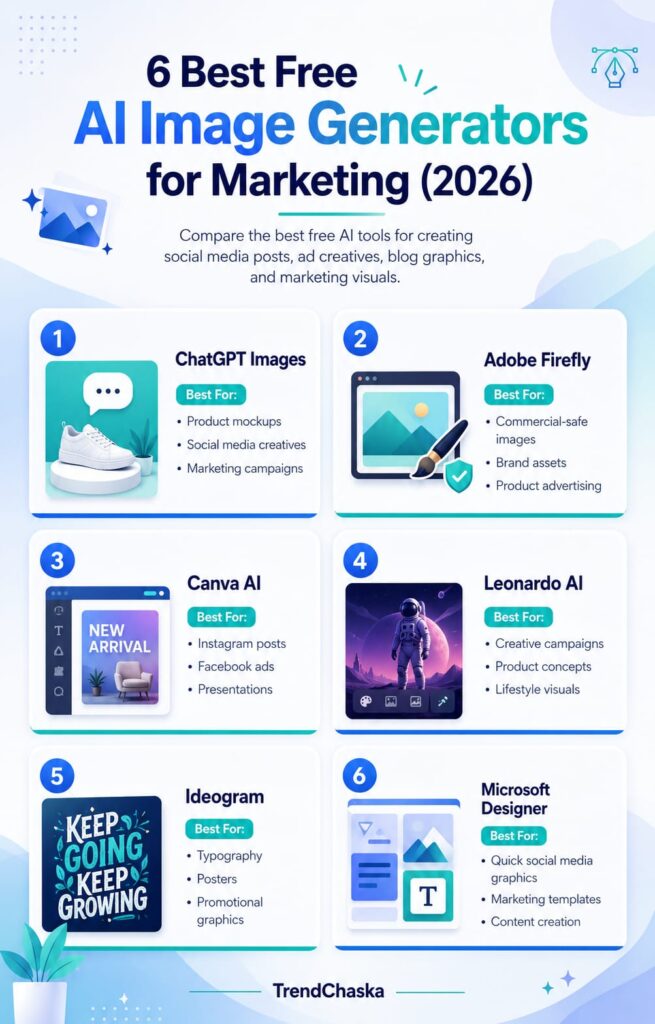
1. Canva AI (Magic Studio)
Canva’s AI is integrated into a suite called Magic Studio, and if you already design in Canva, this is the most straightforward AI upgrade to implement—with no new tool to learn!
Best features: Dream Lab for creating text-to-image, Magic Write for drafting captions, Magic Eraser and Magic Expand for fast editing, and Magic Resize to reformat one graphic to fit all the platforms’ dimensions.
Free plan: The basic plan is free and comes with a large template library and limited access to Magic Studio’s AI features to test the workflow, not to use every single day.
Pros: Everything is done in one editor, real-time co-editing even with non-Canva users, and the learning curve is very low.
Paid tier: The most useful features of AI are available with Canva Pro ($12–$15/month, roughly ₹1,150–₹1,450/month): generators for your dreams, Magic Eraser, and brand kits.
Best for: Marketers looking for an AI image generation feature in their existing daily design tool.
Commercial use: Allowed with Canva’s free and paid accounts, with more premium assets and brand controls available for the latter.
2. ChatGPT Image Generation
Use the built-in image tool in ChatGPT (which is based on OpenAI’s GPT Image model) to create and edit images with simple text prompts, rather than having to write a full prompt from scratch, such as “Make the background darker” or “Add our logo in the corner.”
Best points: They understand complex prompts well and have conversational editing abilities and decent text rendering for short phrases in an image.
Free plan: The number of image generations per rolling 24 hours is small and demand-driven (OpenAI will leave this number flexible, and it is more accurately a handful per day, rather than a fixed number).
Pros: If your team is already using ChatGPT for content drafts, there’s no need to use a separate app, and the editing process works smoothly.
Cons: Caps on daily use on the free plan make it difficult for larger production sizes, and it doesn’t offer as stringent image quality controls as dedicated design tools.
Ideal for: Marketers already immersed in ChatGPT for copywriting who are looking for images without having to switch between tabs.
Before using an image created by OpenAI in commercial ads or campaigns, be sure to check OpenAI’s usage policies, which may change over time.
3. Adobe Firefly
Adobe Firefly is trained on licensed and public domain content, making it the safest choice in the list of AI image generator for ads options if you’re worried about IP risks for your brand or agency.
Best features: Generative Fill and Expand, style presets, and a commercial-safety guarantee that larger brands specifically seek.
Free plan: Every month offers a certain number of plan credits, the resulting output is watermarked, and there is no commercial license on free-tier pictures.
Cons: High learning curve and a lack of integration with other apps if your team is not already using Creative Cloud.
Pros: You can still use it for free, but it requires at least the Standard plan ($9.99/month or around ₹950/month) in order to remove the watermark and get commercial rights.
Ideal for: Agencies and brands where this question is more about legalities and not an afterthought.
Commercial use: Only paid images can be used commercially; free images are for testing only.
4. Microsoft Designer
Microsoft Designer is a highly underestimated AI design tool that’s powered by OpenAI’s DALL-E model and available to anyone with a Microsoft account (the majority of people will have one from Outlook or Xbox).
Best attributes: Quick text-to-image generation, pre-made templates for social posts and invites, and tight Word, PowerPoint, and Teams integration.
Free plan: Monthly allocation of a number of AI credits (approx. 15) for image generation, no watermarking on exports.
Pros: No credit card necessary, and it’s fully free to use, and export quality is good for social graphics. Easy to use, can make some nice reports.
Cons: No advanced features for collaboration like Canva. The credit cap is used up relatively fast if you keep going over and over prompts, and there are basic collaboration features compared to Canva.
Best for: Marketers already using the Microsoft 365 suite who do not wish to make the switch to another platform for AI visuals.
Commercial use: It is generally OK to use commercially — check the conditions for use in Microsoft’s documentation if it is your client’s work.
5. Ideogram
One of the key features that sets Ideogram apart from the vast majority of AI image generators is its ability to produce readable text within the image. This is super useful for AI ad creative generator jobs that require a headline/date or discount percentage be neatly contained within the graphic.
Best aspects: The in-image text rendition is accurate, Magic Prompt is a great feature that turns a short idea into a detailed one, and aspect ratio presets are created for social media.
Free plan: Limited number of image credits per day, and all images created on the free plan are public.
Pros: It’s the only item on this list that works in-image with text on a festival, quote graphic, or sale banner.
Cons: It’s ruled out of the picture for private work or branding with free images, which aren’t private until you upgrade.
Ideal for: Marketers who are looking for text-rich graphics like offers, festival greetings, countdowns, and more that don’t require a second design pass for text.
Commercial use: Private generation and commercial safe use require a paid plan, which is about ₹650–₹770/month (about $7–$8).
6. Leonardo AI
Leonardo AI is geared toward creators looking to exert more creative control, offering several art styles, a canvas editor, and tools originally developed for game asset production, which work surprisingly well for branded marketing visuals.
Best things: The daily free token allowance is quite liberal, the AI Canvas for in-painting and touch-ups is a nice addition, and there’s more than the standard “realistic” style models.
Free plan: Unlimited tokens per day (tokens don’t carry over from day to day), and the images that are generated are public.
Pros: It’s one of the most usable free trials in this segment for trying out various looks before signing up for the paid version.
Cons: No custom brand model training or private generations until upgrading to paid tier.
Ideal for: Marketers looking to explore and experiment with unique visual styles instead of the “AI generic” styles.
Commercial usage: Free images are publicly owned images (not suitable for clients or commercial images)—private, commercial-safe image generation requires a paid plan.
8. Google Imagen (using Gemini)
Google’s Imagen model, available on the Gemini app, has a great photorealism factor, useful when the first impression of an image is “AI-made” but sounds like gibberish.
Best part: It is very photorealistic, it has the same type of editing as ChatGPT, and it can be directly integrated into Google Docs, Google Slides, and Google Photos for Google Workspace.
Free plan: Generating images is capped at a small number per day for consumers and much higher for developers using the Google AI Studio app.
Cons: If your team is on Google Workspace, the smoothness is not that great; it is not the most photorealistic of any free tool here. The daily limits on the consumer app are less than the AI Studio, which is only designed for developers.
Ideal for: Marketers who are looking for realistic product or lifestyle imagery and are already using Google’s marketing tools.
Commercial use: Mostly free for commercial use (PLEASE ALWAYS check current Google usage terms before large campaigns).
8. Freepik AI (Magnific)
Freepik’s AI generator (renamed as Magnific in 2026) complements the Freepik stock photos and vectors with AI-generated content, which comes in very handy when you need AI images that seamlessly integrate with existing stock photos.
Best thing: Multiple underlying AI models are available on the same dashboard, and Freepik also has a huge library of stock elements to combine with the generated ones.
Free plan: Unlimiting generations for a fee, no commercial rights on free tier output.
Cons: Limited application if you do not currently use Freepik’s stock library; models available in a single location.
Pros and Cons: The free version is only for testing; a paid version is required for commercial use, and the credits can be tricky to budget.
Ideal for: Users who are already using this website to subscribe to Freepik and do not need to install another tool to generate images using artificial intelligence.
Commercial usage: The free plan isn’t suitable for commercial usage; it requires a paid plan for any client- or ad-facing use.
How to Use AI to Create Social Media Graphics
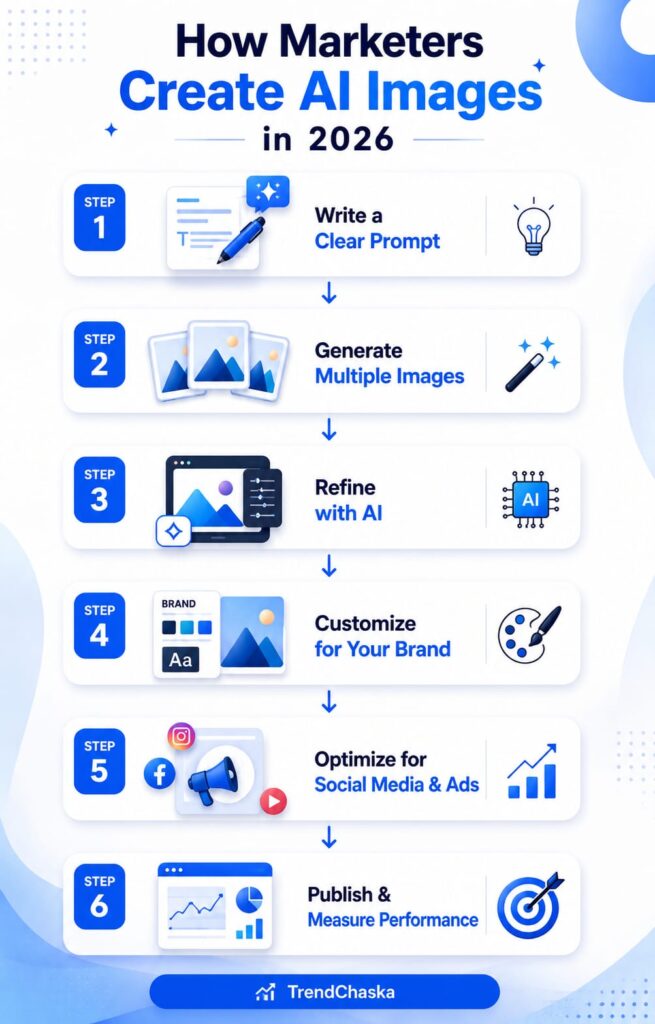
The basic workflow shape is identical across any tool you choose, a good AI-assisted workflow:
- Plan first. The platform, size, and objective of the tool require different prompts, so be sure to know what it is, its size, and the objective before opening it; a LinkedIn carousel is different from an Instagram story.
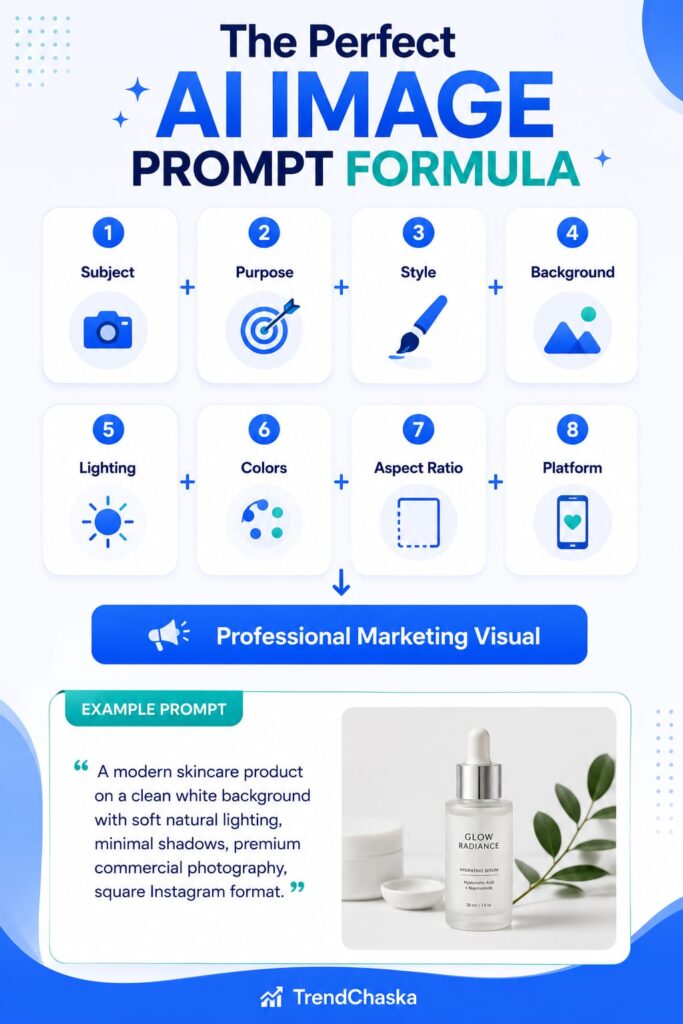
- Create a prompt. Fuzzy triggers yield fuzzy results. Add character, place, lighting, tone, and color. Before writing prompts, conduct proper keyword research to understand what your audience is searching for.
- Generate multiple variations. Most tools will provide you with 2–4 options for each prompt—always check the options before choosing one.
- Tidy up for consistency of “brand.” Color, logo, and font settings; all fonts match other texts.
- Export in proper format. Match file type and resolution with the platform’s needs.
- Publish and track. Identify which visual styles are engaging and have a better response rate to make use of them in forthcoming prompts.
Generate High-Converting AI Ad Creatives to Boost Conversions
The different visual strategies paid off differently on ad platforms:
| Platform | What Works Best |
|---|---|
| Facebook Ads | Picture styles that are not obviously ads work well; Adobe Firefly or Google Imagen’s photorealistic style is good for this. |
| Instagram Ads | Bright, attention-grabbing colors and a clear focus on the product are more successful — Canva’s Dream Lab or Leonardo AI’s stylized-generated photos work. |
| LinkedIn Ads | A professional and reserved style with simple and clean compositions — busy and overly stylized ads do not work as well. |
| Google Display Ads | Come in a variety of sizes, and a tool that has good resize/reformat capabilities (Canva) saves significant time. |
| Pinterest Ads | Favors tall, text-rich graphics, which is where Ideogram’s ability to render text really shines. |
Best practices for all platforms: If the text is baked into the image, keep it short, always test at least two visual directions, and never skip a human review pass before the ad goes live, as AI occasionally gives weird information in hands, text, reflections, etc.
10 AI Prompts for Marketers You Can Copy and Paste
- Instagram: “Bright, minimalist flat lay, top-down angle on pastel backdrop of [product], soft natural lighting.”
- Google: “A close-up of a person using [product] in their home, in a relaxed setting, with natural light.”
- Twitter: “A nice relaxed shot of a person using [product] at home with natural lighting.”
- LinkedIn: “Abstract geometric shapes in [brand colors] in a clean and professional graphic design, corporate but modern.”
- Carousel: “A group of three images that depict [product] from various perspectives, different lighting, and backgrounds.”
- Product/Premium: A dramatic shot of the product in the studio with a soft spotlight and dark background, with a sense of premiumness.
- Sale/Offer: Bold banner design with large percentage-off text, festive accents, and energetic color palette.
- Diwali post: Vibrant, festive graphic with a diya and marigold pattern, warm, soft golden lighting.
- Blog header: “Modern flat style graphic – horizontal banner [topic] with a brand color accent.”
- Email campaign: “Clean, friendly illustration style for a newsletter about a simple header graphic.”
Google Ads: “Rectangular display ad banner with [product] as the focal point and ample call-to-action space for text overlay.”
Common Mistakes to Steer Clear Of
- Using generic prompts. The idea of “marketing image” won’t do—specificity is the key.
- Ignoring branding. If the color scheme is not consistent with your brand scheme, your audience will be lost over time with random color palettes.
- Publishing low-resolution exports. When exporting, be sure that the size is compatible with the platforms.
- Ignoring the copyright and licensing notice. Some of the tools on this list offer free images for legal use, but not commercial. Find out before publishing an ad.
- Over-editing. An AI image on top of heavy manual retouching may result in the introduction of those same artifacts (odd textures and warped shapes) you are trying to avoid.
- Riding the wave of any AI trend without rationale. Some viral AI styles don’t suit a brand; choose the style more in line with your positioning, rather than what’s viral this week.
Tips to Get Better AI Images
- In addition to describing the subject, describe the lighting and mood of the picture—”soft morning light” is a far more powerful description than any other noun.
- Save both credits and time by generating in batches, instead of one image at a time.
- Maintain a list of prompts that really got your brand going and use the format.
- Use tools that go together—create a base image in one tool and edit it in another for strength.
- Always perform a last human check prior to publishing, particularly for text, hands, and reflections.
AI Image Generation Best Practices
- Use brand colors: Provide your exact brand colors in the prompts if they recognize them.These visuals become even more effective when combined with hyperlocal marketing strategies that target customers in specific locations.
- Consistency: Use only 1 or 2 AI tools per campaign; otherwise, the images may appear inconsistent throughout the post.
- Image dimensions: Match the current recommended sizes for each platform – these can vary from time to time, so double-check before a large campaign.
- Accessibility: Use sufficient color contrast between text and background to make it readable, and provide alternative text to explain the content of the image. You can also use these visuals when optimizing your Google Business Profile with high-quality posts and product images.
- Commercial licensing: If you want to use an image in paid ads, please ensure that the plan you are following includes the commercial license.
- Human editing: Use AI output as a solid first draft, not a final product—manual editing of most issues can be done in a few minutes.
Conclusion
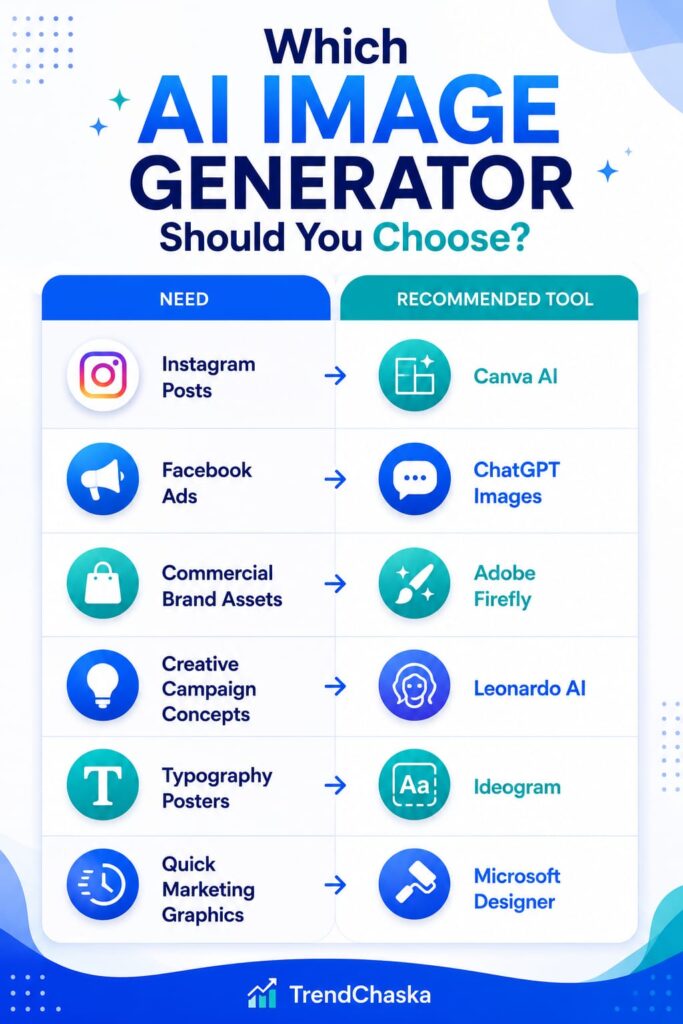
AI image generation for marketers is no longer a far-fetched concept; it’s a reality of daily operations in 2026. Whether you are creating an Instagram post for a quick post on the platform, a text-heavy sales banner for Ideogram, or relying on Adobe Firefly for commercial safety when it matters the most, the free tools listed here can handle the majority of a small marketing team’s needs without breaking the bank.
Now, the real trick is in knowing how to ask the right question, select the right tool to accomplish it, and review all things AI-generated and ensure they are spot on before publishing to the web. Try out two or three of these and determine which one works best with your brand’s visual aesthetic, and allow AI to take care of the tedious tasks, leaving your time for strategy instead.
Still on a quest to enhance the AI marketing toolbelt? Learn more about AI and digital marketing with TrendChaska to get a head start on 2026.
Frequently Asked Questions
Does an AI-generated image cost money?
The majority of major tools have a free tier, though the size of the daily cap ranges from a few images per day (ChatGPT, Google Imagen) to a larger daily limit (Leonardo AI, Ideogram). Commercial use is typically limited to paid plans.
Is it legal to use AI-generated images in commercial projects?
This is completely dependent on the tool and plan. The commercial terms are clearly stated in both Adobe Firefly and Canva Pro, and there are a number of free tools like Freepik and Leonardo AI that actually state that you are not allowed to use the images commercially until you upgrade their versions.
Which is the best AI image generator?
None of these is the ultimate winner, however: Adobe Firefly is the best commercial safety solution, Ideogram is best for in-image text, and Canva AI is easiest to fit into a workflow.
Are AI-generated images free from copyright?
Not automatically. The licensing and copyright conditions of image platforms differ from tool to tool and are constantly changing in many countries, so be sure to read the specific conditions of any platform before you assume images are “free” to use in any way.
Is it possible to generate Facebook ads with AI?
Yes—there are tools such as Adobe Firefly, Canva AI, and Google Imagen that can create ad-worthy content, but it’s best to perform a human review pass before going live.
What is the easiest AI tool to use?
Canva AI and Microsoft Designer are the most approachable—both offer a template-based interface that is very familiar, so there is virtually no learning curve.
Is there a way to get rid of the graphic designer with AI?
Not entirely. While there are many tasks that can be done efficiently using AI, such as routine visual tasks and high-volume creative needs, there are still certain aspects of brand strategy, intricate campaign concepts, and client-oriented work that require human expertise and creative input.
Is it possible to create Instagram posts with AI?
Yes, this is one of the most common use cases, especially when it comes to Canva AI and Leonardo AI, which are developed with social formats in mind.
Nidhi Patel is an SEO and digital marketing content strategist focused on AI SEO, content marketing, blogging, and personal branding. Through TrendChaska, she shares practical digital marketing insights, SEO strategies, and AI tools for beginners, students, and small businesses in India.