
You are browsing a page on your phone while stuck in a Mumbai local train. The page is slow to load, and right when you are about to click on a link, an intrusive ad appears, tricking you into clicking on it.
Core Web Vitals know how frustrating such scenarios could be, and they serve to enhance the browsing experience.
Core Web Vitals could be what is needed by SEO beginners, bloggers, or WordPress website owners in India to boost their site’s ranking if their content is not resonating well enough with searchers despite having good content.
Most Indian users are browsing from their mobile on a data connection that is neither 4/5G nor stable. This is why page experience is even more relevant here than in other parts of the world.
Core Web Vitals
Core Web Vitals Kya Hain?
Core Web Vitals basically comprise three metrics that Google uses to determine the overall “experience” for a user on a webpage. They are part of the expanded set of Page Experience signals that Google utilizes to determine which web pages deliver the best overall experience.
To simplify, it is safe to assume that Core Web Vitals have to do with making sure a website is pleasant and easy to use and do not specifically deal with making the website faster.
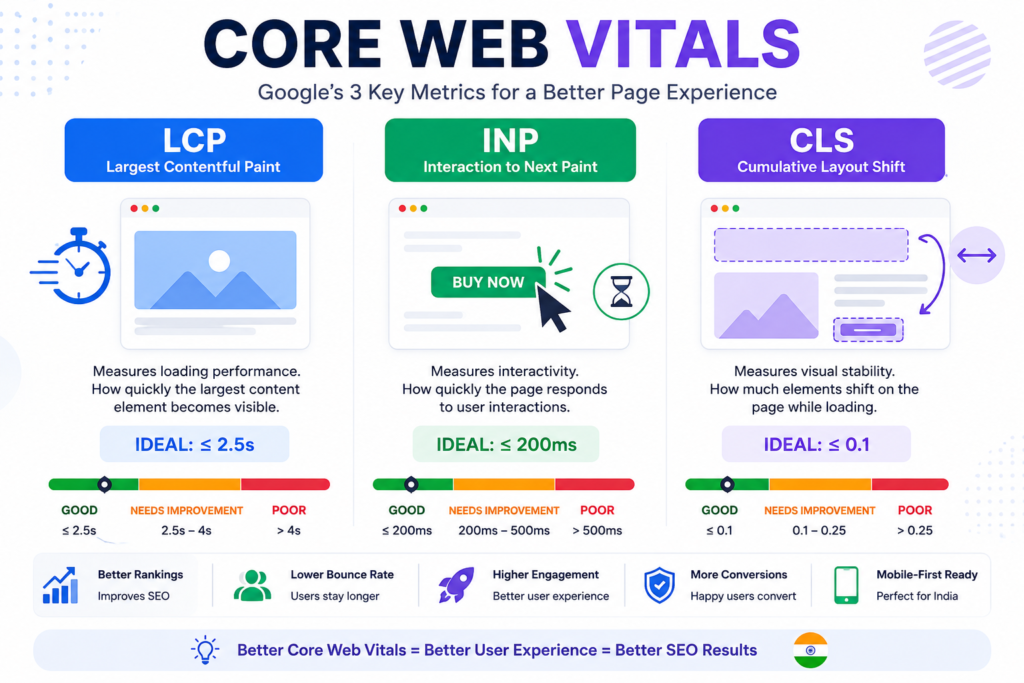
Three Core Web Vitals are:
- LCP (Largest Contentful Paint)
- INP (Interaction to Next Paint)
- CLS (Cumulative Layout Shift)
Essentially, each of these three metrics deals with issues that users would face when browsing. The list comprises slow-loading websites, websites that are unresponsive to input, and websites with elements that keep shifting as the page loads.
Why Core Web Vitals are Important for SEO
While they are definitely not a direct ranking factor, core web vitals could indirectly impact a page’s ranking on search engines.
Google has publicly stated that page experience is a ranking signal, and core web vitals could be used to differentiate between two similar pages that have equal relevance to a searcher’s query.
Core Web Vitals indirectly impact:
- Rankings
- Bounce Rate
- Engagement
- Conversions (for small businesses)
- Trust
- Mobile-first-indexing (Google primarily uses mobile to index websites)
Core web vitals are significantly more important in the context of India.
This is primarily because of the large chunk of Indian traffic that comes from browsing on mobile data via lower-end Android phones.
The experience offered by a webpage on a 2G connection from a Samsung Feature phone in a tier-2 city is very different and should be considered the standard.
If you are a beginner, and the basics of SEO are already clicking in for you, Core Web Vitals could be your next frontier. You could audit your website’s pages based on their traffic volume and prioritize fixing the most trafficked pages for better optimization.
Introduction to Core Web Vitals: Understanding the 3 Metrics
1. LCP (Largest Contentful Paint)
What is LCP?
LCP, or Largest Contentful Paint, primarily measures the time taken for the largest element on a page to appear on screen. It is a good indication of how fast the page is loading as a whole.
Ideal LCP Score: 2.5 Seconds or Lesser
Poor LCP Score: More than 4 Seconds
Reasons for poor LCP:
- Large images, especially hero banners
- Slow server response, usually due to shared hosting
- Page elements that are render-blocked (especially CSS and JavaScript)
- Not using a CDN (Content Delivery Network)
Example: An Ahmedabad-based textile manufacturer uses a banner of size 3000 x 2000 pixels on his website. It takes 1.5 seconds to load on your home broadband connection and 6 seconds to load on your client’s mobile data connection on a low-end Android phone.
Ways to Optimize for LCP:
- Compress and resize images
- Use a CDN
- Leverage Browser and Server Caching
- Preload your hero image or font
2. INP (Interaction to Next Paint)
What is INP?
INP (Interaction to Next Paint) determines how quickly a page responds to a user’s input such as clicking or typing.
INP replaced FID (First Input Delay) as the standard primary interaction metric starting in 2024.
While FID only measured the first user input, INP measures the responsiveness of the page to all interactions throughout the session.
Ideal INP Score: 200 Milliseconds or Lesser
Poor INP Score: More than 500 Milliseconds
Example: A small local D2C business owner’s website has a slow INP as the scripts take time to respond to users’ input. This leads to poor user engagement, higher bounce rates, and loss of potential sales.
Ways to Optimize INP:
- Defer or remove JS (especially third-party JS)
- Break up long JS tasks
- Avoid too many plugins
- Test on an actual device to gauge performance
3. CLS (Cumulative Layout Shift)
What is CLS?
CLS stands for Cumulative Layout Shift. It measures shifts in the position of visual elements on a page as it loads. A high CLS score indicates that elements on your page are moving around as the page loads, which can lead to a frustrating browsing experience.
Ideal CLS Score: 0.1 or less
Poor CLS Score: More than 0.25
Common causes of layout shift:
- Ads with no reserved space
- Images and Videos that do not have indicated height and width
- Web fonts causing layout shifts
- Unexpected addition of elements such as a cookie banner
Ways to Optimize CLS:
- Always specify image dimensions
- Reserve space for elements that are added dynamically
- Preload important fonts
- Avoid layout-shifting elements
Core Web Vitals at a Glance
| Metric | Measures | Good Score | Poor Score | Why It Matters |
|---|---|---|---|---|
| LCP | Loading speed of main content | ≤ 2.5s | > 4.0s | First impression of page speed |
| INP | Responsiveness to interaction | ≤ 200ms | > 500ms | Whether the site “feels” alive when used |
| CLS | Visual stability while loading | ≤ 0.1 | > 0.25 | Prevents frustrating, accidental clicks |
How Google Calculates Core Web Vitals
Google uses two different datasets to calculate Web Vitals:
1. Field Data: Real-world performance data of actual users who land on your web pages using Google Chrome. This is later compiled in Chrome UX Report or CrUX.
2. Lab Data: Synthetic data from Google’s controlled lab environment that tries to simulate a real-world environment.
Field data is more important than lab data since it reflects the real-world performance of your website on different devices for different users in different environments. However, lab data becomes handy when you are troubleshooting issues.
If there is not enough field data available for a website, you might notice that you might not get any data or the data would be skewed towards origin-level data as opposed to page-level data.
Tools to Measure Core Web Vitals
Google PageSpeed Insights Measures Core Web Vitals in the real-world for your website pages based on Field Data
Lighthouse (Chrome DevTools) Audits your website for potential optimization opportunities
Google Search Console Tracks the Core Web Vitals of all your web pages over time
Chrome DevTools Performance Panel helps to dig deeper and understand core web vitals at a lower level
GTmetrix offers waterfall chart analysis of your website.
WebPageTest offers extensive customization and can be used to test a website across multiple locations and devices.
| Tool | Best For | Notes |
|---|---|---|
| Google PageSpeed Insights | Quick check combining field + lab data | Best starting point for beginners |
| Lighthouse (built into Chrome DevTools) | Deep technical audits | Great for developers diagnosing specific issues |
| Google Search Console | Site-wide, real-user trends over time | Shows which URLs are flagged as “Poor” or “Needs Improvement” |
| Chrome DevTools Performance Panel | Frame-by-frame debugging | More technical, useful once you’ve identified a problem area |
| GTmetrix | Detailed waterfall breakdowns | Good for comparing before/after optimization changes |
| WebPageTest | Advanced, location- and device-specific testing | Useful for testing how your site performs specifically for Indian users on mobile networks |
Tools like GTmetrix and WebPageTest could be useful if you already have some basic understanding of Core Web Vitals. For most beginners, Google PageSpeed Insights and Google Search Console would suffice. You could use these tools to measure the Core Web Vitals of your website’s main page and the other most trafficked pages.
Common Issues Causing Poor Core Web Vitals
- Large images
- Poor or slow shared hosting
- Third-party scripts
- Too many WordPress plugins
- Poorly implemented caching
- Render-blocking CSS
- Web fonts
- Poorly coded themes
Optimization Opportunities To Fix Core Web Vitals
| Issue | Fix |
|---|---|
| Large images | Compress, resize, and convert to WebP/AVIF |
| Slow first load | Use a CDN and enable browser/server caching |
| Slow hosting | Move to better-performing hosting suited to your traffic |
| Render-blocking CSS | Inline critical CSS, defer the rest |
| Heavy JavaScript | Minify, defer, and remove unused scripts |
| Layout jumps | Set explicit dimensions for images, ads, and embeds |
| Slow fonts | Preload key fonts, use font-display: swap or optional |
| General bloat | Minify HTML/CSS/JS and enable GZIP or Brotli compression |
If you have optimized as much as possible and you are not seeing any improvements in INP, it is probably a good idea to look at the Total Blocking Time (TBT) in Lighthouse’s Performance Tab to find out how much JS is actually running on your page.
Tools To Optimize WordPress Websites
Since a huge share of Indian blogs and small business sites run on WordPress, here’s where to focus:
- LiteSpeed Cache A good all-rounder caching plugin, especially if you are on LiteSpeed hosting.
- WP Rocket One of the most popular premium caching WordPress plugins available
- Perfmatters Another good WordPress plugin to disable unnecessary scripts and features
- Imagify and ShortPixel Image optimization WordPress plugins
The right WordPress caching plugin would significantly affect the performance of your website. While there are many such plugins on WordPress, the right plugin would depend on what kind of hosting you are on. A WordPress caching plugin that works on LiteSpeed Hosting would not work as well on WordPress Hosting. It is also important to note that installing two caching plugins on a WordPress site would not yield better results, and could potentially damage performance.
Core Web Vitals and Mobile SEO
Mobile optimization has always been a concern in India. Google also primarily uses mobile for indexing purposes, and most of your traffic is also on mobile. As a result, Core Web Vitals would especially be a concern for Indian Webmasters.
When you test a website on your high-end mobile phone on a good wifi connection, it usually represents just one set of users. The traffic that Google sees in CrUX represents users on a variety of devices, including lower-end mobile phones and connections, both 3G and 4G. Therefore, it is important to optimize for the lowest common denominator in terms of performance, rather than testing only on a fast mobile phone and a good wifi connection.
Common Myths About Core Web Vitals
- “Core Web Vitals are the only ranking factor” Core Web Vitals are merely a tie-breaker and ranking signal. A page’s relevance to a user’s query remains far more important than Core Web Vitals.
- “Core Web Vitals only impact technical SEO” Core Web Vitals primarily impact technical SEO, but several optimization opportunities apply to all sites. Also, the impact of these is not limited to SEO, as they also impact bounce rate and engagement.
Beginner’s Checklist
- Audit your homepage and the other most trafficked pages with Google PageSpeed Insights.
- Check the Core Web Vitals report in Google Search Console for your website’s URLs
- Optimize images that are larger than 200KB in size.
- Add image dimensions to all images and other embedded elements such as videos.
- Use one good caching plugin and configure it correctly.
- Remove any redundant or unnecessary plugins.
- Preload your hero image or fonts.
- Re-test after implementing some changes. Avoid making too many changes at the same time.
- Check Google Search Console regularly to see if there are any new poor URLs
Conclusion
Core web vitals essentially boil down to one factor: does this site load fast enough, is it responsive to my inputs, and do the elements on the web page shift as it loads? In other words, it is an attempt by Google to quantify the overall experience offered by a website. Core web vitals are particularly crucial for website owners in India, given the large amount of traffic that comes from mobile via unstable connections. If you are an Indian blogger or a small business owner with a website, core web vitals are something you should pay attention to. Use the beginner’s checklist as described in this article as a starting point to optimize your website.
Frequently Asked Questions
How to improve LCP?
You can improve LCP by optimizing images, using a CDN, enabling caching, and removing render-blocking CSS and JavaScript.
What is a good CLS score?
A good CLS score is 0.1 or lower. A poor CLS score is anything higher than 0.25.
Does Core Web Vitals affect Google ranking?
Yes, Core Web Vitals could affect a page’s rank on Google as part of the page experience. But it is still only a minor ranking factor.
What is INP?
INP stands for Interaction to Next Paint. INP is a metric that determines how responsive a website page is to a user’s input. INP replaced FID (First Input Delay) as the standard primary interaction metric starting in 2024.

Nidhi Patel is an SEO and digital marketing content strategist focused on AI SEO, content marketing, blogging, and personal branding. Through TrendChaska, she shares practical digital marketing insights, SEO strategies, and AI tools for beginners, students, and small businesses in India.