Compare the best AI marketing tools for SEO, content, analytics, design, and automation. See pricing, pros, cons, and ideal use cases.
In the past, creating a “best AI marketing tools” post just meant throwing together a list of ten logos and adding a quick note for each. That doesn’t cut it anymore. By 2026, pretty much every marketer—whether they’re students, freelancers, or seasoned experts with 15 years in the game—already knows about tools like Semrush and ChatGPT.
What they need now is something more detailed: what each tool excels at, how much it costs today, where it struggles to deliver, and when it becomes a must-have for getting serious work done.
This guide tackles that question head-on instead of just listing things. It evaluates the most useful AI marketing tools available today based on cost, strengths, limitations, and real-world use cases.
It digs deeper than our usual roundup of AI tools for bloggers. Each tool mentioned includes the current cost, a key strength, a major drawback, and a note on who it’s meant to help. A tool that works for someone just starting isn’t the same tool an agency managing 40 client accounts would depend on. This is made to help all kinds of digital marketers, not just beginners. Beginners can find a starting point here, while experienced marketers and agency teams will see how pricing options, limitations, and tool combinations play into their daily choices.
The best AI marketing tools are not necessarily the most expensive ones. The right choice depends on your goals, budget, and level of experience.
Why This List Stands Out From Typical “AI Tools” Articles
The landscape of AI marketing tools changes quickly, which is why outdated lists often fail to provide useful recommendations.
In 2026, three key shifts reshaped talks around tools, but most lists haven’t kept up with them:
- You can now track AI search traffic as its own channel. Google Analytics introduced an AI Assistant channel in its Default Channel Group reports. This means you don’t need to guess anymore—you’ll know if ChatGPT, Gemini, or Claude drove web traffic to your site.
- Content tools have been divided into two groups. Some tools are designed to help create content that builds human trust by focusing on EEAT principles. Others focus on helping your content get cited within AI answers, concentrating on AEO or GEO strategies. While a few tools manage to do both, the majority specialize in just one area.
- Pricing differences stand out more than ever. The divide between free versions and the ones with essential usable features has grown bigger. Some tools may look affordable but turn pricey once you hit the limits of their free features.
AI Tools for SEO and Search Visibility
The best AI marketing tools for SEO help marketers research keywords, analyze competitors, track rankings, and measure search visibility more effectively.
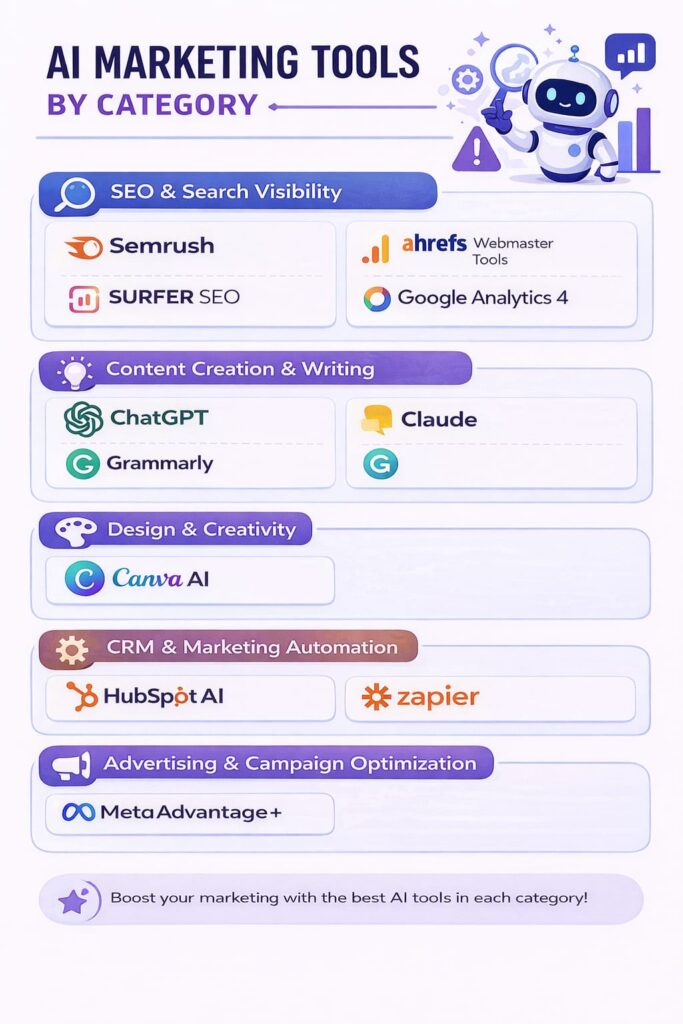
1. Semrush
What it does best: Semrush works as a solid all-in-one SEO tool. It handles keyword research audits for site issues, analyzes backlinks, and tracks competitors all in one place. Its AI-powered writing tool gives ideas about topics and intent, but the real strength is how much it covers. You rarely need another tool to handle essential SEO research.
2026 pricing: The Pro plan costs $139.95 a month if you pay monthly or $117.33 per month when billed. It lets you manage 5 projects and track 500 keywords, which works well for one website or a small group of sites. The Guru plan costs $249.95 monthly or $208.33 per month with an annual payment and includes the Content Marketing Toolkit historical data and multi-location tracking features.
For $499.95 each month or $416.66 with yearly billing, the Business plan adds API access and Share of Voice reporting. Semrush also offers a newer option called “Semrush One” starting at $199 a month. This package combines the SEO toolkit and AI tools for visibility tracking.
Where it struggles: The jump in cost from Pro to Guru is a hefty 79%, which can feel like a lot. Many of the more valuable tools for planning content are locked away in the Guru plan rather than being available in the basic one.
Who benefits from this: Pro works well to manage a single site or for solo freelancers. Combining it with a clear SEO learning path makes it easier to understand the data instead of just staring at numbers. But if you’re handling client projects or need advanced content planning tools, plan to invest in Guru right away. Pro won’t give you enough.
2. Ahrefs Webmaster Tools
What it does well: Verified site owners get a helpful site audit, backlink tracking, and a keyword suggestion tool at no cost. It delivers real value without the hefty Semrush price. Few other “free” SEO tools manage to deliver this kind of full-featured experience without feeling like a sneak preview.
Where it lacks: You can use it on sites you’ve verified. To analyze competitor backlinks or look up keywords for other sites, you’ll hit a paywall and need to move to Ahrefs’ paid plans, which cost about the same as Semrush.
Who it suits: It works for anyone auditing their own site without spending money. Beginners and seasoned SEOs alike will find it handy. Agencies, however, need a paid tool to dig into competitors’ data.
3. Surfer SEO
What it’s good at: The Content Editor in Surfer compares your draft with top-ranking pages for a keyword while you work. It checks things like word count, NLP terms, and headings, and gives a score in real time. In 2026, it introduced AI Search Guidelines to show how content should perform in both AI-driven answers and regular search results. This tool stands out for teams producing lots of content because the tips are actionable instead of vague advice like “add more keywords.”
2026 pricing: The Essential plan costs $99 monthly or $79 per month with an annual subscription. It includes 30 Content Editor articles per month. The Scale plan, priced at $219 per month or $175 with an annual option, comes with the added Audit tool. This tool allows users to update up to 100 pages each month, which helps bring back content that has lost its ranking.
Be aware of extra costs. The SERP Analyzer costs an additional $29 per month for Essential subscribers. Also, if you rely on AI-generated articles, credits can get used up.
Its weak points: The tool focuses on optimizing existing high-ranking content. This can lead writers to create content that mimics what’s already on the first page. Without human intervention to add a unique perspective, it risks losing originality.
Who benefits from this: Those who often write content and aim to rank for certain keywords. This isn’t something you use once and leave. You’ll use this tool every time you create drafts.
4. Google Analytics 4 (GA4)
What it does well: GA4 is free, and there’s no debating its importance—if you’re not using it, you won’t have a clear view of your data. The 2026 updates are something to pay attention to. GA4 now includes an AI Assistant channel in Default Channel Group reports. This lets you track traffic from ChatGPT, Gemini, or Claude instead of lumping it all under “referral” or “direct.”
They’ve also added AI-created insights on the home dashboard along with ready-made segments tailored for e-commerce, SaaS, and lead generation. This makes it way easier to skip creating custom reports from scratch. TrendChaska’s GA4 property has shown that the AI Assistant channel is now pulling in some referral traffic. This traffic got lost under “direct.” This change addresses the attribution gap that often made AEO and GEO work seem impossible to measure before this update arrived.
Its weaknesses: GA4’s design still feels hard to use, and the event-based reporting style (unlike the session-based format of the older Universal Analytics) leaves many people puzzled, those who learned analytics before 2023. The AI-generated insights provide a baseline, but they can’t replace understanding the data with your own knowledge.
Who it’s meant to help: This tool is created for digital marketers managing websites, whether they’re starting a simple WordPress blog or managing reports for clients at an agency. The real challenge isn’t in adopting the tool; it’s in being able to interpret the information it provides. This understanding requires practice and can be learned—it’s a skill anyone can pick up, not just an instinct.
Content-focused AI marketing tools are designed to speed up research, drafting, editing, and optimization while still requiring human oversight.
AI Marketing Tools for Writing and Content Creation
5. ChatGPT / Claude (AI Writing Assistants)
What it gets right: Creating quick first drafts like outlines, email drafts, headline options, and ad copy ideas. It works better as a brainstorming tool than something to deliver polished final drafts, and it helps solve the issue of staring at a blank page.
Google’s quality systems and EEAT signals now check if content shows genuine experience and expertise instead of just seeing if it looks well-written. This is more important in 2026 than it was in 2024. We explained the exact rules Google favors in 2026 in detail, but here’s a quick summary: AI-produced content without any editing often feels bland, gets facts wrong here and there, and lacks a unique perspective. Websites that upload AI drafts without proper editing are the first ones to get flagged during quality checks.
Who it’s meant to help: This tool works for anyone, no matter the experience level, though the approach should shift based on how you use it. Beginners rely on it as a final product. On the other hand, those who get the most from it see it as a starting point that a person edits, verifies, and enhances with unique ideas.
6. Grammarly (AI-Powered Editing)
What it handles well: It spots issues with grammar, tone, and overall readability. It’s handy to use as a last check for anything you’re writing. It works for everyone, not just beginner writers.
What it doesn’t do well: This tool is not about helping you plan or strategize your content. While it makes writing cleaner, it won’t increase rankings or boost conversions. Its main value lies in eliminating the negative impression that poor grammar creates.
Who benefits from it: Anyone who shares their writing. Even skilled writers often overlook their own mistakes.
AI Marketing Tools for Design & Creativity
Creative AI marketing tools help teams produce graphics, social media assets, presentations, and videos without extensive design experience.
7. Canva AI
What it does best: It creates social posts, ad designs, and simple graphics even if you don’t have design experience. All Canva’s AI tools are now grouped under Magic Studio. The big 2026 update to know about is Canva AI 2.0. This new conversational tool lets you describe what you need, like “a 10-slide pitch deck in our brand colors,” and it generates editable design elements instead of static images.
2026 pricing: The free plan works well enough to handle basic design needs. The Pro plan costs about $12 to $15 a month, depending on how you pay, and comes with a monthly AI credit allowance of 500 credits for Magic Studio tools. Teams or Business plans charge per user $20 to $30 each month, which can add up for groups of more than 10 people.
Weak points: The AI credit system can be limiting. Credits expire at the end of each month, so you can’t carry them over. Advanced tools like AI-generated video use up credits much faster than simple image creation, which means frequent users often hit their limit long before the month ends. Also, the finished products created with templates start looking repetitive when you’ve seen a lot of them.
Who benefits from this: Independent marketers, small teams, and agencies that prioritize quantity and consistency over custom designs. Skilled designers often use it to save time on simple assets rather than focus-heavy or flagship creative work. If someone plans to use AI for creating videos, they should prepare to manage spending to avoid hitting credit limits.
AI Marketing Tools For CRM, Ads, and Marketing Automation
Automation-focused AI marketing tools reduce repetitive work and help marketing teams scale campaigns more efficiently.
8. HubSpot AI
Where it excels: Combines CRM, lead tracking, and email personalization into a single system so users don’t need to juggle multiple tools. Its AI tool, such as Breeze AI, content suggestions, and subject-line assistance, saves a lot of time when the CRM data is well-organized.
2026 pricing: HubSpot’s free CRM works fine for basic contact management, but it doesn’t include email sequences or workflow automation, which are key features that make HubSpot stand out. Starter costs about $15–20 per seat every month, but it still misses full automation.
The big leap happens with Marketing Hub Professional, priced at around $800–890 monthly if billed with a required one-time onboarding fee of about $3,000. Enterprise jumps even higher at about $3,200–3,600, along with a $6,000–7,000 onboarding cost.
Its downsides: The jump between the Starter and Professional tiers isn’t minor. They fall into different price ranges. On top of that, the onboarding fee for Professional and Enterprise levels is fixed — you have to pay it, and you won’t get it back whether you use the service or not. The cost for Marketing Hub also depends on the number of contacts you have, which means your bill might increase just because your list gets bigger, even if you’re not using more features.
Who would want this: Companies that need both marketing automation and CRM in one package and can afford to go straight to the Professional plan. The free and Starter options are fine to test things out, but if automation is your priority, you’ll exceed their limits pretty fast. If you’re a solo freelancer and don’t have a sales pipeline to manage, this isn’t something you’d really need yet.
9. Meta Advantage+
What it gets right: It handles audience targeting, ad placements, budget splitting, and creative testing. It uses Meta’s performance data to do this. This means people no longer need to spend hours on manual A/B testing.
By 2026, it became the go-to setup for new campaigns like Sales, Leads, and App Promotion. Most of its creative upgrades come pre-selected from the start. Benchmarks for the whole system show it cuts costs per result in a big way, though the actual savings depend on the account. Don’t count on hitting those results right away.
Where it struggles: You get less control over the process, so it becomes tough to figure out why something succeeded. This makes learning from it harder to apply to other platforms. More, Advantage+ depends on having lots of data. It needs at least 50 purchases or conversions per week to finish its learning phase. That requires spending at least $2,000 to $3,000 every month for most e-commerce accounts.
If spending is lower than that, the algorithm won’t have enough data and might burn through your budget without helping much. Manual campaigns still tend to work better for new ad accounts with no past conversion data or for expensive products that take time to sell.
Who it’s meant to help: Advertisers with enough spending and conversion data to give the algorithm valuable input. Beginners with tiny budgets or no prior conversion data should try manual campaigns first to build up that necessary history.
10. Zapier (now with AI features)
What it’s good at: It links up tools like forms, CRMs, spreadsheets, and email systems without needing coding skills. Now, it combines Zaps (automated workflows), Tables (data storage), Interfaces (custom forms), and an AI-powered Copilot under one subscription. This Copilot can guide you in creating and fixing workflows just by breaking down what you need automated in simple terms.
2026 pricing: Zapier reduced its free plan to 100 tasks a month, down from the previous 750. It allows single-step Zaps and has a 15-minute update delay. This setup works fine to test things, but it is not practical to use in production. The Professional plan costs between $20 and $30 a month,depending on how you pay. It gives 750 tasks per month along with multi-step Zaps and access to premium app integrations. The Team plan costs from $70 to $104 a month.
Pricing depends on how many tasks you use, not just the type of plan. For example, a workflow using four apps uses up four tasks in one run, so your task count may increase faster than expected.
Where it could be better: The main issue is the task-based pricing structure. When you scale up, Zapier becomes pricier compared to usage-based options like Make.com, which handle similar volumes of automation. It’s set up for simplicity rather than being the cheapest choice if you’re handling large workflows.
While Copilot provides a solid starting point, complex multi-step automations still demand some understanding of basic logic, like if/then statements and formatting. Fixing a broken Zap takes technical know-how and patience.
Who it’s meant for: This tool suits people who handle recurring manual tasks across different platforms and prioritize convenience over saving money. It works well for solo freelancers, automating things like client onboarding, ing and for agencies managing large workflows. But if you’re part of a tech-heavy team with high automation needs, it’s smart to compare costs with other platforms before making a decision.
Picking the Best AI Marketing Tools Without Testing Every Option Out There
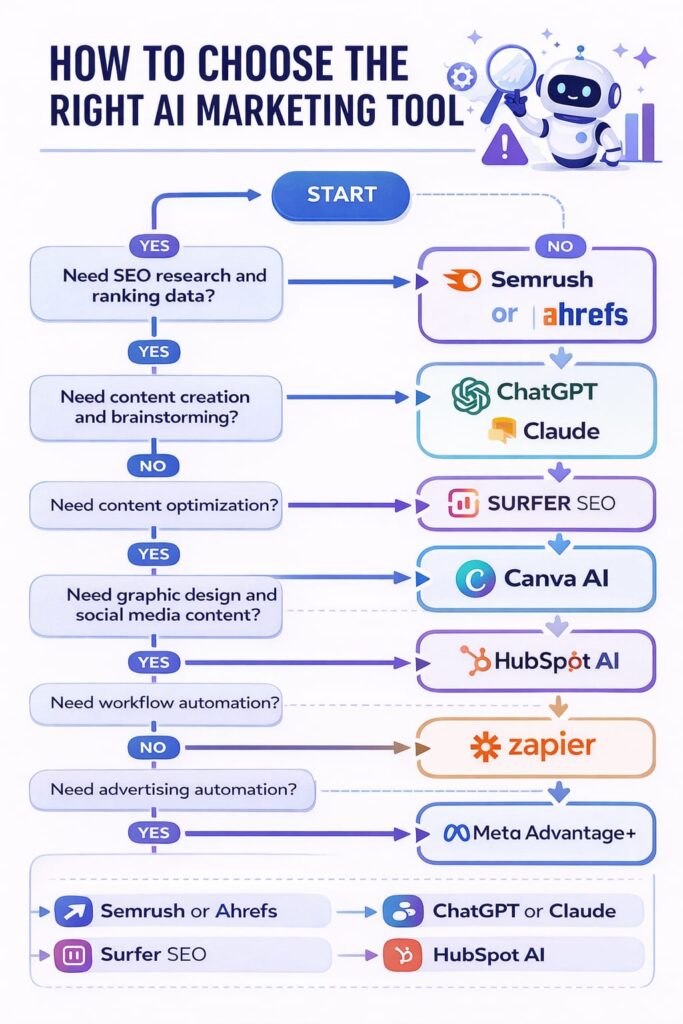
Here’s something you’ll notice with almost all the tools mentioned:
the basic plan offers what you need.
- Semrush Pro skips content tools.
- Surfer Essential leaves out the Audit feature.
- HubSpot’s free CRM misses the automation that makes HubSpot worth talking about in the first place. Worse, upgrading to the plan that includes it isn’t a small bump in cost; it’s a whole new budget category and often includes an onboarding fee.
- Zapier doesn’t help much on its free plan either, as it now limits you to 100 tasks a month, which is fine for testing but not for real use.
Before you spend anything, figure out the top two or three features you’ll need every week and check which plan offers them. This is hands-down the most common mistake people make with money, no matter how experienced they are.
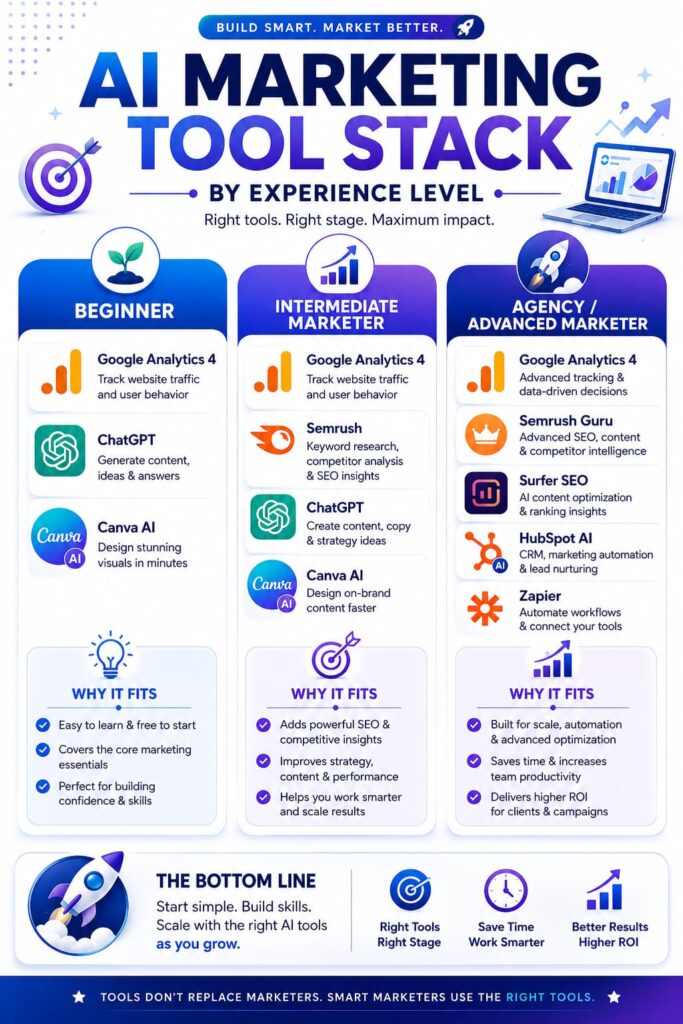
Another pattern shows tools dividing into two main groups—research and strategy tools like Semrush, Ahrefs, and GA4, and production tools like Surfer, ChatGPT, Canva, or Grammarly. Most folks don’t need every tool out there. What they need is a reliable option from each group, along with the commitment to stick with it instead of juggling four similar subscriptions.
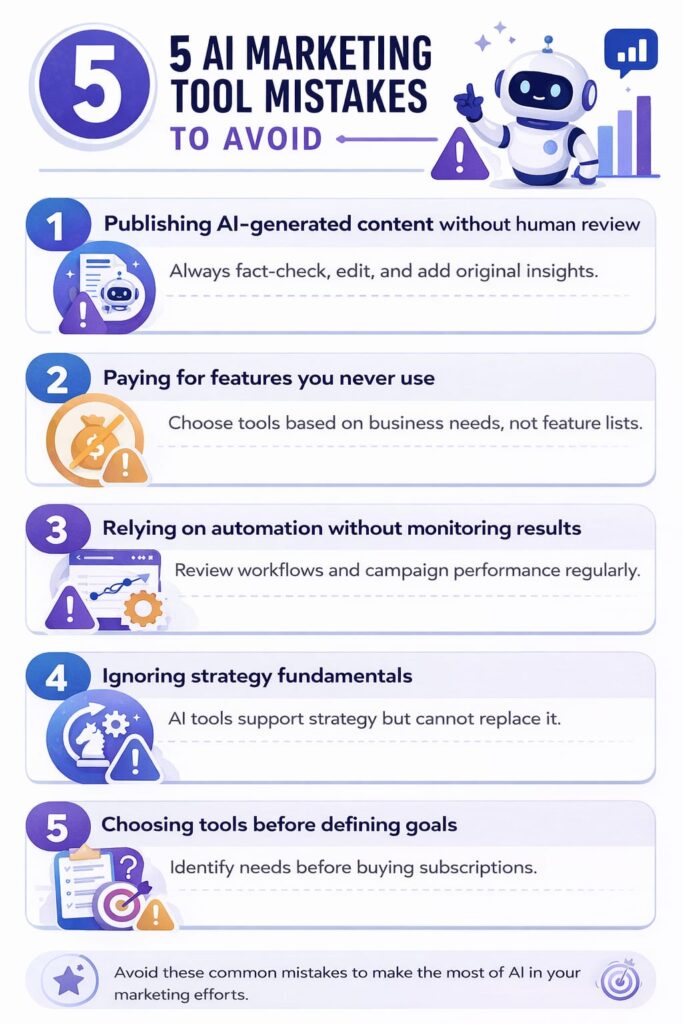
Mistakes Everyone Makes, No Matter Their Skill
- Putting out AI-generated content without human review. Nothing gets caught by EEAT-focused quality systems in 2026 faster. The issue isn’t that AI writing is prohibited, but unpolished AI content is easy to spot.
- Paying for tools you barely touch. Plenty of people subscribe to premium Semrush plans that they never use, but they don’t talk about it much.
- Relying on automation without follow-ups. Tools like Zapier or Meta Advantage+ don’t run forever. Over time, triggers break and targeting gets outdated, wasting money if you’re not checking in.
- Skipping the basics that the tool depends on. A site audit tool cannot fix a content strategy lacking audience research. These tools point out issues, but they do not take the place of a good strategy. No AI tool can substitute the trust signals that help improve Google rankings.
Choosing the right AI marketing tools is often more important than using a large number of AI marketing tools.
FAQs
1. Are these AI marketing tools designed for experienced marketers, or are they better for beginners?
They’re meant for everyone. These tools are used by professionals at all stages of their marketing journey—not just beginners. The difference lies in how people apply them as they gain experience. For example, a newcomer and a seasoned marketer might both work with GA4. The beginner might focus on understanding the data, while the expert might use it to confirm a theory they developed from handling client projects.
2. If I have the budget for one or two tools, where should I start?
Start by choosing one free tool like GA4 or Ahrefs Webmaster Tools to manage your own website. Then pick one paid tool that addresses your biggest challenge, whether it’s improving content creation (Surfer) or digging deeper into research (Semrush Pro). Stick to these tools until you’re using them. Add more when needed.
3. Will Google penalize AI-generated content in 2026?
No, Google has made it clear that it assesses the quality of content, not how it’s created. The real problem comes from publishing bland, unpolished AI output that doesn’t meet EEAT standards, not the use of AI itself.

Nidhi Patel is an SEO and digital marketing content strategist focused on AI SEO, content marketing, blogging, and personal branding. Through TrendChaska, she shares practical digital marketing insights, SEO strategies, and AI tools for beginners, students, and small businesses in India.