New to Google Ads? Learn how Indian beginners can launch their first campaign, avoid common mistakes, manage budgets, and get results in 2026.
Introduction
If you’re searching for a Google Ads for beginners India guide, here’s something most people won’t tell you when you try Google Ads for the first time: beginners often waste money. It’s not because the platform has flaws. It’s because they skip over the basic steps. Many new users dive in by picking a campaign type they don’t understand. Then, they toss in five random keywords, slap together a quick headline, and hit the launch button. A few days later, their budget is gone, and all they’re left with is frustration and the belief that “Google Ads doesn’t work.”
The truth is, Google Ads isn’t that complicated. The real issue is that no one teaches you the right steps to follow.
It’s odd when you think about it, because Google Ads is still one of the most dependable ways to catch the attention of people looking for what you’re offering. In many other types of marketing, you’re just disrupting whatever someone is doing, like scrolling through their feed. But with Google Ads, your business shows up right when someone searches for something specific, like “best digital marketing course in Ahmedabad” or “home bakery near me.” That shows intent. This is why the platform has stuck around for over two decades, despite shifting trends. It connects you with people who want something, not just those browsing.
By 2026, this edge becomes even clearer. Google’s AI-driven bidding tools handle much of the work that once needed a dedicated PPC expert. Performance Max campaigns allow small businesses to advertise on Search, Display, YouTube, and Gmail all from one setup. This does not mean you can ignore strategy. Instead, the focus has moved away from manually adjusting bids to sending the right signals for Google’s algorithms to use.
This guide is designed to help Indian students, freelancers, bloggers, startup founders, and small business owners who have never tried Google Ads before. By the time you finish, you’ll know how the platform works, how to launch a campaign with clear steps, what it could cost in India, and what common beginner mistakes might waste your money. It skips the complicated terms and keeps things simple. The goal is to give you what you need to start your first campaign with confidence.
What Do Google Ads Do and How Do They Work?
Google Ads works as an advertising platform that operates through an auction system. Whenever someone searches for anything, advertisers who picked similar keywords join a bidding competition. Google doesn’t just give the ad spot to the highest bidder. Instead, it considers a factor called “Quality Score.” This measures how well your ad and landing page match the search and how likely users are to click.
That’s why a smaller business with a focused and relevant ad can often appear above a larger competitor with a less specific one. Being relevant matters more than having a huge budget, which surprises many people.
You pay when someone clicks on your ad. This is called the pay-per-click or PPC model. Showing the ad doesn’t cost anything, which makes Google Ads a solid option to try if you’re just starting and working with a smaller budget. You’re not paying to be seen but to get results.
Another big thing to get familiar with is targeting. You control who gets to see your ad by choosing things like the keywords they search for, their location, the gadget they use, and even their browsing habits on other websites in some cases, like with Display and video ads. Many beginners don’t focus enough on this part. But narrowing down your audience doesn’t just save money; it can make your campaign more effective and help you target better.
Why Indian Businesses Use Google Ads
Most people in India use the internet on their phones, which shapes how they search online. They often turn to Google to look up almost anything before making a purchase—like a wedding photographer, someone to help file taxes, a coaching center, or even a used bike. That moment matters a lot because they’re not just browsing but making choices.
Google Ads helps solve some real issues for Indian businesses in smaller cities. A business in a Tier 2 or Tier 3 city can compete without spending a fortune on marketing. Instead of paying for ads across the entire country, you can just focus on a five-kilometer area around your store. Business owners can also test demand right away. Rather than guessing if customers are interested in a product, they can launch a small campaign and see what people are searching for or clicking on.
Having control over the budget is important too. With just a few hundred rupees a day, you can get started. That makes Google Ads a popular choice among students trying out side projects, freelancers looking to grow their clients, or small business owners who aren’t ready to hire an agency yet.
Types of Google Ads Campaigns
Picking the wrong campaign type can quickly drain a beginner’s budget. It’s important to know the purpose behind each campaign to make a smart choice.
| Campaign Type | Best For | Note |
|---|---|---|
| Search | People already searching with clear intent | Simple to measure, adaptable to smaller budgets |
| Display | Brand awareness | Banner ads across Google’s network; not built for instant action |
| Video | Storytelling and brand building on YouTube | Needs more time and effort to produce |
| Shopping | Online product sales | Requires a Google Merchant Center account and product feed |
| Performance Max | Advertisers with existing conversion data | AI-driven, runs across Search, Display, YouTube, Gmail, and Maps; less manual control |
Search Campaigns
These ads show up as text when people search on Google. They work well because they match what users already want—in this case, someone typing “buy running shoes online India” already plans to make a purchase. Beginners should often start with Search campaigns. They’re simple to measure and adaptable to smaller budgets.
Display Campaigns
Display ads look like banners and appear on tons of websites and apps in Google’s network. These ads aim to create awareness and aren’t made to push instant actions. They’re great when a new brand wants people to notice it. However many beginners hope display ads will get results like search ads, which often leads to frustration.
Video Campaigns
Video ads play on YouTube. They work well to tell stories and build brands for service businesses like coaching centers or SaaS tools that need to explain how they help. But making videos takes more time and effort upfront, so most newbies tend to try other ad types first.
Shopping Campaigns
Shopping campaigns focus on showcasing products. If you sell products online, shopping campaigns show your product image, price, and store name right in search results. You need a Google Merchant Center account connected to a product feed to set it up. This process can be a bit tricky, but it often brings great results for e-commerce businesses.
Performance Max Campaigns
Google’s Performance Max campaigns work using AI. They let your ads appear on Search, Display, YouTube, Gmail, and Maps all from one campaign. These campaigns are powerful but allow less manual control. They work best for advertisers who already have some conversion data for Google’s system to learn from. They’re not the best choice if you’re a complete beginner with no data history.
What is the Cost of Google Ads in India?
There isn’t a straightforward answer because cost depends a lot on the industry, the competition level, and the keywords you select. However, some general trends apply to many small businesses in India.
Local services like tutoring, home repairs, or salons often have a lower cost-per-click. In most cases, CPC for these services falls between a few rupees and about twenty rupees per click since the competition is narrower and limited to local areas. On the other hand, industries such as finance, real estate, insurance, and legal services face a much steeper CPC. In these sectors, costs can go over fifty rupees per click because the value of gaining a single customer is high, and the competition for such keywords tends to be strong.
| Business Type | Typical CPC Range |
|---|---|
| Local services (tutoring, home repairs, salons) | A few rupees to about ₹20 per click |
| Finance, real estate, insurance, legal | Often over ₹50 per click |
| Beginner starting budget (any category) | ₹300 to ₹500 per day |
Beginners can start with a daily budget of ₹300 to ₹500 to collect helpful data without putting much money at stake. This amount won’t let you win over a tough keyword, but it will show you which keywords drive clicks, which ads attract attention, and if your landing page works well. Think of the first two weeks as paid research time instead of rushing to make sales.
If you’re completely new to digital marketing, earning some free digital marketing certifications can help you understand Google Ads, analytics, and campaign management before increasing your advertising budget.
How to Set Up Your First Google Ads Campaign
If you’ve been looking up “google ads kaise chalaye” and want a simple guide, here’s a plan that works.
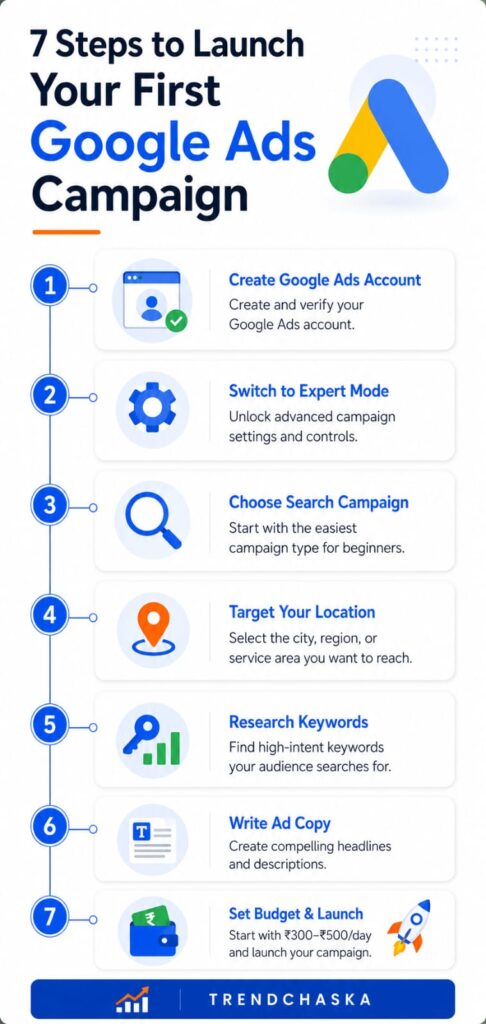
- Set up a Google Ads account. Head to ads.google.com and create an account using your Google login. Google often tries to steer you toward its “Smart” setup option, which makes things easier but limits your control. Find the option to switch over to Expert Mode. It gives you better access to the tools you need to understand the platform.
- Setting campaign goals. Google will ask you about what matters—sales, leads, site traffic, or brand awareness. Choose the one that matches what success means for your business. Don’t pick the one that just sounds good on paper.
- Picking campaign type. From what we’ve talked about so far, beginners will do best with Search.
- Targeting locations. Keep it specific. If your business is local, focus on your city or even a certain radius around it. Don’t target all of India if you can’t serve those areas. Reaching people you can’t help wastes your budget.
- Researching keywords. You can use Google’s Keyword Planner, which comes free with Google Ads. It helps you find relevant search terms, plus you can check how often those terms are searched and how competitive they are.
- Creating ad copy. Write headlines and descriptions tailored to what the user searches for. Avoid making broad statements like calling yourself “the best.”
- Budget setup: Begin with a small budget. A daily range of ₹300 to ₹500 works well to test things out if you’re just starting.
- Starting a campaign. Check all details again before hitting launch. Give it 24 to 48 hours without changing anything so the system can gather data from actual clicks.
Tips to Pick the Best Keywords
Choosing the right keywords isn’t about picking the most popular ones. It’s about finding words people use when they’re ready to take action. Understanding search intent is equally important when building topical authority and improving SEO rankings.
Someone searching “what is digital marketing” is just gathering information. On the other hand, searching “digital marketing course fees Ahmedabad” shows they’re closer to making a choice.
For beginners, it’s smart to focus on long-tail keywords. These phrases are longer and more detailed. They often cost less and bring in better results than general terms. For example, “affordable wedding photographer in Surat” will deliver better leads at a lower price than just using “photographer.”
The type of match you choose is just as important as the keywords themselves. Broad match triggers your ad for many related searches. It can quickly drain your budget if you don’t keep an eye on it. Phrase match and exact match, on the other hand, help you control which searches show your ad. If you’re starting a campaign, focusing on phrase and exact match with a strong list of negative keywords can help cut out irrelevant clicks and save money.
Tips to Write Google Ads That Grab Attention
Being vague is the biggest issue in ad copy, not bad grammar. A line like “Best Services in India” doesn’t give any clear information. But something like “GST Filing for Freelancers — Starts at ₹999” answers what’s being offered, who it’s for, and how much it costs.
Here are a few examples that Indian small businesses can use: A coaching institute could promote with “NEET Crash Course 2026 — Starts This Month” instead of using something generic like “Join Our Coaching Classes.” A home bakery might say “Customized Birthday Cakes Delivered in Pune” instead of a broad line like “Delicious Cakes for Every Occasion.” Being specific helps achieve what fancy adjectives can’t.
Good ads always tell people what to do next. Phrases like “Book a Free Consultation,” “Order Online Now,” or “Get a Quote in 2 Minutes” make it clear what will happen when someone clicks.
How to Budget for Beginners
| Stage | Recommendation |
|---|---|
| Daily budget | ₹300–₹500 while learning |
| Testing period | First one to two weeks |
| Risk management | Split the budget, test small, scale what works |
| Raising the budget | After one to two weeks of conversion data |
Setting daily budgets
Set a daily budget you’re okay with losing at first. While you’re learning, ₹300 to ₹500 per day is a solid starting point. This amount lets you get enough clicks to gather useful data without risking too much.
Testing budgets
Use your first week or two to test things out. Run a few ad versions alongside small, focused keyword groups. Monitor which setups bring not just clicks but actual conversions.
Risk management
Avoid blowing your entire monthly budget on an unproven campaign. Break the budget into smaller portions. Experiment on a smaller scale, spot what’s working, and then put more money into the keywords and ads that deliver results.
Beginner tips
If you want tips on planning a Google Ads budget in India, the best way to begin is to keep it small, monitor every detail, and raise the budget after collecting at least one or two weeks of conversion data to see what’s effective.
10 Common Mistakes Google Ads Beginners Make
- Not setting up conversion tracking. Running ads without tracking is like driving with your eyes closed. You won’t know which clicks turn into leads or sales. Do this before starting your campaign, not after.
- Using broad match without adding negative keywords. This wastes money on searches that don’t matter. Be sure to include negative keywords right from the start.
- Not matching search intent. Placing bids on informational keywords when you’re trying to sell products mismatches your goal with what searchers are looking for.
- Directing traffic to a generic homepage. Using a homepage forces visitors to find their way, while a focused landing page tied to your ad promise converts much better.
- Using unclear ad copy. Vague statements fail to grab attention. Clear and specific offers work best.
- Choosing a budget too small to learn anything. A budget that gets a few clicks per day won’t provide useful insights.
- Not trying multiple ad versions. Sticking to one ad limits what you can discover. Testing a few headlines lets you see what works.
- Overlooking mobile users. In India most search traffic comes from mobile devices. A landing page that loads too or is tough to use on a phone will ruin conversions no matter how strong your ad might be.
- Ignoring location and device targeting. Running a local service ad across the whole of India wastes money on users who won’t ever turn into customers.
- Ending campaigns too. Google’s system needs at least one to two weeks to adjust and optimize. Cutting off a campaign after just a couple of days doesn’t give it enough time to show results.
If you’re trying to avoid the common beginner mistakes in Google Ads, before spending even a rupee, fixing these ten problems alone can give you a big edge over most first-time advertisers.
Google Ads Top Tips for 2026
AI-driven bidding
Google’s automated bidding tools, including Maximize Conversions and Target CPA, handle much of the work that people used to do by hand. It’s smarter to let these systems operate on their own for simpler setups. However, make sure conversion tracking is in place first. This data is crucial because the AI uses it to work well.
Beginners can also learn campaign management through Google’s free Skillshop platform.
Intent behind searches
No matter how advanced automation gets, successful campaigns stick to matching keywords, ads, and landing pages with a single intent. Keeping them aligned is key to better conversions.
Quality of landing pages
A fast-loading landing page made for mobile featuring a clear message and a bold call to action beats a cluttered or sluggish page every time. As more people browse on their phones, this is now even more critical.
Mobile-Friendly Design
Since most Indians use their phones to browse, every part of your customer journey—from the ad to the landing page and even forms for checkout or contact—needs to work well on small screens.
Tracking Conversions
Let’s say it again because most people skip this crucial step: set up conversion tracking before you spend any money. Without it, you’re flying blind, and neither you nor Google’s smart bidding tools can identify what works.
Basic Illustration: Running a Google Ads Campaign for a Small Indian Business
Imagine a home baker in Pune making personalized cakes and hoping to get her first 10 online orders using Google Ads.
She begins with a search campaign focusing on a 10-kilometer area around her locality. She keeps her list of keywords short and specific: “customized cake Pune,” “birthday cake delivery Pune,” and “anniversary cake order online Pune,” all on phrase match. Her ad headline says, “Customized Cakes Delivered Fresh in Pune.” The description highlights same-day delivery and includes a link to place orders through WhatsApp.
She keeps a daily budget of ₹400. During the first week, she sees about 40 clicks and gets 3 confirmed orders. This shows her that the keyword “birthday cake” performs much better than “anniversary cake.” In the second week, she puts more of her budget toward the better-performing keyword and stops using the one that isn’t working.
By the end of the month, she has spent ₹12,000 and gained around 15 orders. Each order proves to be worth the investment many times over. She doesn’t rely on anything complicated or automated yet. She uses chosen keywords and a clear budget plan and pays close attention to the data instead of making guesses.
| Metric | Result |
|---|---|
| Daily budget | ₹400 |
| Week 1 | About 40 clicks, 3 confirmed orders |
| Best-performing keyword | “birthday cake” |
| Month-end spend | ₹12,000 |
| Month-end orders | About 15 orders |
Should Beginners in India Try Google Ads?
The short answer is that it depends on what you’re ready to put in. If you’re okay with starting small, analyzing your outcomes, and making tweaks based on data, Google Ads can help you connect with buyers already searching for what you offer. It’s easier to start with compared to old-school advertising.
But don’t expect miracles. If your offer doesn’t stand out, your website isn’t working, or you want instant results, you might end up frustrated and blame Google Ads when the real issue is how you set things up. Google Ads rewards careful planning and patience much more than spending a lot of money.
Students, freelancers, and small business owners trying out their first campaign should focus on learning in the first two weeks, not on achieving success. You will see results after figuring out what works for your audience.
Kick off with a search campaign. Choose focused keywords, craft ad copy that matches what users search, set a testing budget you’re comfortable with, and track every single conversion from the start.
Final Thoughts
Your first Google Ads campaign doesn’t need to feel like a risky bet. Most businesses that lose money often skip key steps like using tracking, creating clear targeting, or taking time to craft ad copy. The businesses that do well aren’t doing anything complicated. They just follow the simple steps outlined in this guide with discipline.
Kick off with a search campaign. Choose focused keywords, craft ad copy that matches what users search, set a testing budget you’re comfortable with, and track every single conversion from the start. Stick with it, and Google Ads will feel a lot easier to handle than it first seems.
Learning Google Ads is a valuable skill for students, freelancers, and aspiring marketers. If you’re planning to apply for internships or jobs, make sure you know how to present your Google Ads skills effectively on your resume.
FAQs
Q1. Is ₹500 a day good for running Google Ads in India?
₹500 per day works fine as a starting budget for small or local businesses. While it may not compete on popular keywords, it’s enough to collect valuable clicks and conversion insights during the first few weeks.
Q2. How long does Google Ads take to show results?
Most campaigns need a week or two before you can trust the data enough to evaluate how they’re performing. During this time, Google’s system adjusts to deliver ads better, so hold off on making big changes right away.
Q3. Can I run Google Ads without a website?
You can. Instead of a full website, you can connect options like your Google Business Profile or a WhatsApp Business catalogue or even use a basic landing page tool. However, using a proper landing page often leads to better results compared to third-party profiles.
Q4. Which Google Ads campaign is best for beginners?
Search campaigns are the easiest to start with. They focus on people searching with clear intent, and they’re simpler to track and improve than campaigns like Display, Video, or Performance Max.
Q5. What is the biggest mistake beginners make in Google Ads?
They skip setting up conversion tracking. Without tracking, you can’t tell which keywords, ads, or audiences bring in leads or sales. Without that data, the rest of your campaign is just guesswork.

Nidhi Patel is an SEO and digital marketing content strategist focused on AI SEO, content marketing, blogging, and personal branding. Through TrendChaska, she shares practical digital marketing insights, SEO strategies, and AI tools for beginners, students, and small businesses in India.