
Optimize your Google Business Profile with 7 steps for 2026. Improve Google Maps rankings, attract local customers, and grow your business.
INTRODUCTION
When you search for a shop or a restaurant on Google, you see a box on the side with pictures, reviews, and a call button. This is called a Google Business Profile. If you have a business in India, this box is very important for people to find you online.
Small business owners do not use Google Business Profile correctly. They just claim their profile, add a phone number, and upload one picture. Then they wonder why another shop shows up first when people search for something near them.
Google Business Profile is not a listing. It is a way for Google to decide which businesses show up on the map when people search. Google looks at how complete and active your profile is to decide.
This guide will show you how to set up and optimize your Google Business Profile. This will help your business show up when people search for something near them.
A strong Google Business Profile works best when combined with a broader [local SEO strategy for Indian small businesses], helping businesses improve their visibility, attract nearby customers, and compete effectively in local search results.
What Is Google Business Profile?
Google Business Profile is a tool that helps your business show up on Google Search and Google Maps. For businesses, Google Business Profile is very important.
Most people in India search for things on their phones. They look at the map. Then call or visit the business.
In cities like Ahmedabad or Bengaluru, there are many businesses that are similar. So reviews and pictures are very important to stand out.
Many small businesses in India do not have a website. So Google Business Profile is like their website.
If you are an agency or freelancer helping your clients with Google Business Profile, it can be a win.
2. Before You Start
You need to claim and verify your Google Business Profile.
- Go to google.com/business and search for your business name.
- If your business is already listed, claim it. If not, create one.
- Then choose how you want to verify your business. In India, you can verify by phone, video, or postcard.
- Once you verify your business, you can edit your profile. Add more information.
Note: The way you verify your business might change, so always check the options on your dashboard.
If someone else has already claimed your business, you can request access to the profile.
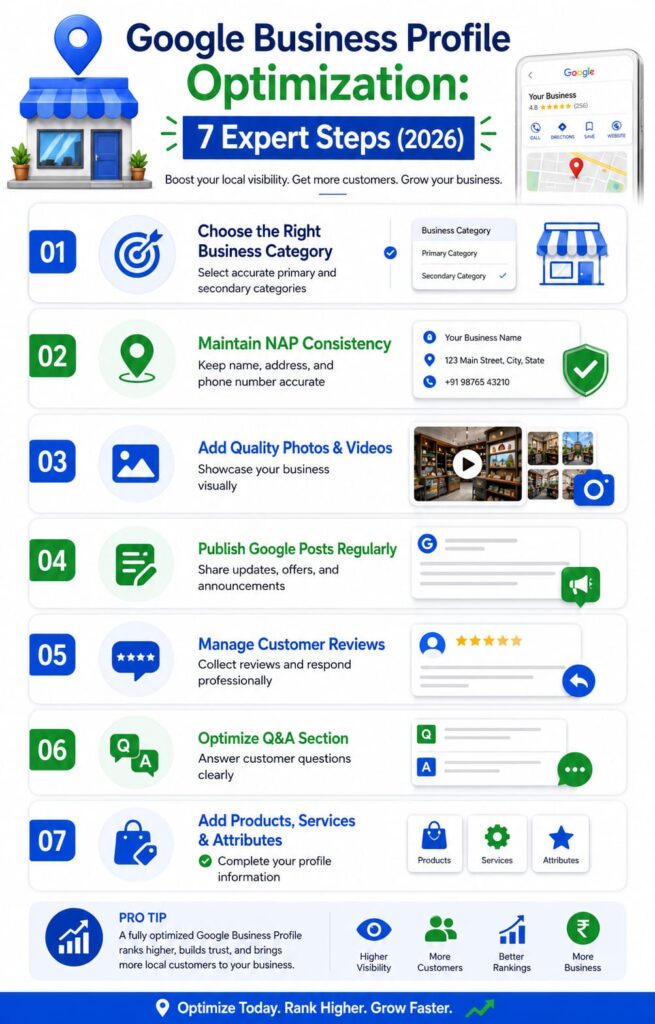
Step 1: Getting Your Business Categories Right
This is an important step. Your primary category is one of the signals for Google to rank your business.
- Choose a category that’s specific to your business. For example, “Dental Clinic” is better than “Medical Clinic.”
- Search for your target keyword. See what categories the top businesses use. Proper keyword research can help you understand what your customers are searching for and how to optimize your profile accordingly.
- Do not pick a category just because you think it might help. Be specific.
- You can also add categories for services you offer.
This approach works even better when combined with a [hyperlocal digital marketing strategy] that focuses on reaching customers in your local area.
Example:
| Business Type | Weak Primary Category | Strong Primary Category |
| Home tutoring service | Education | Tutoring Service |
| Local sweet shop | Store | Indian Sweets Shop |
| Car repair garage | Automotive | Auto Repair Shop |
| Physiotherapy clinic | Health | Physical Therapist |
Step 2: Business Description and NAP Consistency
You have 750 characters to describe your business. Use them to tell people what you do, who you serve, and where you are.
- Do not just list keywords. Write a description.
- Make sure your business name, address, and phone number are the same everywhere. This is called NAP consistency.
- Check that your suite number, road name, and phone number are the same on your website and directories.
Step 3: Photos and Videos
Profiles with good photos do better than those with few photos.
Minimum photos you should have:
- Logo
- Cover photo
- Interior shots
- Exterior shot
- Team photo
- Product or service in action
Pro Tip: Take photos in daylight. Avoid stock photos. Add photos every month to show that your business is active.
Videos of 30 seconds or less can also be very engaging.
Step 4: Google Posts
Google Posts are a way to publish updates directly to your profile.
- You can post about services, offers, events, or products.
- Post at least once every 7–10 days to keep your profile active.
- Do not post much at once and then forget about it.
Step 5: Reviews
Reviews are an important signal for Google to rank your business.
- Ask your customers for reviews when they are happy with your service.
- Make it easy for them to leave a review by creating a link.
- Respond to all reviews, bad and good, to show that you care about your customers.
Important Note:
Never try to get people to write reviews by giving them discounts or free things. This is against Google’s rules. Can get your Google Business Profile suspended for real. It is not worth it to get a few more reviews for a little while.
Responding to Reviews
- You should respond to every review, whether it is good or bad, within 24 to 48 hours if you can.
- For reviews: say sorry for the problem, do not get defensive, and try to fix the issue outside of the review section (“Please call us at [number] so we can fix this problem directly”).
- For reviews: It is better to write a real and specific response instead of just saying “Thank you!” Say what you are thankful for.
Handling Bad Reviews
Some businesses in India have problems with fake reviews from competitors. If you see one:
- Respond to it in a factual way (other people will see this even if Google does not remove the review).
- Report it using the “Report review” option on your Google Business Profile listing.
- If the review is clearly fake or mean (anonymous account, no real customer interaction, hate speech, or a competitor pretending to be a customer), report it to Google’s Business Profile support. It may take some time to get it removed.
Step 6: Managing Your Q&A Section
Anyone can edit your Q&A section, including competitors, so you need to pay attention to it.
- Be prepared. Add questions that customers often ask (like “Do you have parking?” or “Can I book an appointment?”) and answer them yourself as the business.
- Check your Q&A section every week for questions from real customers and answer them quickly. If you do not answer a question for a long time, it looks like you do not care.
- Vote for your answers so they show up at the top because the Q&A section is sorted by how helpful the answers are.
Step 7: Products, Services, and Attributes
There are two sections that can help you show up in search results:
- Services/Products tab: List each service or product with a description and price if you can. For example, a salon should list “Haircut,” “Hair Spa,” and “Bridal Makeup” separately from just “Salon Services.”
- Attributes: These are the checkboxes that Google gives you based on your category. “Wheelchair accessible,” “Women-led business,” “Free Wi-Fi,” “Accepts UPI payments.” Check all the boxes that’re true for your business because they help people find you when they search.
How Long Does It Take to See Results From Optimizing a Google Business Profile?
A lot of businesses think they will see rankings right away after they optimize their Google Business Profile. The truth is that it usually takes some time to see results from local search engine optimization.
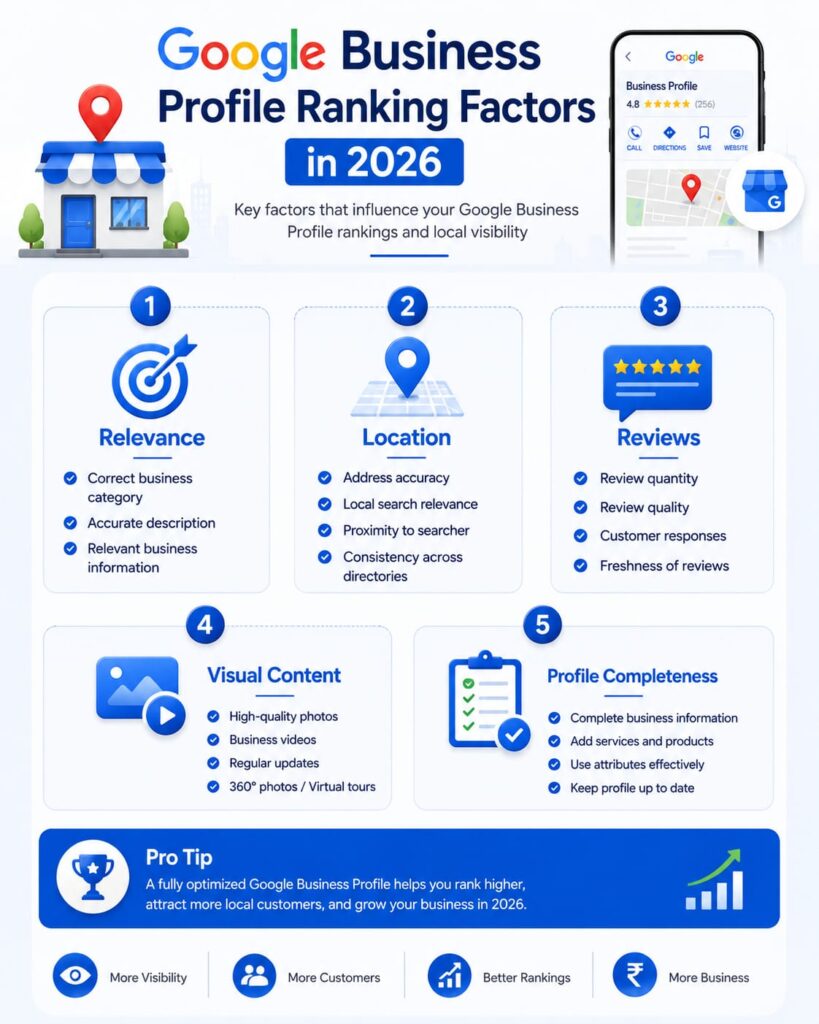
Google looks at a lot of things when it decides how to rank businesses, including:
- What kind of business you have
- Where you are located
- Who your competitors are
- What your customers say about you
- How often you update your profile
- How relevant your business is to what people are searching for
If you make some simple changes, like updating your business information or adding photos, you might see those changes show up pretty quickly.
However, if you want to see real improvements in your local search rankings and get more customers to take action, you need to keep working on optimizing your profile over time.
For businesses in India, where markets can be very competitive, it is important to keep your profile updated, collect reviews from customers, and make sure all your information is accurate.
This will help you build a stronger presence in your local area.
Optimizing your Google Business Profile is not something you do one time and then forget about. You need to keep checking how your profile is performing, update your content, and make improvements when needed.
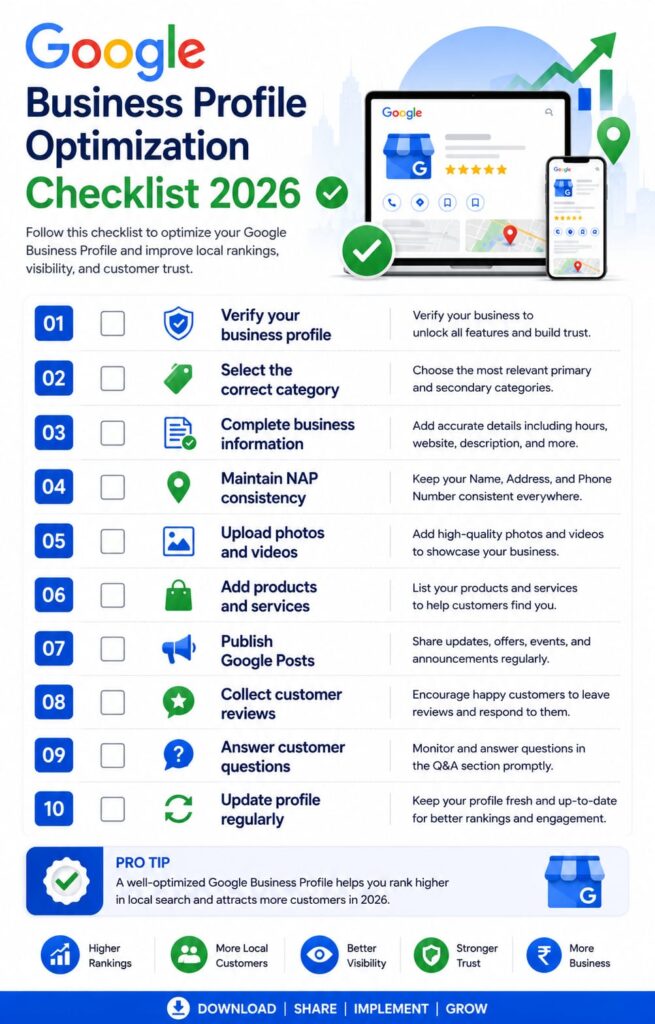
Google Business Profile Optimization Checklist
Use this list to make sure your Google Business Profile is complete and up-to-date.
- [ ] Your profile is verified
- [ ] Your main category is the most specific and accurate one
- [ ] You have added relevant secondary categories (do not add too many)
- [ ] Your business description is written in a way and is under 750 characters
- [ ] Your name, address, and phone number are the same on your website and all directories
- [ ] You have uploaded a logo and cover photo
- [ ] You have at least 10 photos of your business, including inside, outside, team, and products
- [ ] You have uploaded at least one short video
- [ ] You have scheduled Google Posts to go up at least once a week
- [ ] You have created a link to leave a review and shared it with your customers
- [ ] You have responded to all your reviews
- [ ] You have added questions and answers to your Q&A section
- [ ] You have listed all your products and services
- [ ] You have selected all the attributes that apply to your business
- [ ] Your hours of operation are accurate, including holidays
Common Mistakes Indian Businesses Make with Google Business Profile
| Mistake | Why It Is Bad For You |
| Using a fake address to try to rank in a city you do not operate in | This is against Google’s rules and can get your profile suspended. |
| Adding keywords to your business name (like “Sharma Dental Clinic. Best Dentist Ahmedabad”) | This is against Google’s guidelines. Can get your name changed or your profile suspended. |
| Ignoring reviews | This shows that you do not care about your customers. |
| Ignoring your Q&A section | This lets old or wrong answers stay up. |
| Only updating your profile once | If you do not update your profile, it will not show up in search results much. |
| Using stock photos | This can make your business look fake. |
| Choosing the category to try to show up in more search results | This can actually make it harder for people to find you. |
Other Mistakes to Avoid
Apart from the mistakes mentioned above, businesses should also avoid these common issues:
Not Checking Google Business Profile Insights
Google Business Profile Insights helps you understand how customers find your business, what actions they take, and where you can improve.
Using Keywords Incorrectly
Adding too many keywords in your business name or description can make your profile look unnatural. Use keywords only when they genuinely describe your business and services.
Not Updating Business Information Regularly
Outdated information, such as incorrect business hours or missing services, can create confusion for customers. Review your profile regularly to keep information accurate.
Ignoring Customer Questions
The Q&A section can influence customer decisions. Answering questions clearly helps build trust and gives customers useful information before they contact your business.
How Often Should You Update Your Google Business Profile?
| Task | How Often |
| Google Posts | Every 7 to 10 days |
| Photos | Every month |
| Review responses | Within 24 to 48 hours |
| Q&A monitoring | Every week |
| Hours and holiday updates | As needed |
| Full profile audit | Every quarter |
Why Google Business Profile Matters for Indian Businesses in 2026
Google Business Profile has become an important tool for businesses in India because many customers now search for products and services in their local area.
People use Google Search and Google Maps to discover nearby businesses, compare options, read reviews, and make decisions.
An optimized Google Business Profile helps businesses:
- Showcase their products and services
- Collect customer reviews
- Share updates and offers
- Improve their chances of appearing in local search results
Unlike paid advertising, Google Business Profile allows businesses to build online visibility without spending a large amount of money.
By consistently optimizing and updating your profile, you can compete more effectively with other businesses in your local market.
Conclusion and Next Steps
A good Google Business Profile is not something you set up once and forget about. It needs to be updated regularly like any other marketing tool. The businesses that are winning in India are the ones that are taking care of their Google Business Profile every week.
Key Takeaways:
- Start with the checklist above.
- Fix your categories first, then work on your photos, posts, and reviews.
If you found this helpful, you can learn more about how to choose the keywords for your Google Business Profile with our guide.
If you want a done-for-you version of this checklist, stay tuned for our Digital Marketing Templates & Checklists Pack.
FAQs
Q1: Is Google Business Profile free?
Yes, Google Business Profile is completely free to create, verify, and maintain.
Q2: How long does it take to verify a Google Business Profile in India?
It usually takes a few minutes to verify by phone or SMS, a few days to verify by video, and 1 to 3 weeks to verify by postcard.
Q3: Can I have Google Business Profile listings for one business at one location?
No, Google does not allow listings for the same business at the same address.
Q4: Does optimizing my Google Business Profile help if I do not have a website?
Yes, a good Google Business Profile can help you get calls and visits without a website.
Q5: How do I remove a bad review?
Report it using the “Report review” option. Respond to it in a factual way.
Q6: Does responding to reviews actually affect my ranking?
Yes, responding to reviews is part of how Google decides which businesses to show in search results.
Q7: How do I optimize my Google Business Profile for better rankings?
Optimize your Google Business Profile by choosing the right category, adding accurate business information, uploading photos, collecting reviews, publishing posts, and keeping your profile updated regularly.
Q8: What are the most important Google Business Profile ranking factors?
The important Google Business Profile ranking factors include relevance, accurate business information, primary category selection, reviews, profile completeness, photos, customer engagement, and regular updates.

Nidhi Patel is an SEO and digital marketing content strategist focused on AI SEO, content marketing, blogging, and personal branding. Through TrendChaska, she shares practical digital marketing insights, SEO strategies, and AI tools for beginners, students, and small businesses in India.