Most B2B brands that struggle to build their impact on LinkedIn don’t fail due to poor content ideas but inconsistent posting, a lack of planning leading to running out of ideas mid-month, and resorting to whatever content they can throw together the night before the scheduled publishing date, which has a clear impact on the engagement the post will receive.
A LinkedIn content calendar allows you to batch and plan your LinkedIn content in advance rather than having to sit down in front of a blank document in search of ideas every time you want or need to share something with your audience.
This post provides a free 30-day LinkedIn content calendar template for B2B brands, along with guidance on customizing it to your needs, choosing content pillars, selecting LinkedIn post formats, and analyzing and measuring your LinkedIn content performance.
What Is a LinkedIn Content Calendar?
A LinkedIn content calendar is a planning guide that helps you organize your LinkedIn content, publishing dates, and goals. It involves a strategic distribution of your content across your LinkedIn feed in a way that creates value for your audience without overwhelming them with similar content types.
For B2B brands, this means a balance between educational, industry/opinion-based content, and posts promoting a product/service with engagement-boosting content such as polls/questions.
Why B2B Brands Need a LinkedIn Content Calendar
LinkedIn has become a marketplace full of long sales cycles; a potential client engages with a brand without expecting to fill out a CRM form right away. A LinkedIn content calendar helps to ensure that the interaction the brand has with the potential client is regular and predictable.
A content calendar for LinkedIn helps in several key ways:
- It ensures content consistency throughout the month/year, which helps keep the brand top of mind for the audience.
- It helps create a balanced content distribution that prevents the audience from getting overwhelmed by promotional posts and allows the brand to showcase its personality beyond its sales goals.
- It ensures content variety so that the brand can avoid repeating the same post idea over and over while providing the predictability of regular updates that the audience expects from the brand.
- A LinkedIn content calendar promotes the value of the brand to the audience rather than focusing on one-time promotional posts, which is the most effective way of gaining followers and customers on the platform.
- A LinkedIn content calendar promotes cross-department collaboration by helping sales, marketing, and founders understand the content goals of the brand.
- It reduces the daily pressure of coming up with new LinkedIn posts by batching content creation in advance.
Free 30-Day LinkedIn Content Calendar Template for B2B Brands
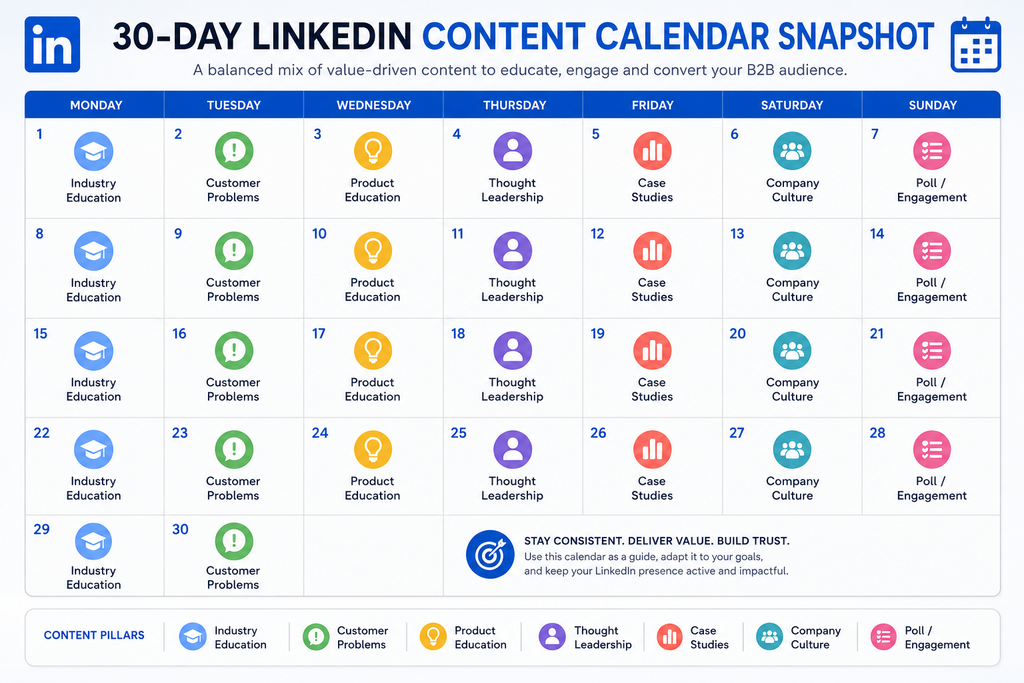
The 30-day LinkedIn content calendar below provides a general idea of how a LinkedIn content calendar should be structured. It can be copied as it is or customized in any way that suits the needs of the brand.
This 30-day LinkedIn content calendar has an approximate 80/20 ratio of value-based posts to promotional posts and can be modified in any application or spreadsheet software.
| Day | Content Pillar | Post Idea/Topic | Format | Purpose/Goal | CTA |
|---|---|---|---|---|---|
| 1 | Educational | Explain a term or concept that the [audience] frequently misunderstands | Carousel | Build authority and save-worthy content | Save this for later |
| 2 | Industry Insight | Share a relevant trend or shift that is currently happening in the [industry] | Text + image | Showcasing the research and market knowledge of the brand | What are your thoughts on [topic]? |
| 3 | Customer Pain Point | Describe a common problem that the [ideal customer persona] regularly faces | Text post | Building an emotional connection with the [ideal customer persona] | Tag someone dealing with this |
| 4 | How-To | Share a step-by-step process of addressing a particular issue | Carousel/document | Provide valuable content that the audience can bookmark or save | Which step would you try first? |
| 5 | Poll | Ask a relevant question to your audience | Poll | Boost engagement rates and get audience feedback | Vote and share your thoughts in the comments |
| 6 | Founder/Expert | Give your opinion on a relevant topic or trend | Text or video | Humanizing the brand | Agree or disagree? Share your thoughts |
| 7 | Case Study | Share a high-level result of a case study (without being overly promotional) | Carousel | Establish credibility and expertise in the [niche] | Ask to know more in the comments |
| 8 | Myth-Busting | Clear up a common myth in the [niche] | Text post | Demonstrating expertise in the [niche] | Share a myth you commonly hear |
| 9 | Behind-the-Scenes | Showcase a small part of the [team’s] process | Image/video | Appearing more relatable and authentic in front of the audience | Ask questions about the [topic] |
| 10 | Thought Leadership | Share your thoughts on where the [niche] is headed | Text post | Establishing authority in the [niche] | Do you agree with this outlook? |
| 11 | Statistics/Data | Share an interesting statistics/data point with your outlook on it | Carousel/image | Leverage credibility and create share-worthy content | Save this for your next pitch |
| 12 | FAQ | Answer a question that a [prospect] frequently asks | Text post | Educating the [audience] and reducing support inquiries | “Got a different question? Drop it below” |
| 13 | Client/Customer Story | Share a [client/customer] story (at a high level to avoid being overly promotional) | Text + image | Showcasing social proof and building credibility | Want similar results? Message us |
| 14 | Engagement/Question | Ask a question about how the [audience] handles a specific task | Text post | Encouraging comments and boosting engagement | Share your process in the comments |
| 15 | Product/Service | Explain a problem that the [product/service] solves | Text/carousel | Creating awareness about the [product/service] | More details – link in comments |
| 16 | How-To | Share a helpful checklist that the [audience] can use | Document/carousel | Providing share-worthy content that the [audience] can save | Bookmark this checklist |
| 17 | Industry Insight | Comment on a relevant news piece or a change in the [niche] | Text post | Appearing as an expert in the [niche] | What are your thoughts on [topic]? |
| 18 | Short Video | Offer a quick tip via a short video | Video | Boosting discoverability and appearing more relatable | Follow for more tips |
| 19 | Customer Pain Point | Address a relevant concern or objection | Text post | Appearing as an expert while building a connection with the [audience] | Does this concern sound familiar? |
| 20 | Poll | Create a poll asking a “would rather” question | Poll | Boosting engagement without needing to put in extra effort | Vote now |
| 21 | Case Study | Share a before-and-after result (at a high level) | Carousel | Showcasing the value of the [product/service] | “Comment ‘case study’ for details” |
| 22 | Thought Leadership | Share a unique outlook on a common subject | Text post | Appearing as a thought leader while differentiating from competitors | Push back against this outlook |
| 23 | Founder/Expert | Share a valuable lesson from a [project/challenge] | Text post | Appearing more relatable while showcasing expertise | Share a lesson learned the hard way |
| 24 | Myth-Busting | Debunk a popularly believed myth or information | Text/carousel | Showcasing expertise while educating the [audience] | Tag someone who believes this myth |
| 25 | Statistics/Data | Share a relevant benchmark that the [audience] can strive to achieve | Carousel | Appearing as an expert while providing valuable information | Save this for later |
| 26 | Behind-the-Scenes | Showcase how the [team] handles a [project/task] | Video/image | Appearing more relatable and authentic | Ask us about [topic] |
| 27 | FAQ | Answer a frequently asked question by the [audience] | Text post | Educating the [audience] and reducing support tickets | Ask a question in the comments |
| 28 | Product/Service | Share a feature, benefit, or current promotion | Text/image | Creating brand awareness and driving traffic to the website | Book a call to know more |
| 29 | Client/Customer Story | Share a testimonial or a similar customer journey (at a high level) | Carousel | Driving credibility and social proof for the [product/service] | Read the full story – link below |
| 30 | Engagement/Recap | Recap the [month] and ask what should be covered next | Text post | Driving engagement while finding content ideas for the following month | What should we cover next month? |
How to Customize This LinkedIn Content Calendar
The 30-day LinkedIn content calendar above is simply a guide. Every business has different requirements depending on the [niche], [target audience], and the overall objective. Below are some general guidelines for customizing the LinkedIn content calendar.
Choosing the Right Content Pillars
The majority of B2B brands should focus on 3 to 5 content pillars. Content pillars are simply themes of content that a brand frequently covers, and all of its posts should be able to fall under these themes. Here are some suggestions for content pillars:
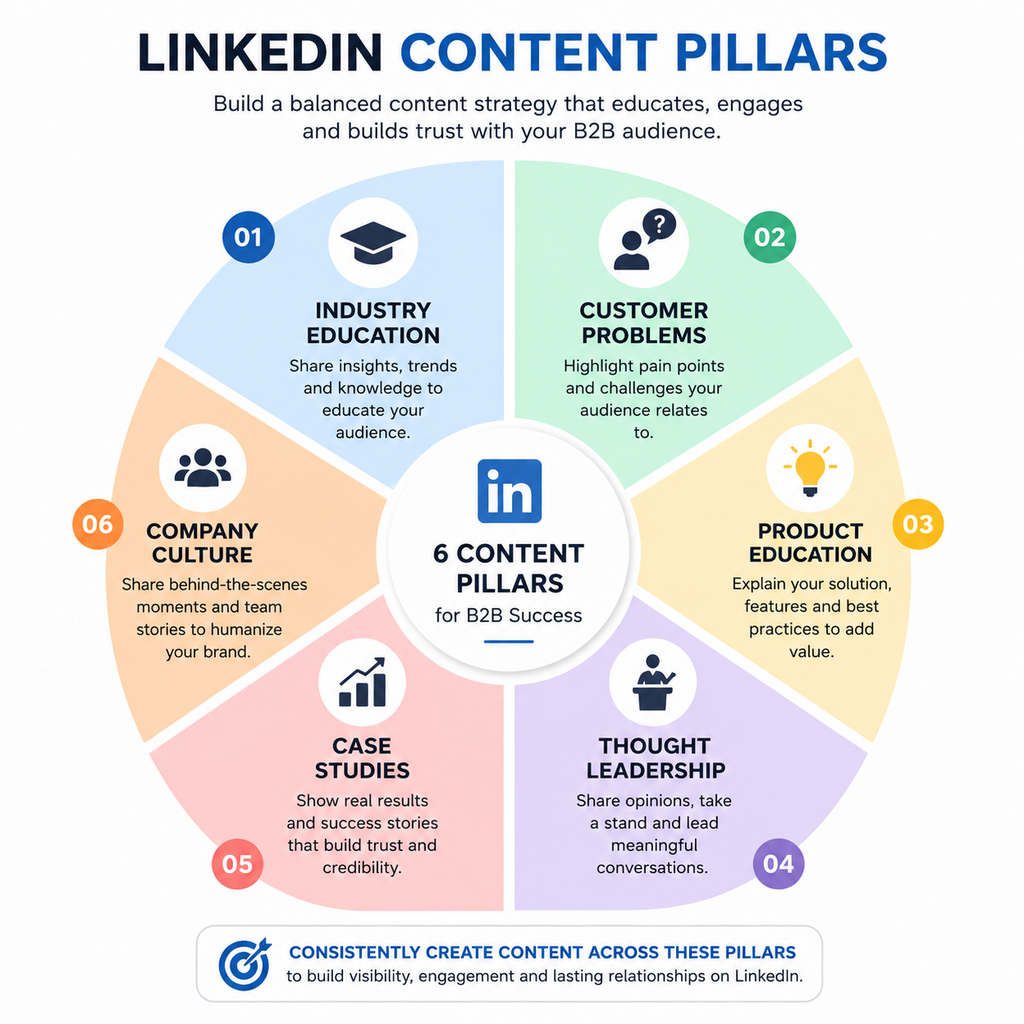
- Industry Education – This pillar covers concepts, trends, and themes relevant to the industry of the brand.
- Customer Pain Points – This one is self-explanatory and covers the problems the [ideal customer persona] is facing
- Product/Service Education – Covers the [product/service] and how it can address the [pain point]
- Thought Leadership – This pillar focuses on providing the outlooks, opinions, and predictions of the [brand/founder]
- Case Studies – This pillar covers the successful results delivered by the [product/service]
- Company Culture – This pillar focuses on the company culture of the brand.
Avoid choosing content pillars based on what sounds good; base your decision on what your [target audience] asks for. Most of the content ideas that brands come up with are based on guesswork. A simple analysis of the questions asked by the [target audience] during sales calls or in the comments section of LinkedIn posts will provide insight into themes the [audience] is interested in.
Choosing the Right Content Formats
Based on your content pillars, you will need to decide on the content formats that work best for you. Below are some general suggestions:
- Text Posts – Great for most content types, including opinion-based, question-asking, and educational content
- Carousel/Document – Best for how-to guides and checklists
- Polls – Great for boosting engagement without putting in much effort
- Video – Perfect for showcasing personality and increasing discoverability
- Image – Can be used to highlight text, stats, and announcements
- Case Studies – Best presented as carousel or document posts containing multiple data points
For additional guidance on creating content and choosing formats on LinkedIn, see LinkedIn Marketing Solutions.
Customizing the LinkedIn Content Calendar by Industry
Every industry has slightly different requirements, and below are some general suggestions:
- SaaS – Focus on product education, customer onboarding wins, and industry education
- Digital Marketing Agencies – Prioritize case studies, industry education, and myth-busting content
- Consulting/Professional Services – Emphasize thought leadership pieces, founder opinions, and industry insights
- IT Services – Focus on industry education, myth-busting, and company culture-centric posts
- B2B Startups – Focus on founder content and customer stories as brand culture development is a priority
For smaller B2B brands and founders, explore our guide to LinkedIn marketing for small businesses for practical strategies to build visibility, engagement, and business opportunities on LinkedIn.
LinkedIn Posting Schedule: How Often Should B2B Brands Post?
There is no hard and fast rule about the best LinkedIn posting schedule for B2B brands, but it ultimately comes down to a balance between consistency and sustainability. For most brands, 3 to 5 LinkedIn posts per week is a great place to start. Here are some general suggestions:
- Batch content creation so that you only spend a few hours a week coming up with content rather than a day or more.
- Prioritize consistency over quantity. It is better to publish 3 engaging posts regularly than 7 low-effort posts.
- Make sure to choose a consistent schedule that you can maintain for a long time rather than a burst of frequent posts that fizzle out after a month or two.
Choosing the Best Time to Post on LinkedIn
As far as the timing of LinkedIn posts is concerned, there is no one-size-fits-all answer. Most brands will benefit from experimenting with different times and days and identifying what works best for them rather than blindly following generic guidelines. To get results, analyze your own LinkedIn engagement statistics and look at what time of the day gets you the best reactions/comments/shares.
How to Measure Your LinkedIn Content Performance
Different content types and goals will have different success metrics, but below are some of the most important metrics to track and analyze for a balanced view of your LinkedIn performance:
- Impressions – The number of times your post appeared in the feed of an [audience] member
- Engagement Rate – The overall engagement (reactions, comments, and shares) divided by the number of impressions
- Reactions – The number of reactions your post received
- Comments – The number of comments your post received
- Shares – The number of shares your post received
- Click-Through Rate – The percentage of people who engaged with the link in your post
- Followers Growth – The rate at which your LinkedIn audience is growing
- Profile/Page Views – The number of people who visited your LinkedIn Profile or Page
- Leads/Conversions – The number of leads generated by a LinkedIn post, which requires a call-to-action and tracking via a CRM or website.
An engaging educational LinkedIn post is no less successful than a promotional post that has a higher CTR. To truly gauge the effectiveness of a LinkedIn post, you must look at the big picture and analyze the trends across multiple posts instead of evaluating individual posts.
Common LinkedIn Content Calendar Mistakes to Avoid
- Avoid publishing only promotional LinkedIn posts
- Avoid replicating the content strategies of your competitors
- Avoid publishing content that does not resonate with your audience
- Avoid using the same post format for all of your LinkedIn posts
- Avoid focusing on likes as the ultimate validation of your content
- Avoid skipping the step of analyzing your LinkedIn performance
- Avoid irregular LinkedIn posting that fails to engage the audience
If you’re looking to extend your LinkedIn strategy across other platforms, explore our social media content calendar for a practical approach to planning consistent, engaging content across your social channels.
Frequently Asked Questions
What should a B2B company post on LinkedIn?
A mix of educational, industry, customer pain point, case study, and a smaller percentage of product/service-related posts. Strive for an 80/20 ratio of value-based posts to promotional posts.
How often should a B2B brand post on LinkedIn?
Most B2B companies should aim to post 3 to 5 times per week on LinkedIn with a focus on consistency.
How do I create a LinkedIn content calendar?
A LinkedIn content calendar should be built based on the content pillars, a realistic posting schedule, and a list of post ideas, formats, and goals. The 30-day LinkedIn content calendar above can be used as a starting point.
What are the best content pillars for B2B LinkedIn marketing?
The best content pillars for B2B LinkedIn marketing include industry education, customer pain points, product/service education, thought leadership, case studies, and company culture.
What is the best LinkedIn posting schedule?
There is no best LinkedIn posting schedule for every brand, but it is important to test different schedules and stick to the one that delivers the best results.
How can I measure whether my LinkedIn content is working?
Measure the metrics that matter for each type of LinkedIn post. Engagement rate and comments are important for awareness-building posts, whereas click-through rate and conversions are more important for promotional posts.

Nidhi Patel is an SEO and digital marketing content strategist focused on AI SEO, content marketing, blogging, and personal branding. Through TrendChaska, she shares practical digital marketing insights, SEO strategies, and AI tools for beginners, students, and small businesses in India.