
Get a free Social Media Content Calendar template and learn how to plan 30 days of content, stay consistent, and grow online.
Social Media Content Calendar: Free Guide and 30-Day Planning Template
Have you ever found yourself staring at a blank screen first thing in the morning, rushing to come up with any post just to stay active online? You’re not the only one.
The main issue for most businesses isn’t a lack of creativity. The real problem is not having a proper system in place.A social media content calendar provides a structured approach to planning, organizing, and publishing content across different platforms.
A social media content calendar isn’t just a basic spreadsheet. It acts as the core of a steady and well-thought-out content plan. It lays out what to share, the platform to share on, and the best time to do it. This way, you avoid making last-minute guesses. In this guide, you’ll find a free template along with a simple, detailed process to map out your next 30 days of posts stress-free.
What Is a Social Media Content Calendar?
A social media content calendar works as a planning tool to organize your future posts for platforms like Instagram, LinkedIn, Facebook, X (Twitter), or TikTok. It includes details like dates, types of content, captions, and other specifics. You can think of it as a map guiding all the content you share online.
This calendar can exist in something as basic as a Google Sheet, a tool like Notion, or a scheduling app like Buffer. The specific format doesn’t matter much, but sticking to the habit of using it does.
Why Businesses Use a Content Calendar
When there’s no plan in place, managing social media turns into a reactive process. You post when you remember and may skip posting during busy periods. This often results in a feed that looks messy or even neglected.
A content calendar helps you create a reliable system for managing your social media. It pushes you to plan ahead, match your posts with upcoming events or product launches, and keep a consistent brand tone over time to engage your audience.
Why Planning Content Early Helps
- No more last-minute stress — Say goodbye to “What should I post today?” struggles.
- Boosts content quality — You’ll have time to think, draft, and polish your posts.
- Keeps business goals in focus — Every post serves a clear purpose.
- Improves teamwork — Everyone knows the plan and their role.
- Saves mental energy — Planning in batches cuts down on weekly work.
Why You Need a Social Media Content Calendar to Grow
A social media content calendar isn’t about keeping things tidy. It’s a powerful way to help you grow.
Post
Social media loves consistency. Platforms like Instagram, LinkedIn, and TikTok favor accounts that post often. A content calendar helps you stick to a schedule so you show up all the time.
Boost Interaction
Planning your posts ahead helps you focus on what your audience cares about, not just what you can put together quickly. This change in approach lets you create better ideas, stronger images, and posts that get people talking.
Work Better as a Team
If you team up with a social media manager, designer, or copywriter, using a shared calendar helps avoid misunderstandings. It lets everyone see the schedule, know who is responsible for tasks, and track what’s been approved. You won’t have to send last-minute content through WhatsApp in the middle of the night anymore.
Saves Time and Cuts Down on Stress
Creating content in batches—like writing captions, creating graphics, or recording videos—within one work session is much faster than doing a little each day. A content calendar helps you plan and create multiple pieces of content at once, making your workflow more efficient. Many marketers also use AI-powered content writing techniques to speed up content creation while maintaining consistency.
Must-Have Parts of Any Social Media Content Calendar
The best social media content calendar layout includes everything you need to post without hunting through files or bothering teammates with questions.
Post Date
The planned date, and if possible, the time, at which the post should be published. Try to match it with when your audience is most active online.
Platform
Pick where the post will appear, like LinkedIn, Instagram , Pinterest, X, Facebook, TikTok, or YouTube Shorts. A post written for LinkedIn doesn’t always fit on Instagram the same way.
Content Format
Decide if the content will be a carousel, a static image, a Story, a Reel, a video, or a blog share. The type of content affects how you create it and how platforms push it out to people.
Caption
Write the full caption in your content calendar instead of just dropping a placeholder idea. This lets the person scheduling the post grab it instead of having to rewrite.
Hashtags
Plan your hashtag lists ahead of time to match each platform’s rules. Use 5 to 10 specific hashtags on Instagram. Stick with 3 to 5 on LinkedIn.
CTA (Call to Action)
Decide what action you want people to take when they see your post. Should they comment, visit the link in your bio, share, or save the post? Make sure each post focuses on one clear CTA.
Performance Metrics
Keep an eye on how your post does after you share it. Look at numbers like reach, impressions, engagement rate, clicks, or saves based on your goal. Use this info to improve your next calendar.
Free Social Media Content Calendar Template
You can use this simple template by copying it into Notion, Google Sheets, or Excel.
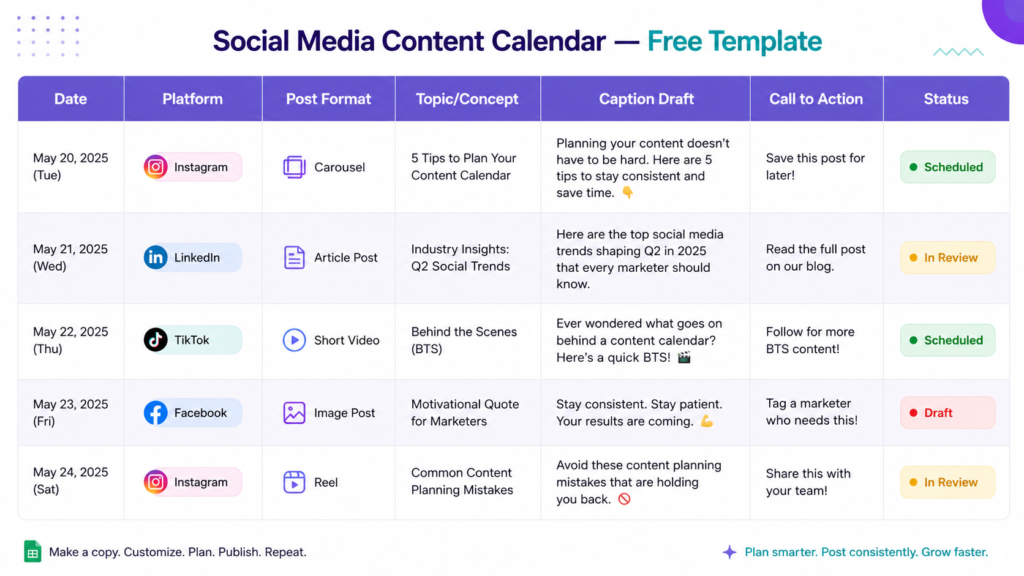
| Date | Platform | Content Type | Topic / Theme | Caption Draft | CTA | Status |
| June 2 | Carousel | 5 tips for productivity | “Working smarter starts here. Here are 5 habits…” | Save this post | Scheduled | |
| June 3 | Text post | Industry insight | “Most people overlook this when hiring…” | Comment your thoughts | Draft | |
| June 4 | Image | Behind the scenes | “Here’s a peek at how our team…” | Tag someone who’d love this | Approved | |
| June 5 | Reel | Product demo | “You’ve been using it wrong. Here’s the right way…” | Follow for more | In progress | |
| June 6 | TikTok | Video | Trending audio + tip | “POV: You finally have a content system that works” | Follow us | Idea |
How to Work With It:
- Create a new version of this table in Google Sheets or Notion.
- Complete one entire week at a time so it feels manageable.
- Use colors to show status (like green for scheduled, yellow for in review, red for missing).
- Share it with the team and assign each row to someone responsible.
- Go over it and update the results once the posts are live.
How to Plan Social Media Content for 30 Days
Setting up an entire month’s worth of content might feel intimidating, but you need a few hours if you follow the right steps. This is the method expert content creators count on.
Step 1 – Set Your Objectives
Before creating a caption, think about what you want social media to achieve for your business this month. Are you trying to boost brand awareness? Are you aiming to drive people to check out a new product? Or maybe you’re planning to grow your email subscribers?
Your goals shape what kind of content you’ll need. To increase sales, post content designed to lead to conversions. To gain followers, share educational or shareable posts.
Step 2 – Know Who You’re Talking To
Who is your audience? Be specific. Don’t just say “small business owners.” Instead, picture “women running product-based businesses with small teams of 5–20 who feel stressed about marketing.” The clearer your audience is, the better your content will connect with them.
Look at your analytics. Find which posts people save the most. Check the kinds of questions they send in your DMs. These are the areas where your best content ideas live.
Step 3 – Pick Your Content Pillars
Content pillars are the key topics your account always focuses on. You’ll stick to 3–5 main themes. If you’re running a marketing agency, your pillars could include:
- Education — Guides, tutorials, and tips
- Inspiration — Motivational stories, quotes, or transformations
- Behind the scenes — Team activities, workflows, or day-to-day life
- Promotion — Highlighting your services, products, or special deals
- Community — Asking questions, running polls, or sharing audience content
Pillars shape your calendar and make sure you avoid posting the same kind of content multiple days in a row.
Step 4 – Pick Weekly Themes
Come up with a general theme for every week in the month. Here’s an example:
- Week 1 — Awareness (highlight a challenge your audience deals with)
- Week 2 — Education (share useful information or tips)
- Week 3 — Social proof (use case studies or testimonials)
- Week 4 — Conversion (focus on your offer or posts with a clear CTA)
Weekly themes help build a purposeful flow. They make your content feel planned instead of random.
Step 5 – Create Content in Batches
Set aside a chunk of time, like 3 to 4 hours, to work on creating a bunch of content at once. Write all your captions first. Then focus on your graphics. After that, tackle the videos. Batching your work helps you stay in the creative zone instead of jumping between tasks.
Use your content pillars and weekly themes to spark ideas. Plan and create content about one or two weeks in advance so you always have extra posts ready to go.
Step 6 – Schedule Posts
Use a tool to schedule your content to post . This saves you from having to post things by hand each day and makes sure your posts go live at the right time, even if you’re busy or off enjoying a trip.
Some tools you can check out include Buffer, Hootsuite, Later, or Meta Business Suite, which works well with Facebook and Instagram.
Step 7 – Review and Improve
Take time at the end of every month to check how your content performed. Which posts grabbed the most attention? Which ones didn’t work well? Pay attention to trends in things like the style subject, day posted, or how long the captions were. Use what you notice to make the next month’s plan better.
Planning your content isn’t something you just do once and forget. Each month teaches you something new to make the next one even better.
Sample 30-Day Social Media Calendar
This is a simple 30-day content schedule made for an imaginary digital marketing company:
| Week | Day | Platform | Format | Topic |
| 1 | Mon June 2 | Carousel | “Why your social media isn’t growing” | |
| 1 | Wed June 4 | Text post | Industry stat + opinion | |
| 1 | Fri June 6 | Reel | Quick tip: best time to post | |
| 2 | Mon June 9 | Image | Client testimonial | |
| 2 | Tue June 10 | Story | Poll: What’s your biggest content challenge? | |
| 2 | Thu June 12 | Article share | Link to blog post | |
| 2 | Fri June 13 | TikTok | Video | “Content mistake I see every day” |
| 3 | Mon June 16 | Carousel | Step-by-step content calendar guide | |
| 3 | Wed June 18 | Text post | Behind-the-scenes team story | |
| 3 | Thu June 19 | Video | Product walkthrough | |
| 3 | Fri June 20 | Reel | Trending audio + content tip | |
| 4 | Mon June 23 | Image | Quote graphic | |
| 4 | Tue June 24 | Post | Case study / results | |
| 4 | Wed June 25 | Carousel | “30 days of social media: what we learned” | |
| 4 | Fri June 27 | All platforms | Promotional | End-of-month offer / CTA |
Note: This is just a glimpse! A complete calendar would include daily posts tailored to your major platforms. Adjust how often you post to match your audience’s needs and your available time.
Top Tools to Build a Social Media Content Calendar
The best tool depends on what you need, your budget, and how big your team is. If you’re looking to improve productivity, these AI marketing tools can help automate research, planning, and content workflows.
Google Sheets — It’s free, simple to use, and familiar to most people. It’s a solid choice when you’re working solo or in a small group and need full control. You can even use it to follow the sample template above.
Notion — Creative teams tend to love this one. It lets you set up a sleek content database with options for filters, different views, and multimedia. For beginners and small teams, the free plan provides enough functionality to start planning and scheduling content efficiently.
Trello — Kanban-style boards let you see content move through different stages like Idea, Draft, Approved, Scheduled, and Published. It works well to track tasks for teams that don’t need technical know-how.
Asana — Ideal when big teams juggle complex tasks, need content approval workflows, or manage input from many stakeholders. It offers robust features but can take longer to master.
Buffer — This tool blends planning and scheduling together. You can write, schedule, and check post performance all in one spot. It’s a smart pick to run a small business’s social media.
Hootsuite — Built for larger-scale operations, it handles many social profiles, offers detailed analytics, and supports team collaboration. Agencies or brands managing lots of accounts will benefit the most.
Meta Business Suite — Built into Facebook and Instagram at no cost. This works well if you use these platforms and need a free option to schedule posts.
Mistakes You Should Watch Out For
A calendar helps, but these errors can mess up your social media plans:
- planning without direction — Filling your schedule with random posts that don’t achieve anything. Tie every post to a clear business goal.
- Treating all platforms the same — Copying and pasting the same caption everywhere is a mistake. LinkedIn isn’t the same as Instagram. Change your tone and style to fit the platform.
- Trying to post too much — Aiming for daily posts when you can handle three a week isn’t smart. It’s better to stick to a steady, realistic rhythm than overload yourself.
- Skipping performance checks — Making a calendar and then ignoring how your posts do is a bad habit. Understanding analytics and SEO performance metrics can help you make better content decisions over time. Without tracking results, you’ll just keep making the same errors over and over.
- Skipping an approval process before publishing can lead to errors, mismatched branding, or posts that feel out of touch during important events.
- If you create content without connecting it to email campaigns, product launches, or blog updates, you miss out on a chance to make your marketing efforts work better as a team.
- Sticking to your content plan stops you from taking advantage of trending topics, viral events, or sudden news stories. Make sure your calendar can handle quick, on-the-spot updates.
- Focusing on trending topics may make your content lose relevance . To keep it useful longer, mix in content that stays helpful or interesting over time.
Tips to Manage a Social Media Content Calendar
These habits make the difference between good content teams and outstanding ones:
- Use colors to organize. Assign colors to types of content, platforms, or progress stages. A colorful calendar makes spotting key details much easier than reading a clutter of text.
- Create a stash of ideas. Always keep a list handy with ideas like quotes, tips, questions, or testimonials. Having this ready saves you from scrambling to think of new ideas every month.
- Turn one thing into many. Stretch a LinkedIn article by breaking it into Instagram slides, Facebook updates, or even a script for TikTok. A single concept can become multiple pieces of content.
- Align content with your schedule. Plan your posts around launches, holiday events, seasonal campaigns, and industry dates. Fill in the extra spaces once you’ve placed those main events.
- Create a content brief for every post. When working with a team, writing a brief that includes the goal, the audience’s main message, and visual ideas helps keep the quality consistent, even if people have different styles.
- Set up a monthly content planning routine. Take two to three hours at the end of the month to evaluate how your content performed and plan for the next month. Treat it as a regular habit, not something you do last-minute.
- Experiment and improve. Try small tests, like posting at a different time using a new format, or changing up the call to action. Track the results and adjust based on what works rather than guessing.
Conclusion
Being consistent on social media doesn’t mean you need to put in more effort. It means you need to have a smarter approach with a system to back you up. A social media content calendar acts as that system. It helps take out the confusion, makes things less stressful, and ensures that every post you share has a clear purpose.
This guide gives you a few key points to remember:
- A content calendar serves as the backbone of every strong social media plan.
- Solid calendars list key details like dates, platforms, post types, captions, calls-to-action, and performance tracking.
- To plan 30 days at a time, you need to set clear goals, pick content pillars, come up with themes, organize posts in bulk, and check results often.
- The most effective tool is the one you’ll stick with .
- Be careful not to fall into traps like taking on too much skipping data insights or posting without a clear goal in mind.
The social media brands that stand out aren’t always the ones with endless funds or a massive fan base. They’re the ones who come prepared and stick to their strategy.
Your turn now. Grab the free template in this guide, set aside two hours this week, and plan out your next month. You’ll be surprised at how much smoother managing social media becomes when you follow a plan instead of improvising every day.
Questions People Ask
Q1.What’s a social media content calendar?
A social media content calendar is a tool, a spreadsheet, or a task management board. It shows what you’ll post where you’ll post it, and when it will go up. It contains the topics, captions, types of posts, and calls to action for a specified period, like a week or a month.
Q2.How do I make a social media content calendar?
Start by defining your goals and content themes. Then create a Social Media Content Calendar to organize your posts by date, platform, content type, and publishing schedule.. Divide your calendar into weekly themes. Download the free template from this guide to get started, add your planned posts for the next month, and organize them with a tool like Buffer or Hootsuite.
Q3.What should go in a social media content calendar?
At the very least, include the posting date, platform, content type, topic rough caption, call to action, and post status. To track how posts perform, add a space for performance metrics.
Q4.Can I find a free template for a social media content calendar?
Yes, you can. The table provided in this article works as a pre-made template. Copy it over to Google Sheets or Notion and adjust the columns to match how you work.
Q5.How should I schedule social media content?
Many professional marketers aim to plan their posts about 2 to 4 weeks ahead. This timeframe allows you to create strong content and still stay adaptable if trends or current events pop up.

Nidhi Patel is an SEO and digital marketing content strategist focused on AI SEO, content marketing, blogging, and personal branding. Through TrendChaska, she shares practical digital marketing insights, SEO strategies, and AI tools for beginners, students, and small businesses in India.