
Use this YouTube video optimization checklist to optimize titles, tags and descriptions for better visibility and clicks in 2026.
Introduction
Uploading a great video? That’s only half the battle. YouTube’s system won’t promote what it doesn’t understand. Your viewers won’t click on what they can’t figure out. Even solid content sits there collecting dust if nobody knows what it is. A proper optimization checklist changes that. It’s the difference between hoping someone stumbles on your video and actually giving YouTube reasons to recommend it.
Titles, descriptions, tags, thumbnails. They all work together to tell YouTube what you’re showing and help the right people find it. Nothing guarantees you’ll hit the top of search results, but doing this right puts your video in a much better position to get discovered and clicked.
Are you a new creator, managing a brand channel, or running a small business trying to squeeze more value out of your videos? This walks you through everything to check before you publish.
What’s a YouTube Video Optimization Checklist?
It’s a list of things you go through before publishing. Title, description, tags, thumbnail, captions. All of it. Most people upload first, then mess with metadata later. You do the opposite. Optimization is part of publishing, not something you tack on after. Running through a checklist every time means your videos stay consistent. You’re not reinventing your process with each upload.
You’re not trying to trick the algorithm. You’re making sure YouTube’s system and actual viewers can quickly see what your video is, who should watch it, and why it matters. Creators who use a checklist regularly put out more polished, discoverable videos because nothing important gets skipped in the rush to hit upload.
The Complete YouTube Video Optimization Checklist for 2026
Go through these steps for every video. Get your tags and titles right. Check the smaller details too.
Start With the Right Keyword and Search Intent
Before you write your title or description, figure out what people actually type into YouTube search when they want something like your video. Use YouTube’s autocomplete, check what’s already ranking for your topic, and think about what problem your viewer is trying to solve.
Search intent matters more than the exact keyword. Someone typing “how to edit videos on phone” wants a tutorial. Not a review of editing apps. Get this right early, and your title, description, and tags naturally align with what people are actually looking for.
For a deeper understanding of YouTube search optimization, read our guide to YouTube SEO for Digital Marketers in India.
Write a Clear, Search-Friendly YouTube Title
Your title does two things at once. Helps YouTube understand your topic. Convinces a real person to click. Getting both right is what makes tags and titles work as a system instead of separate pieces.
A strong title balances these:
- Keyword relevance. Does it match what someone would actually search?
- Clarity. Can a stranger tell what the video is about in three seconds?
- Curiosity. Any reason to click now instead of later?
- Accuracy. Does the video actually deliver what you promised?
Weak title: “My Editing Setup!” A viewer learns nothing. Better version: “Budget Video Editing Setup Under ₹30,000 (Beginner Guide).” That’s specific, searchable, and honest about what’s inside.
Add Your Main Keyword Naturally to the Title
Don’t force an exact keyword into every title. Readability comes first. Your main keyword is “budget video editing setup.” A title like “Best Budget Video Editing Setup for Beginners in 2026” reads naturally while covering what people search for. Keyword-stuffed titles feel awkward. Real viewers skip past them even if the words are technically there.
Optimize Your YouTube Description for SEO
Most people skip over this part of publishing. Big mistake. Your description is where YouTube SEO actually works. YouTube reads your description to figure out what your video’s about. Viewers? They skim the first couple lines and decide if they’re staying.
Few things matter for solid YouTube description SEO:
- Opening 1-2 lines show up in search results and previews. Lead with what the video covers, clear and simple.
- Explain what viewers learn or see. Use plain language.
- Keywords go in naturally. Don’t repeat the same phrase over and over.
- Add useful stuff. Tools mentioned, timestamps, and related resources.
- Links and calls to action work when they actually help the viewer. Not just to make the description longer.
Your description template:
A 1-2 line summary of the video and who it’s for, then what’s covered in a short paragraph, relevant links or resources, social and channel links, and a couple of relevant hashtags.
If you need ready-to-use resources for your marketing workflow, explore our Free Digital Marketing Templates Pack.
Good YouTube description SEO isn’t cramming keywords everywhere. It’s giving YouTube and your viewer something actually useful.
Use YouTube Tags Strategically
Tags matter less than titles or descriptions, but they add context. When your title or niche term has multiple meanings, tags help YouTube figure out what you mean. Tags reduce ambiguity.
Keep tags relevant. Include natural variations or common spelling differences if they apply. Skip unrelated trending tags just to show up in more searches. Tags alone won’t rank your video. Think of them as support, not a shortcut.
Create a Relevant Thumbnail That Encourages the Right Click
Thumbnail and title work together to get the click. Your thumbnail should be honest about what’s inside the video. Overpromise and you get clicks short-term, but watch time and trust suffer later.
Keep text minimal. Make sure it’s readable on a phone screen. Use imagery that matches what’s actually in the video.
Add Relevant Categories, Playlists, and Video Details
The right category plus related videos in playlists helps YouTube understand where your content belongs. Viewers watch longer. Multiple topics on your channel? Playlists make it easier for new viewers to find what they want.
Use Chapters When They Improve the Viewer Experience
Chapters work best for longer tutorials, reviews, or educational content where viewers might jump to a specific section. Short, single-topic video? Chapters probably don’t add value. Use them when navigation actually improves.
Add Captions or Accurate Subtitles
Captions help viewers who are hard of hearing, watching without sound, or more comfortable reading another language. Accurate captions, not just auto-generated ones YouTube creates, give YouTube real text context about your content.
Encourage Engagement Naturally
Ask a genuine question tied to what the video’s actually about. Meaningful comments come from that. Generic stuff like “comment below” with no real reason? Feels empty. Rarely helps.
Check Everything Before Publishing
Run through your checklist before you publish: title, description, tags, thumbnail, category, playlist, captions, links. Catch the small mistakes, typos, missing links, and unchecked auto-captions. Easy to miss when you’re ready to hit publish.
If you’re planning content across multiple platforms, use our Social Media Content Calendar to organize your publishing schedule and keep your content consistent.
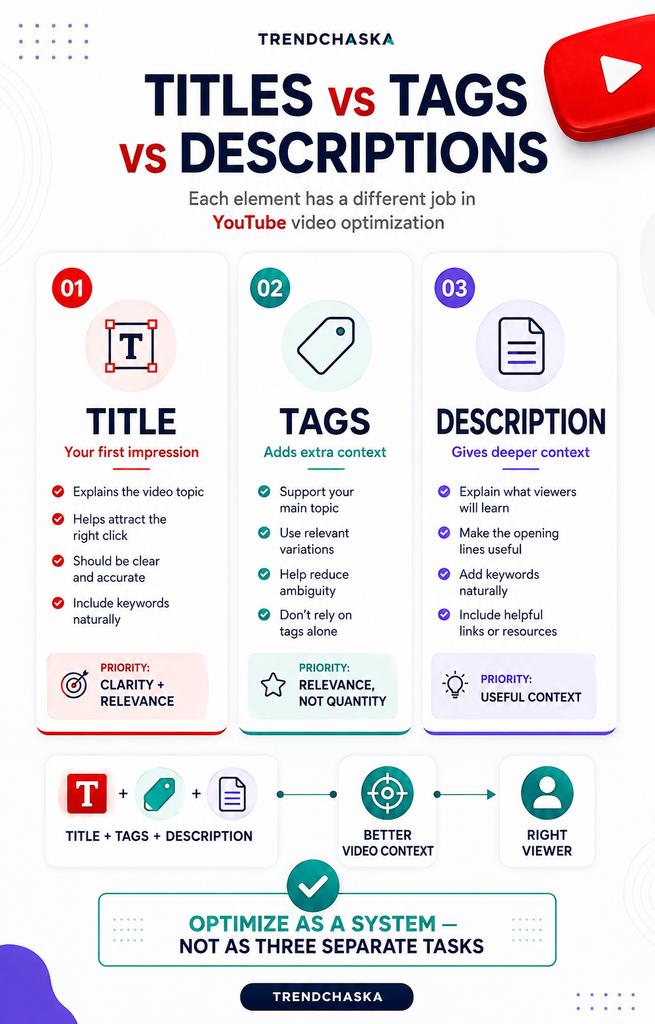
YouTube Titles, Tags, and Descriptions: What Should You Prioritize?
You can’t just pick one and call it done. Each one does something different.
Titles are your shot at a first impression. They need to be clear, accurate, and interesting enough that someone actually clicks. Descriptions give YouTube and viewers more context. Most people won’t read the whole thing, but solid description SEO still matters. Tags help clarify what your video’s about. They’re not going to drive discovery by themselves.
Think of tags and titles as one system, not separate boxes to check off. Write them together so they work with each other instead of fighting.
Common YouTube Video Optimization Mistakes to Avoid
Stuffing keywords into titles or descriptions until they sound weird. Writing vague titles that don’t say what’s in the video. Using misleading titles or thumbnails that don’t match what people actually see. Copying and pasting the same generic description on every video. Throwing in popular tags that have nothing to do with your content. Ignoring what viewers are actually searching for. Not checking how your title and thumbnail look on mobile. Spending hours on metadata while your video quality stays mediocre.
Most of these come from treating tags and titles like an afterthought. They’re not. A video optimization checklist only works if your video actually delivers what the metadata promises.
A Quick YouTube Video Optimization Checklist Before You Hit Publish
Save this and use it before every upload:
- Main topic and target keyword confirmed
- Title reviewed for clarity, relevance, and accuracy
- Main keyword included naturally in the title
- Description written to genuinely explain the video
- Relevant tags added, no random or unrelated ones
- Thumbnail reviewed for honesty and mobile readability
- Category and playlist checked
- Links and calls to action reviewed
- Captions or subtitles checked for accuracy
- Final spelling and detail check completed
Final Thoughts
A video optimization checklist won’t promise you the top spot in search results or sudden views. No honest checklist can do that. What it does is give you a consistent process so nothing gets missed before you publish. Optimization works best when you combine it with content that’s actually useful and a good viewer experience. Metadata opens the door. Your video keeps people watching.
FAQs
1. What is the most important part of YouTube video optimization?
No single element wins. Titles, descriptions, and tags all do different things. A clear, accurate title usually matters most, though, since that’s what makes people click in the first place.
2. How do I optimize YouTube titles for SEO?
Start with clarity. Get your main keyword in there naturally. Skip vague titles and clickbait. A title that actually matches your video performs better over time.
3. Do YouTube tags still matter?
Tags add some context and help clarify your topic, but they’re minor compared to titles and descriptions. Don’t expect tags alone to move your rankings.
4. How important is YouTube description SEO?
Pretty important, especially those opening lines. Good description SEO helps YouTube figure out what your video’s about and gives viewers a reason to stick around.
5. Should I use the same keywords in my title, tags, and description?
Your main keyword can show up in all three. Just don’t force it everywhere unnaturally. Keep a consistent theme across title, description, and tags. Helps YouTube understand your video without feeling repetitive to viewers.

Nidhi Patel is an SEO and digital marketing content strategist focused on AI SEO, content marketing, blogging, and personal branding. Through TrendChaska, she shares practical digital marketing insights, SEO strategies, and AI tools for beginners, students, and small businesses in India.