
If you’re managing a small business marketing campaign, working as a freelancer on client projects, or just new to the space, you know how frustrating it can be: audience research always seems to take too long, content calendars need constant filling, and most campaign drafts require at least 5 variations of the same headlined topic before finalization. This is where Gemini for digital marketing comes in – not as an all-powerful replacement for your marketing skills, but rather as a quick, competent assistant that can help you get from a blank document to a working draft faster.
This guide skips the theoretical preamble (what is AI, etc), and dives straight into how marketers are actually using Google Gemini in their day jobs – for SEO research, content ideas, social media captions and posts, ad copy variations, email drafts, document structuring, and strategy notes. It includes a set of practical Gemini marketing prompts that can be used as-is or tweaked to specific needs.
What is Google Gemini?
Gemini is Google’s AI assistant, accessible via the Gemini app and website, and embedded in Google Workspace apps such as Docs, Sheets, Gmail, and Slides. (See Google Gemini Help for the current, official list of features and plans.) The difference between Gemini and a standalone chatbot lies in its close integration with Google Workspace – users can rely on Gemini to make changes not just to chatbot-like queries, but to documents, spreadsheets, and PDFs.
Where Google Gemini can be handy for marketing:
- Structuring disorganized documents, transcripts, or spreadsheet data
- First drafts of various marketing assets (captions, emails, outlines, ad variations)
- Brainstorming sessions when stuck
- Simplifying or explaining unfamiliar marketing concepts
Where human judgment is still needed:
- Defining the brand message and voice
- Double-checking any statistical or fact-based claims before publishing
- Interpreting actual keyword difficulty and volume from keyword analytics tools
- Nuanced understanding of customers better understood through actual conversations
Google Gemini is a research and first draft assistant. The critical thinking, brand voice, and final polishing still have to come from humans. That combination of research help and draft generation is what makes Gemini for digital marketing worth learning properly.
How to use Gemini for digital marketing
This prompt library is designed to make Gemini for digital marketing a daily habit, not a one-off experiment.
A. Market and Audience Research
Before jumping into content creation, Gemini can help marketers brainstorm questions to ask their target audience. It cannot access your actual audience data, but it can help you organize your thoughts around common buyer personas, objections, or themes that emerged from your sales conversations or customer support interactions.
Prompt:
“Act as a market research assistant. I run a [business type] targeting [target audience] in [location]. Help me draft 3 buyer personas, including likely pain points, buying triggers, and objections. Then suggest 8 research questions I could ask real customers to validate these personas.”
B. Keyword and SEO Research
Gemini can be helpful in thinking through keyword clusters, topics, and themes for content creation, but it cannot pull actual search volume or ranking difficulty data. Save time by asking Gemini to come up with initial keyword ideas and clusters, then use a keyword research tool to prioritize topics with the highest potential.
Prompt:
“I run a blog about [topic] for [target audience] in India. Suggest 15 keyword ideas grouped into 3-4 topic clusters. For each keyword, note the likely search intent (informational, commercial, transactional) and one FAQ question I could answer in that article.”
C. Blog and Content Ideation
When content calendars are bare, Gemini makes for a decent brainstorming partner. It works best when given a specific focus (such as an audience segment) rather than a broad topic.
Prompt:
“Suggest 10 blog post ideas for a website that teaches [topic] to [target audience]. For each idea, give a headline option, a one-line content angle, and the primary search intent it would target.”
D. Content Briefs and Blog Writing
Gemini can turn a topic into a content brief, or a first draft of a blog post, or a series of FAQs and meta descriptions. Any content created with Gemini should be treated as a working draft that requires fact-checking, research, and rephrasing in one’s own words before publishing. This is one of the most time-saving parts of using Gemini for digital marketing — as long as you edit before publishing.
Prompt:
“Create a detailed content brief for a blog post titled ‘[working title]’ aimed at [target audience]. Include: target keyword, search intent, suggested H2/H3 structure, key points to cover under each heading, 4 FAQ questions, and a meta description under 160 characters.”
E. Social Media Marketing
Rather than staring at a blank content calendar, try telling Gemini about your target audience, social media channels, objective, and tone of voice, and asking it to generate a first draft of a social content calendar.
Prompt (Indian business/creator focus):
“I run a [product/service] business based in [Indian city]. Write 5 Instagram captions and 3 Reel hook ideas aimed at [target audience], in a friendly, conversational tone. Include a clear CTA in each caption, and keep pricing references in INR where relevant.”
F. Email Marketing
When subject lines and promotional email drafts are needed fast, Gemini can be a life-saver. Always double-check and personalize before sending, of course, but a few minutes spent on a well-worded prompt can yield hours of work.
Prompt:
“Write a promotional email for [product/service] aimed at [target audience]. Include 3 subject line options, a short intro, 3 key benefits, and one clear CTA. Keep the tone conversational and avoid sounding like a generic sales email.”
G. Google Ads and Paid Marketing
Gemini can help with writing multiple variations of headlines and descriptions for Google Ads, or brainstorming audience segmentation ideas. It is worth noting that Gemini does not have access to one’s active Google Ads account, and using it will not necessarily improve campaign performance – there is no magic formula for Google Ads success.
Prompt:
“Write 8 headline variations (under 30 characters) and 4 description variations (under 90 characters) for a Google Ads campaign promoting [product/service] to [target audience] in [location]. Keep the tone direct and benefit-led.”
H. Marketing Strategy
When it comes to high-level marketing strategy and campaign planning, Gemini is best used as an organizational tool. Give it a rough idea of your strategy, and ask it to suggest improvements or restructure your strategy using a different framework (SWOT analysis, customer journey mapping, etc). Ask it to flesh out your campaign briefs, or act as a marketing strategist who needs to put together a marketing plan for a new project.
Prompt:
“Act as a marketing strategist. Help me build a simple SWOT analysis and a 3-stage customer journey map (awareness, consideration, decision) for a [business type] targeting [target audience] in [location]. Suggest one marketing goal and one content idea for each journey stage.”
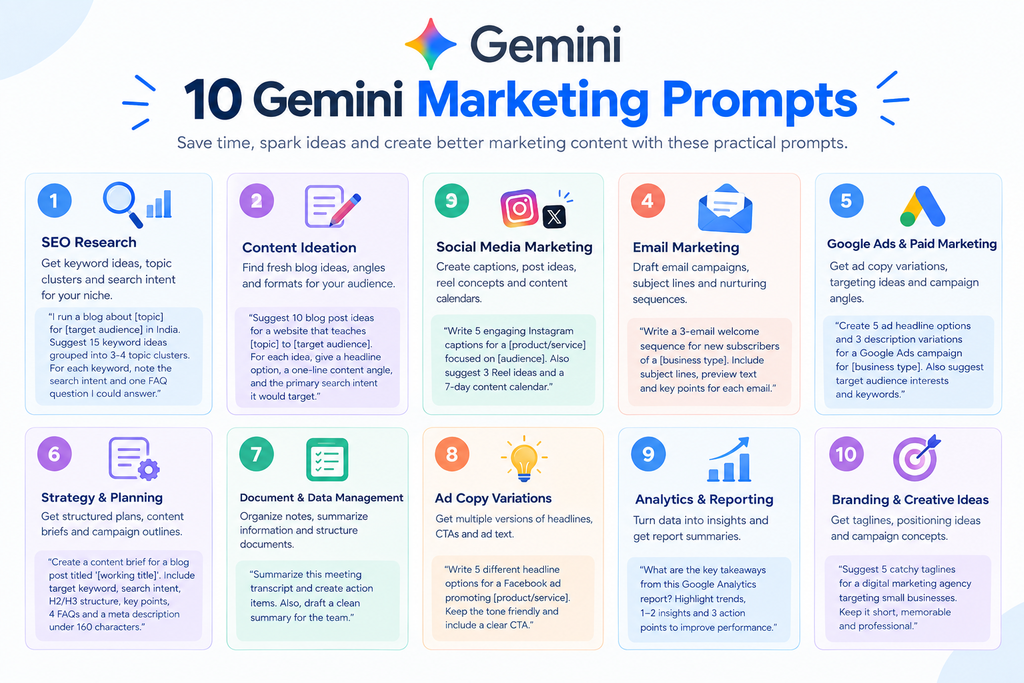
Google Gemini Marketing Prompts You Can Copy
In this section, you’ll find a list of Google Gemini prompts organized by task. Feel free to adjust the prompts to your specific needs by filling in the placeholders.
Getting this structure right is the single biggest factor in whether Gemini for digital marketing feels genuinely useful or frustratingly generic.
SEO
- “Suggest a topic cluster of 8 blog posts around the pillar topic ‘[topic]’ for [target audience]. Include one pillar page idea and 7 supporting cluster posts.”
- “Review this list of my published blog titles: [paste titles]. Identify 5 content gaps I haven’t covered yet for [target audience].”
Content marketing
- “Turn this list of rough notes into a structured blog outline with H2 and H3 headings: [paste notes].”
- “Write 3 alternative headlines for this blog post title: ‘[title]’, optimized for [target audience] and written to sound natural, not clickbait.”
Social media
- “Create a 7-day Instagram content calendar for [business type] targeting [target audience], including post type, caption angle, and CTA for each day.”
- “Rewrite this caption to sound more conversational and add one relevant CTA: [paste caption].”
Email marketing
- “Draft a 3-email welcome sequence for new subscribers of [business type], covering: introduction, value/tips, and a soft offer.”
Paid advertising
- “Generate 5 audience targeting ideas for a Google Ads campaign promoting [product/service] to [target audience] in [location].”
Audience research
- “List 10 likely objections a [target audience] might have before buying [product/service], and suggest one way to address each in marketing copy.”
Marketing strategy
- “Summarize this competitor’s homepage copy and suggest 3 ways my messaging for [business type] could stand out: [paste competitor copy].”
Content repurposing
- “Turn this blog post into: 1 LinkedIn post, 3 Instagram caption ideas, and 1 short email newsletter blurb: [paste blog content].”
How to write better Gemini prompts for marketing
Most prompts that fail to get useful responses from Gemini are vague or generic. Try following this simple structure:
Role + Context + Task + Audience + Constraints + Output format
- Role – What type of professional should Gemini be pretending to be? Example: “Act as an experienced social media strategist.”
- Context – Give background about the business, product, or scenario.
- Task – Clearly state what you want Gemini to do.
- Audience – Define who the end-user of the content should be.
- Constraints – Any specific requirements, such as tone of voice, length, or platform.
- Output format – Tell Gemini how to format the response, such as bullet points, tables, or email.
Before:
“Write social media captions for my bakery.”
After:
“Act as a social media copywriter. I run a home bakery in Ahmedabad selling eggless cakes to young professionals and families. Write 5 Instagram captions for a festive-season offer, in a warm, conversational tone, each under 150 characters, with one CTA per caption.”
The second version tells Gemini exactly who to address, what the offer is, what tone to use, and how to format the response.
Gemini vs ChatGPT for Marketing: Which Should You Use?
There is no one-size-fits-all answer, but here’s a comparison to help you decide based on tasks:
| Task | Gemini | ChatGPT |
|---|---|---|
| Content ideation | Strong, especially when working inside Docs | Strong, widely used for brainstorming |
| SEO brainstorming | Good for clusters and outlines | Good for clusters and outlines |
| Social media content | Convenient if you already draft in Google tools | Convenient with custom GPTs for repeat formats |
| Research assistance | Useful for summarizing uploaded files and documents | Useful with browsing and file uploads enabled |
| Writing and rewriting | Solid first drafts, needs editing | Solid first drafts, needs editing |
| Marketing strategy | Good for structured frameworks | Good for structured frameworks |
For gemini vs chatgpt marketing decisions, the more useful questions are:
- Are you already using Gmail, Docs, and Sheets extensively, and looking to save time on repetitive tasks?
- Do you need a no-frills marketing assistant that doesn’t require setting up custom GPTs or fine-tuning?
- Is one of the two AIs already part of a broader plan that you’re implementing?
- Do you personally find it easier to edit Gemini’s generic-sounding texts to sound more human?
Both Gemini and ChatGPT see frequent updates, so the comparison is only current as of this writing. Many marketers end up using both tools, and it’s worth reading TrendChaska’s guide to How to Use ChatGPT for Digital Marketing and How to Use Claude for Digital Marketing to see how the three AI tools compare practically.
Limitations of Gemini for Digital Marketing
While Gemini is undeniably useful, it has some important limitations that every marketer should be aware of:
- It can generate information that sounds credible but is incorrect – always double-check claims or statistics before publishing.
- Any statistic you quote from Gemini should be verified using another source.
- Gemini cannot understand your brand voice, unless told to imitate a specific company’s tone of voice.
- Generic prompts yield generic content – the more specific you are, the better.
- It should not replace direct customer research or interactions.
- It does not replace keyword research tools.
- Any text generated by Gemini should be edited by a human before publication.
- Do not paste private customer information or financial records into Gemini.
A Google Gemini Workflow for Digital Marketers
This workflow is what keeps Gemini for digital marketing sustainable instead of chaotic.
A simple workflow keeps Gemini useful but prevents it from doing too much:
- Research: Gather the information you already have on the topic or challenge you’re facing.
- Plan: Decide on the goal of the content creation or research task.
- Prompt: Write a Gemini prompt using the structure advised in this guide.
- Generate: Let Gemini do its work.
- Fact-check: Verify any claims, statistics, or facts produced by Gemini.
- Edit: Rewrite Gemini’s generic or formulaic text in your own words. If applicable, remove any information that was not asked for.
- Optimize: Use marketing or SEO plugins to ensure that everything follows best practices.
- Publish: Share the final version with the intended audience.
- Measure: Review the results and update your Gemini prompts for future tasks based on what worked and did not.
A Small Indian Business Example
Here’s what Gemini for digital marketing looks like in practice for a small Indian business. Let’s imagine that a home baker in Jaipur wants to promote a new festive box of home-made treats. Here’s how the workflow described above could play out in practice:
- Ask Gemini to draft buyer persona questions for “young working professionals in Jaipur buying festive gifts”, and note any insights from past customer interactions.
- Use Gemini to come up with 8-10 content ideas around festive gifting, home baking, and small-batch quality.
- Let Gemini draft a week’s worth of Instagram captions and Reel hooks for the new festive box, incorporating INR pricing and a festive tone of voice.
- Turn one of the content ideas into a short blog topic list for the business’s website.
- Ask Gemini to suggest 2-3 ad headline and description variations for a small local Google Ads test.
- Write a short launch email for your existing customer list, with one CTA.
- Compile all of the above into a one-week content planning spreadsheet.
Each of the items above requires a separate Gemini prompt, and each of Gemini’s drafts will need editing and personalization before publication.
Conclusion
Gemini fits into a marketing workflow as a time-saving tool for research, structuring information, and first drafts of various content types. It should not replace human insight or replace proper SEO and marketing research, but it can be very useful at accelerating certain tasks. The prompts provided in this guide should help anyone looking to get started, but the best results will come from experimenting and finding the right prompts for one’s specific needs and goals.
FAQ
Is Gemini good for digital marketing?
Gemini can help with marketing research, organization of information, and first drafts of various content types. It cannot replace keyword research tools, SEO plugins, or customer research, however.
How can I use Gemini for SEO?
Use Gemini to brainstorm keyword ideas and clusters for content creation, but remember to double-check with a keyword research tool.
Can Gemini write marketing content?
Yes, but treat any content drafted by Gemini as a first draft that needs human editing to sound natural and include necessary information.
What are the best Google Gemini marketing prompts?
The best prompts specify a role, context, audience, and the desired format rather than asking for a generic marketing task. See the guide for examples.
Is Gemini better than ChatGPT for marketing?
It depends on the specific tasks and the tools one is already using. Gemini offers better integration with Google Workspace, while ChatGPT allows for more customization with GPTs.
Can Gemini help with social media marketing?
Yes, Gemini can help draft social media captions, content calendars, and Reel hooks. However, it is important to double-check any information or claims before publishing.
Can beginners use Gemini for digital marketing?
Yes, beginners often get the most value from Gemini for digital marketing early on, since it helps structure unfamiliar tasks.

Nidhi Patel is an SEO and digital marketing content strategist focused on AI SEO, content marketing, blogging, and personal branding. Through TrendChaska, she shares practical digital marketing insights, SEO strategies, and AI tools for beginners, students, and small businesses in India.