
Are you an Indian blogger, small business owner, or marketer struggling to stand out on Google Search?
Have you worked on SEO but still see your site show up as just a simple blue link, while your competitors display FAQs, star ratings, and prices in the search results?
If so, schema markup might be what you’re missing. This easy-to-follow guide will teach you everything about schema markup for beginners in India, why it’s useful for sites in India, and how you can add it to your website in under 30 minutes without needing advanced coding skills.

What is Schema Markup?
Schema Markup, or Structured Data, is a specific type of code you can add to your site. It helps Google and other search engines better understand what your website is about.
It works like a label on a box. The box could hold something amazing, but without a clear label, a store worker like Google might not know what it is, how to classify it, or when it expires. Schema markup acts as that label. It lets Google know things like: “This page contains a recipe,” “This is a company profile,” “These are asked questions,” and more.
Schema markup uses a set of terms defined at Schema.org. This project receives support from major players like Google, Bing, Yahoo, and Yandex. These days, the most used format is JSON-LD. Google advises using it.
In simple words, Schema markup means structured directions for Google. This helps Google understand content better and improves search results for you.
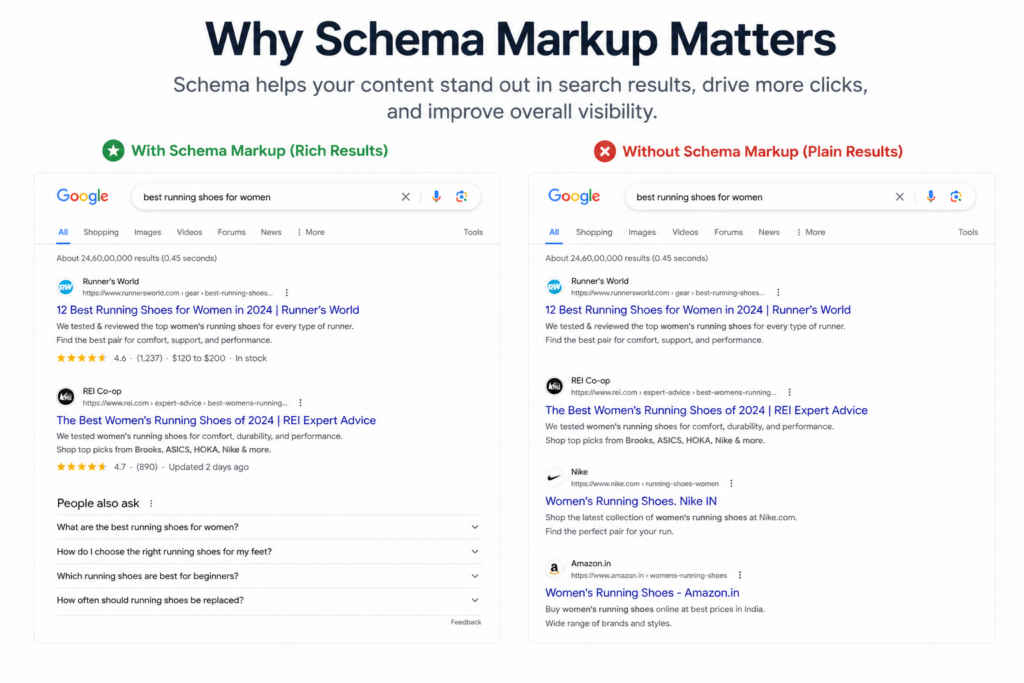
Why Schema Markup Helps SEO in India
Websites in India deal with tough search competition. Whether you’re a coaching center in Pune, a travel blogger writing about Rajasthan, or a D2C seller offering handmade products, structured data can work as an effective SEO tool for Indian sites.
- Google Search becomes clearer: Schema lets you create rich snippets. These are special search results that include extra details like reviews, prices, event dates, or FAQs right below your website link.
- More clicks for your site: Rich snippets catch the eye because of their visual appeal. Research confirms that these enhanced results attract way more clicks than basic blue links. The click rate often jumps by 20 to 30%.
- Boost to local SEO: Local businesses in cities such as Ahmedabad, Mumbai, or Bengaluru can benefit from Local Business Schema. It helps Google highlight key details like your address, contact number, working hours, and even your location on a map in local searches.
- Search engines understand better: Indian content often focuses on topics that are hyper-local or aimed at bilingual readers. Schema helps Google figure out meaning and context even when the keywords are uncommon.
If you want to go deeper into local visibility strategies, read our guide on Hyperlocal Digital Marketing in India.
- Snippets for FAQs and How-Tos : Google often uses FAQ schema to answer people’s questions, which creates a big chance for Indian educational sites, coaching centers, and service providers to show up for informational searches.
- Optimized for voice search: Voice search use is rising in India because of regional language preferences. Schema increases the chances of your content being found by voice assistants.
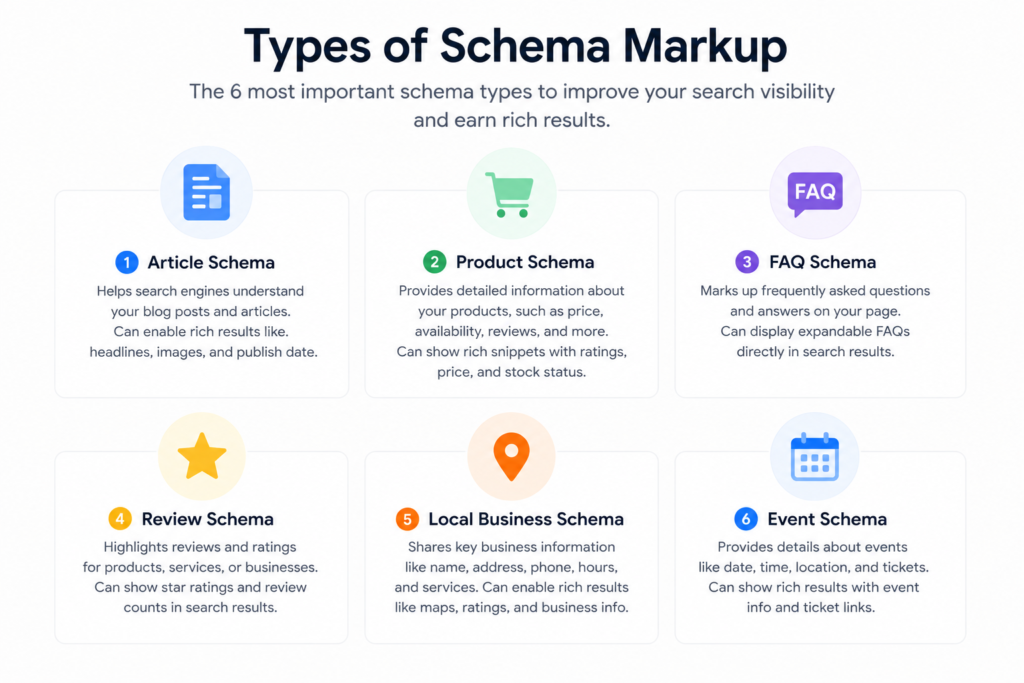
Types of Schema Markup to Learn as a Beginner
There are countless schema options out there, but if you’re just starting out, These are the most important schema types for schema markup for beginners in India to focus on first: ones:
1. Article Schema
- What it does: Identifies blog posts, news stories, or editorial articles.
- When to use: Use it if you have a blog, a news website, or a site with lots of written content.
- Indian example: A site like TrendChaska that posts weekly blogs about SEO and digital marketing.
2. FAQ Schema
- What it is: It helps show a list of questions with their answers on a webpage.
- When to use it: Use this on pages that have a “Frequently Asked Questions” section.
- Indian example: A CA firm’s webpage answering “What documents are needed for GST registration?” can turn each question and answer into a rich result on Google.
3. Local Business Schema
- What it is: It highlights key details like business name, address, phone number, hours, and location.
- When to use it: You use this when you run a local business with a physical location or service area.
- Indian example: A coaching centre in Jaipur, a restaurant in Chennai, or a boutique in Delhi can get listed with detailed info in local search results.
4. Product Schema
- What it is: Assigns specific labels to products like their names, prices, stock status, and customer feedback, such as reviews.
- When to use it: Best suited for online stores or pages listing items for sale.
- Indian example: A handloom saree shop in Varanasi can display pricing and stock information straight through Google Shopping search results.
5. Review Schema
- What it is: Adds details about user ratings and review scores, like star ratings or average feedback.
- When to use it: Use it on pages showcasing product opinions, service ratings, or summary scores.
- Indian example: A Goa hotel could show ★★★★☆ and “4.2/5 from 200 reviews” within search results.
6. Organization Schema
- What it means: Adds details about your brand or company, like your logo, social media links, and contact information.
- When to use it: Use on your homepage to build your brand’s presence in Google’s Knowledge Graph.
- Indian example: A startup, an NGO, or even a school showcasing their official details in search results.
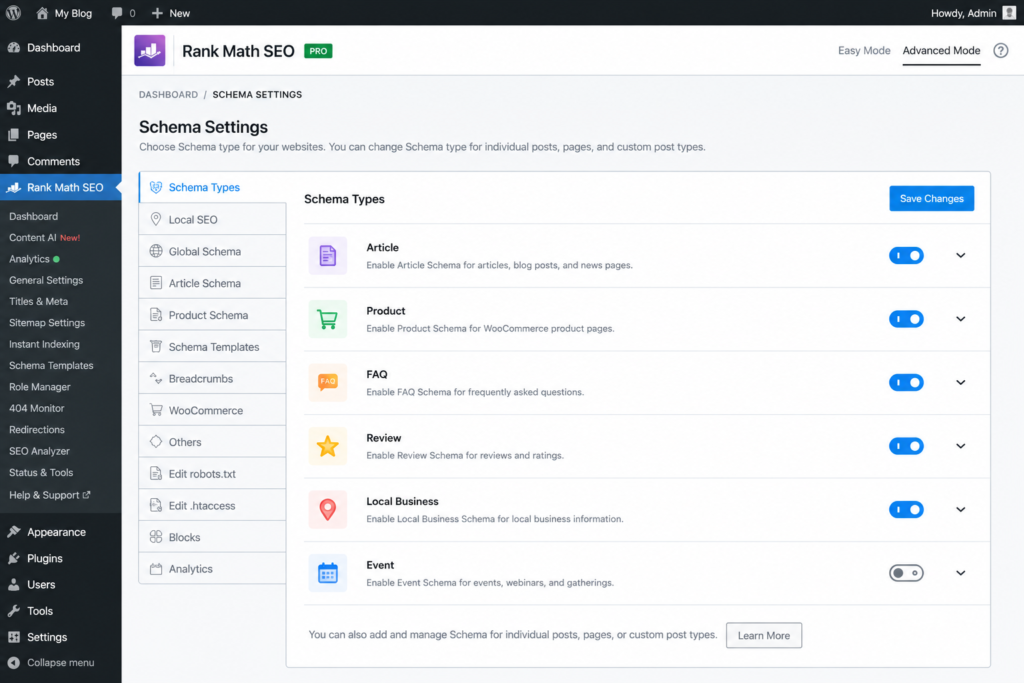
How to Add Schema Markup — Beginner’s Guide for India
The best part? You don’t need to code anything from scratch. You can do it in two main ways.
Method 1: Using a WordPress Plugin (Best Option)
The plugin method is the easiest approach for schema markup for beginners in India
If you run your website on WordPress (it’s what most Indian bloggers and businesses use), this is the quickest way to understand how to use schema markup with WordPress in India.
Option A: Rank Math SEO (Top Free Choice)
Rank Math is a used SEO plugin in India and offers built-in Schema features.
Steps:
- Head over to your WordPress dashboard. Go into Plugins and click on Add New.
- Type “Rank Math SEO” in the search bar. Hit Install Now, then press Activate.
- Follow the steps in the Setup Wizard. Link your Google Search Console when it asks.Not sure how to use Search Console yet? Check our breakdown of the best free SEO tools for Indian websites — GSC is covered there in detail.
- Navigate to Rank Math and open Titles & Meta.
- Pick each post type, like Posts or Pages. Find the Schema Type section as you scroll down.
- Choose the correct schema. Use Article for blog posts, Local Business for pages about a business, or FAQ Page if it’s an FAQ section.
- When editing a post, find the Schema tab in the Rank Math panel below. From there, you can add FAQ questions and answers in the editor.
Result: Rank Math creates and adds the right JSON-LD code to each page .
Option B: Yoast SEO
Yoast serves as another popular SEO plugin that includes built-in schema support.
Steps:
- Download and turn on Yoast SEO from the plugin section.
- Head into Yoast SEO → Search Appearance → Content Types.
- Adjust the Schema settings under every content type. Pick an Article type like BlogPosting or NewsArticle.
- While editing posts, open the Yoast panel. Go to the Schema tab and select a page type and article type.
- To set up the Organization schema, navigate to Yoast SEO → General → Your Site Represents. Add your business information and upload a logo.
Option C: Schema Pro (Premium)
Schema Pro is a high-quality paid plugin from WP Astra. It works well for agencies and skilled users who want detailed control over schema settings on various post types.
You might find it useful when Rank Math’s free version no longer meets your needs.
Method 2: The Manual Way (Without a Plugin)
If you’re not using WordPress or prefer complete control, you can create schema markup by using a generator tool.
Steps:
- Use a Schema Generator Tool. Try out tools like Merkle’s Schema Markup Generator or Google’s Structured Data Markup Helper.
- Pick the Schema Type. Choose whether you want FAQ, Local Business, Article, or something else.
- Complete the Fields. Enter the required details. The tool will create the JSON-LD code for you.
- Copy the Code it creates. It will look something like this:
json
<script type=”application/ld+json”>
{
“@context”: “https://schema.org”,
“@type”: “FAQPage”,
“mainEntity”: [{
“@type”: “Question”,
“name”: “What does schema markup mean?”,
“acceptedAnswer”: {
“@type”: “Answer”,
“text”: “Schema markup uses structured data code on websites so search engines can understand the site’s content more.”
}
}]
}
</script>
- Add this code to your website’s HTML. It’s best to place it in the <head> section or right before the </body> tag.
- On WordPress, you can use the WPCode plugin to add code snippets across your whole site or choose specific pages where you want them.
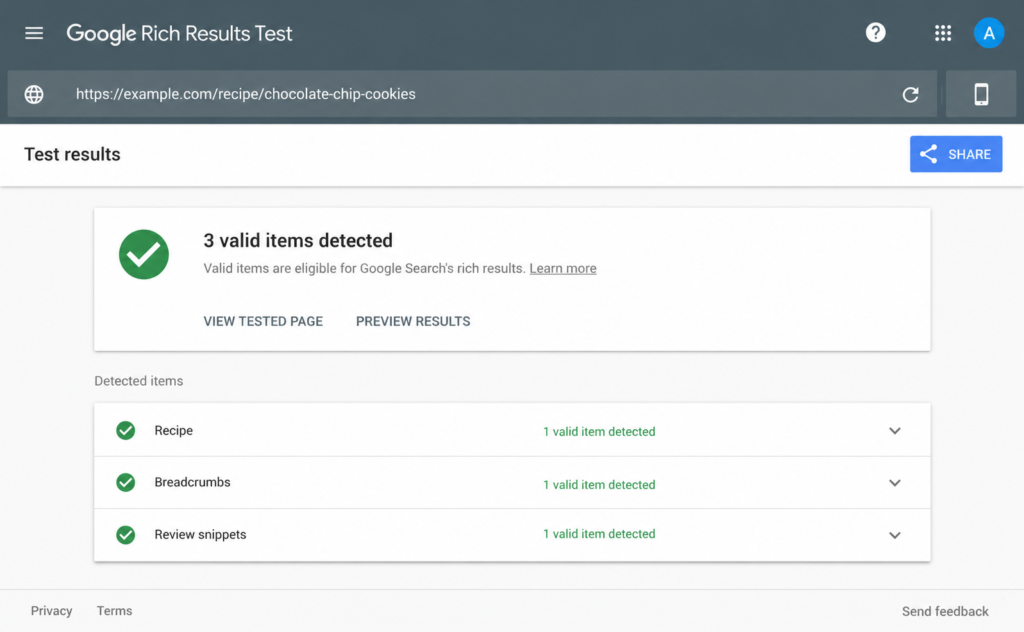
How to Check If Your Schema Markup Works
You should always verify the schema after adding it. Don’t just assume it is correct.
Testing is a step no schema markup beginners in India should skip
Tool 1: Google Rich Results Test
- URL: https://search.google.com/test/rich-results
- Enter your page URL or copy and paste your code.
- Check which rich results are available for your page.
- A green checkmark means valid. Red warnings mean there are issues to fix.
Tool 2: Schema.org Validator
- URL: https://validator.schema.org/
- A more advanced option — lists all schema types found and highlights any errors at the property level.
Common Mistakes to Avoid:
- Leaving out required fields (for example, the FAQ schema must include both name and acceptedAnswer)
- Using incorrect data types (such as using text like “₹999” when prices need to be numbers)
- Mismatch of schema type (like applying Product schema to an article page)
- Lack of visible content (Google insists that schema must match the content that is on the page)
Mistakes Beginners Often Make with Schema Markup
To make sure your schema functions and avoids penalties from Google, steer clear of these errors:
- Google might ignore or penalize your FAQ schema if it includes questions that don’t appear on the page.
- Applying the wrong schema type, like labeling a blog post as a Product or tagging a service page as a LocalBusiness with incorrect fields, creates issues.
- Skipping required fields makes the schema invalid. For the FAQ schema, the name and acceptedAnswer fields are necessary.
- Using conflicting schemas, like having two different Organization schemas on the same page, can confuse Google.
- Skipping validation after adding a schema — Many beginners assume the schema will work just because they added it. Take time to test it using Google’s Rich Results Test to make sure it’s valid.
- Overloading schema with keywords — Schema properties need to match real content. Don’t try to cram in extra keywords, as this can get you penalized by Google.
- Using old schema formats — Formats like Microdata and RDFa are outdated now. Stick with JSON-LD, which Google recommends as the proper format.
- Mismatch in Local Business schema details — The Name, Address, and Phone number in your schema should match what’s listed on your website and Google Business Profile. Discrepancies can hurt your local search rankings.
If you’re just getting started with SEO, understanding the basics first will help you avoid most of these errors. Read our SEO guide for beginners in India before diving into schema implementation.
FAQ Schema India SEO Guide
FAQ Schema is a really effective yet often overlooked tool for Indian websites. If you’re learning schema markup for beginners in India, FAQ schema is the most impactful place to start
What Is FAQ Schema?
The FAQ schema is structured data that shows Google your page features a set of questions with their answers. If you use it the right way, Google might show two to four of your FAQs right in the search results with dropdowns. Users can view them without needing to visit your site.
Why It Matters for Indian Websites
- Occupies extra space on the SERP and moves competitors lower down.
- Grabs featured snippet-like attention without being in the top spot.
- Works well for service providers: Accounting firms, legal professionals, clinics, coaching centers, and travel planners.
- Great for educational topics: Marketing blogs, financial platforms, or resources on government schemes.
- Boosts time spent on site because FAQ answers match user intent .
Steps to Add FAQ Schema
With Rank Math (Simplest method):
- Launch the post or page in the WordPress editor.
- Insert the “FAQ Block” through the Gutenberg editor. This can be done using the built-in option in Rank Math or with a separate block.
- Enter your questions along with their corresponding answers.
- Rank Math creates the FAQ schema from this block. You do not need to write any code yourself.
Manual JSON-LD:
json
<script type=”application/ld+json”>
{
“@context”: “https://schema.org”,
“@type”: “FAQPage”,
“mainEntity”: [
{
“@type”: “Question”,
“name”: “Is SEO essential for small businesses in India?”,
“acceptedAnswer”: {
“@type”: “Answer”,
“text”: “Yes, SEO plays a key role in helping small businesses in India get noticed online without spending on ads. It helps generate lasting organic traffic.”
}
},
{
“@type”: “Question”,
“name”: “How much time does SEO need to give results in India?”,
“acceptedAnswer”: {
“@type”: “Answer”,“`
“text”: “It takes around 3 to 6 months to see major results from SEO. The time it takes can differ based on how competitive the market is, the quality of the content, and how technically sound the website is.”
}
}
]
}
</script>
Tips to Create Effective FAQ Schema
- Stick to 4 to 8 FAQ questions on each page. Adding more might reduce the overall effectiveness.
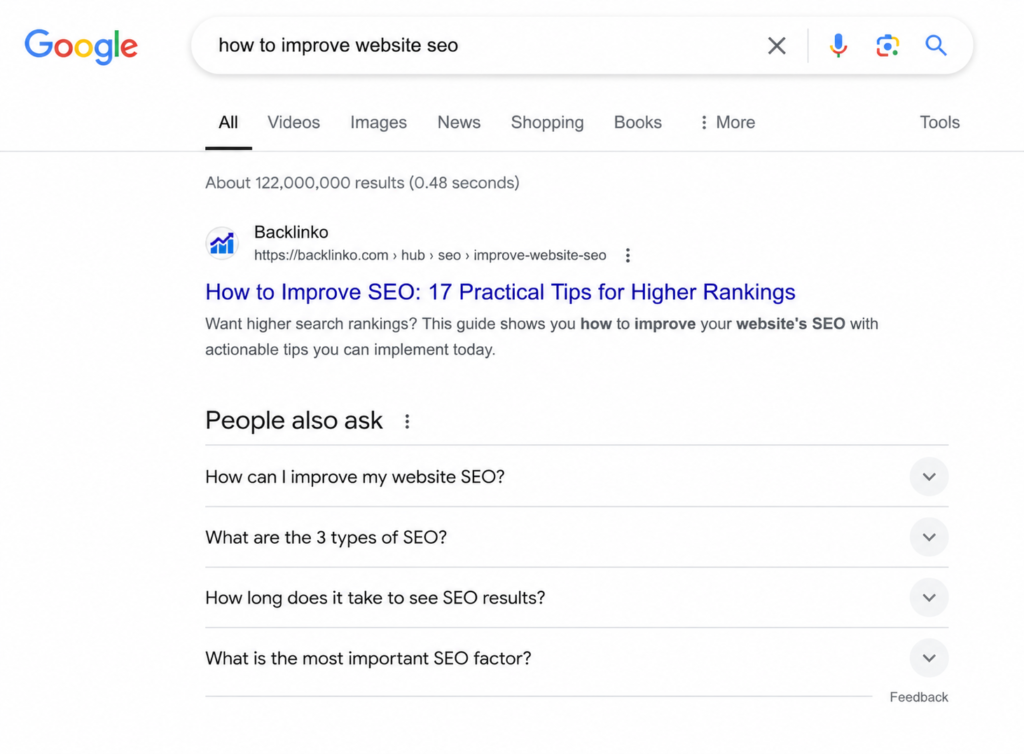
- Use questions that match what users look for online. Google’s “People Also Ask” section can help with this.
- Write short, clear answers. Aim for about 40 to 100 words to keep it helpful but to the point.
- Avoid repeating the same FAQs on different pages.
Example of Schema Markup for a Small Business
Imagine Sharma Tours & Travels, a travel agency located in Jaipur, Rajasthan. They offer heritage tour packages focused on Rajasthan. Their Local Business Schema could look something like this:
json
<script type=”application/ld+json”>
{
“@context”: “https://schema.org”,
“@type”: “TravelAgency”,
“name”: “Sharma Tours & Travels”,
“url”: “https://www.sharmatours.in”,
“telephone”: “+91-98765-43210”,
“address”: {
“@type”: “PostalAddress”,
“streetAddress”: “12, MI Road”,
“addressLocality”: “Jaipur”,
“addressRegion”: “Rajasthan”,
“postalCode”: “302001”,
“addressCountry”: “IN”
},
“openingHours”: “Mo-Sa 09:00-18:00”,
“priceRange”: “₹₹”,
“image”: “https://www.sharmatours.in/logo.jpg”,
“sameAs”: [
“https://www.facebook.com/sharmatours”,
“https://www.instagram.com/sharmatours”
]
How this helps Sharma Tours:
- People can find Sharma Tours on local Google searches, complete with contact info.
- Directions on Google Maps will now be more precise.
- Official social media pages connect straight to their business profile.
- The price range lets users know what to expect without extra clicks.
This type of schema is what every small business in India should set up. It takes less than 30 minutes to get going and make a difference.
Final Thoughts
This complete guide on schema markup for beginners in India proves that structured data isn’t complicated
Schema markup for beginners in India remains one of the most overlooked yet beginners-friendly SEO strategies Indian site owners can use today. It’s beginners-friendly and open to everyone. With half an hour and free tools like Rank Math or a simple generator, you can begin feeding Google structured data. This helps gain rich snippets, boosts click-through rates, and strengthens your brand’s visibility in search results.
Here’s what you can do in 30 minutes:
- Install Rank Math if you’re using WordPress.
- Use Article Schema for all your blog posts.
- Apply the FAQ Schema to your top three pages.
- Add Local Business Schema if you run a physical or service-based business.
- Check everything using Google Rich Results Test.
- Submit your URLs in Google Search Console.
Structured data isn’t just for large companies or tech experts. It’s an easy SEO tool anyone can use. Bloggers in India, small business owners, or even digital marketers can start right away. Take the first step today and improve your search rankings.
Free SEO Audit from TrendChaska
Already read our guide on schema markup for beginners in India? Now let’s audit your site for free
Is your website missing out on SEO possibilities?
At TrendChaska, we check Indian websites to find the exact reasons they’re struggling with Google rankings. These could include missing schema markup, problems with indexing, crawl issues, or overlooked keyword opportunities.
👉 Claim Your Free SEO Audit Today
Learn the following:
- What schema types does your website not have
- The reasons Google isn’t indexing your pages
- How competitors are outperforming you
- Simple wins to boost your organic traffic
No complex terms. No unnecessary details. useful insights designed to help Indian businesses.
FAQs
Q1. Does adding schema markup boost my Google rankings ?
Schema markup does not act as a direct factor in how Google ranks your site. But gaining rich snippets enhances your click-through rate, and when more people engage with your listing, it helps Google recognize your site as relevant, which can improve rankings over time.
Q2. Does it cost anything to use schema markup?
No, using schema markup comes at no cost. The Schema.org vocabulary is available for free. Free plugins like Rank Math provide schema features too. You might need paid tools when dealing with advanced setups.
Q3. Can schema markup work on websites not using WordPress?
Yes, it can. Schema markup uses JSON-LD code, and you can add it to any type of site, whether it’s built on HTML, Shopify, Wix, Webflow, or custom-coded. You just need to put the code in the <head> part of the site.
Q4. How much time does Google need to display rich results after adding schema?
It takes Google a few days to two weeks to crawl and process a schema. To speed up this process, you can submit your URL to Google Search Console.
Q5. How do Schema Markup and Open Graph tags differ?
Schema markup lets search engines like Google and Bing better understand your content. Open Graph tags create rich previews when people share your link on platforms like Facebook, LinkedIn, or WhatsApp. Both are useful in their own ways, but they work for separate goals.
Q6. Does using the wrong schema harm my SEO?
Google skips over invalid schema without punishing you. But if you use a schema with misleading or fake details, like fabricated reviews, that breaks Google’s rules. This can cause manual penalties.
Q7. What schema type should a new Indian blog use?
Begin with Article Schema and FAQ Schema. They are simple to set up, supported by most platforms, and have a good chance of bringing rich results. These work well because Indian blogs share informational content.
If you’re still building your digital marketing foundation, here are the best free digital marketing certifications in India that will help you understand SEO and structured data concepts faster.
Q8. Do I need to add schema to every page of my site?
No, that isn’t required. Focus on key pages like those with high traffic, your homepage, blog posts, product details, or service descriptions. Adding schema to pages with thin or low-quality content doesn’t offer much benefit.

Nidhi Patel is an SEO and digital marketing content strategist focused on AI SEO, content marketing, blogging, and personal branding. Through TrendChaska, she shares practical digital marketing insights, SEO strategies, and AI tools for beginners, students, and small businesses in India.