
Starting with GA4? This 2026 guide for beginners in India explains setup, tracking, reporting, and conversions using clear and easy steps.
Introduction
Running a website without analytics is like navigating in the dark. You won’t see which blog pulled in visitors, which page made them exit, or which marketing efforts are worth your time.
GA4 aims to bridge the gap for beginners in India by 2026. Google Analytics 4 has evolved into much more than a tool that just tracks visitors. It combines AI-driven insights, privacy-focused tracking, and multi-channel reporting all in one free platform. Bloggers, startup founders, and small business owners can take advantage of this tool to grow their online presence.google
This tool holds even greater importance to Indian creators and businesses today. People now expect stricter data privacy, ad platforms demand clearer consent, and the fight for online attention is tougher than ever. Running a blog, online store, or local business means you need to know how to set up GA4. It is not optional anymore. It has become a necessary skill to grow in the digital space.
This guide explains everything you need to know: what GA4 means, why it’s important to Indian websites, and provides steps to set up GA4 even if you don’t have any tech experience. This complete guide on GA4 for Beginners in India covers it all in simple language. By the end, you’ll understand and be able to use a Google Analytics 4 tutorial today.
What is Google Analytics 4 (GA4) for Beginners in India?
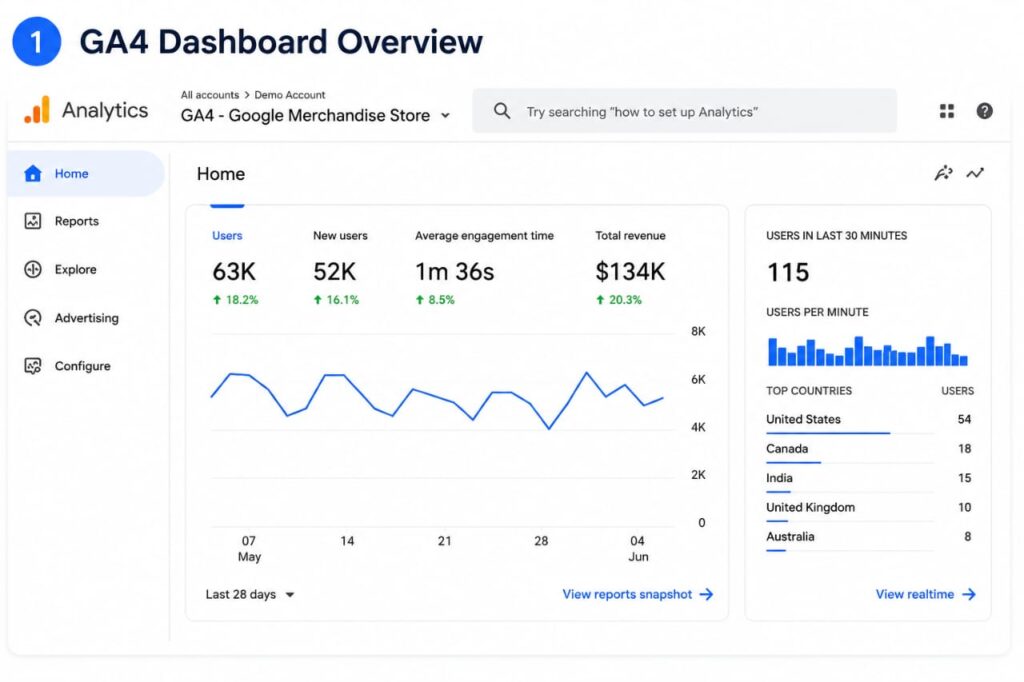
Google Analytics 4 is the latest platform from Google for tracking web and app analytics. Unlike the older Universal Analytics, which tracked “sessions,” GA4 treats everything as an event—whether it’s a page view, a click, scrolling, making a purchase, or submitting a form.
This event-focused system is the biggest change you’ll see in every Google Analytics 4 guide by 2026. Instead of just saying someone visited your site, GA4 explains what actions they took while browsing.
Comparing Universal Analytics and GA4 for Beginners in India
Universal Analytics retired completely by mid-2023 measured visits based on sessions and pageviews. GA4, however, looks at specific user actions as events, offering a clearer and more adaptable view of behavior — even across websites and mobile apps under one property.
Main advantages of GA4 for Beginners in India
- Collects data from websites and apps in a single location
- Focuses on privacy-friendly tracking and uses modeling to address missing data when users reject cookies
- Relies on machine learning to provide predictive insights, such as the likelihood of purchases
- Gives more options and flexibility to set up custom event tracking compared to the previous version
- Works with Google Ads to track results and manage budgets
If you are creating any online presence in India now, this forms the base of your measurement approach.
Universal Analytics works like a basic tool that says, “500 people visited your site today.” GA4 takes it a step further and shares more details, like “500 people visited, 320 looked at your pricing page, 90 added items to their cart, and 40 finished checkout.” This added depth makes GA4 more helpful in making decisions instead of just showing stats.
This means beginners might find it a bit harder to get started. The layout looks a bit different, and the terms have changed. Sessions now revolve around “engaged sessions,” and goals are called “key events.” The way reports work now favors those who plan their events instead of just sticking with the defaults. The bright side is that once you understand the event-based logic, the rest of GA4 — like reports, conversions, and audiences — starts to feel much simpler.
Why GA4 for Beginners in India Matters to Indian Websites by 2026
Analytics with a focus on privacy
Rules around consent are becoming stricter worldwide, and Google has made GA4 focus more on privacy at its core. This is one of the most important things to understand in GA4 for Beginners in India. Changes now distinguish how consent signals manage data in Google Ads and Analytics, while introducing behavioral modeling to let brands gather useful insights even if some users opt out of tracking. Indian businesses catering to EU markets or privacy-focused users need to treat setting up proper consent in GA4 as a necessary operational step, not just an afterthought.
AI-driven insights
GA4 now works as a tool to plan, not just to track and report. The latest updates added features like AI-driven summaries, an onboarding assistant to recommend settings, and options such as cross-channel budgeting and conversion attribution analysis, which is still in beta. If you’re new to GA4, it takes on more of the tough analytical tasks for you over time, which is great news for anyone exploring GA4 for Beginners in India.
Improved tracking features for GA4 for Beginners in India
GA4 lets you track traffic from AI assistants and chatbots such as ChatGPT and Gemini by categorizing this under a specific “AI Assistant” channel. This matters a lot to Indian content creators and SEO experts, as more people now find content through AI-powered search engines instead of just sticking to traditional Google Search.
Benefits for businesses learning GA4 for Beginners in India
Indian bloggers, freelancers, and small business owners gain a clear benefit: they understand which content grabs attention, which marketing expenses bring results, and where visitors lose interest. This is exactly why GA4 for Beginners in India has become such a popular search term lately. All this becomes possible without relying on costly third-party tools.
Steps To Start With GA4 for Beginners in India
Begin by gathering key details before changing any settings. Doing this helps make your GA4 setup simpler and avoids unnecessary errors, especially when you’re just starting with GA4 for Beginners in India.
- A Google account is required. You can use any Gmail account to set up your Analytics account.
- Access to your website. You will need to update the HTML header of your site or have access to a platform like WordPress where you can insert a tracking code.
- Google Tag Manager (optional, but a good idea). Using GTM can simplify tracking updates, like adding new events, by letting you avoid editing your site’s code every single time.
Once you’ve got all these things ready, you can go ahead and start setting up your Google Analytics account.
Beginner’s Guide to Setting Up GA4 for Beginners in India Step by Step
Here’s how to set up GA4. Follow these steps one by one.
Step 1: Build a GA4 Property (GA4 for Beginners in India)
Log in to Google Analytics and head to Admin → Create Property. Type in the name of your website or business. Pick a time zone (the Indian time zone works well if most of your audience is local). Set your reporting currency, like INR, which is common for Indian businesses.
GA4 provides an onboarding assistant. It offers helpful setting suggestions based on your industry, making setup faster for those just starting out.
Step 2: Set Up Data Stream
In your property, pick Web as your platform (or App if you use Firebase to track a mobile app) and input your website’s URL. This action generates a “data stream,” which serves as the pathway for your site’s data to flow into GA4.
Step 3: Add the Tracking Code
You can do this in one of two ways:
- Using gtag.js — Copy the GA4 tracking code and insert it into the part of each page on your website.
- Through Google Tag Manager — Set up GTM once. This lets you handle GA4 and other tracking tags from one place, so you won’t need to keep updating your code.
If you run a WordPress blog and want an easy option, the Site Kit plugin by Google can take care of this process for you.
Step 4: Make Sure the Setup Works
Open your website in a new browser tab and look at the Realtime report in GA4. If your visit appears within a minute or so, it means the GA4 tracking is set up correctly. If nothing shows, check if you added the tracking code to every page. Make sure no caching plugin is delivering an old version of your site without the code.
Step 5: Turn On Enhanced Measurement
Go to your data stream settings, then switch on Enhanced Measurement. It makes tracking things like scrolls, outbound clicks, site search, video activity, and downloads automatic. You won’t need to write any extra code for this. It’s a great option to track key events without doing much setup if you’re just getting started.
Step 6: Set Up Events
Check the events GA4 tracks by itself. These include things like page views, scrolls, and clicks. Figure out which special events matter most for what you want to achieve. For example, you might need a “WhatsApp_click” event if you own an Indian business that depends on WhatsApp for customer inquiries. Or maybe something like a “newsletter_signup” makes sense for your needs.
Step 7: Mark Your Conversions
Head to Admin → Events in GA4. Look for the events that show real results, like someone filling out a form, making a purchase, or downloading something. Tag these as Key Events. This is how you turn all that tracking info into useful data about conversions in GA4 for Beginners in India.
Steps to Set Up GA4 Using Google Tag Manager for Beginners in India
To grow your tracking capabilities in the future, using Google Tag Manager to set up GA4 is the smarter way to go.
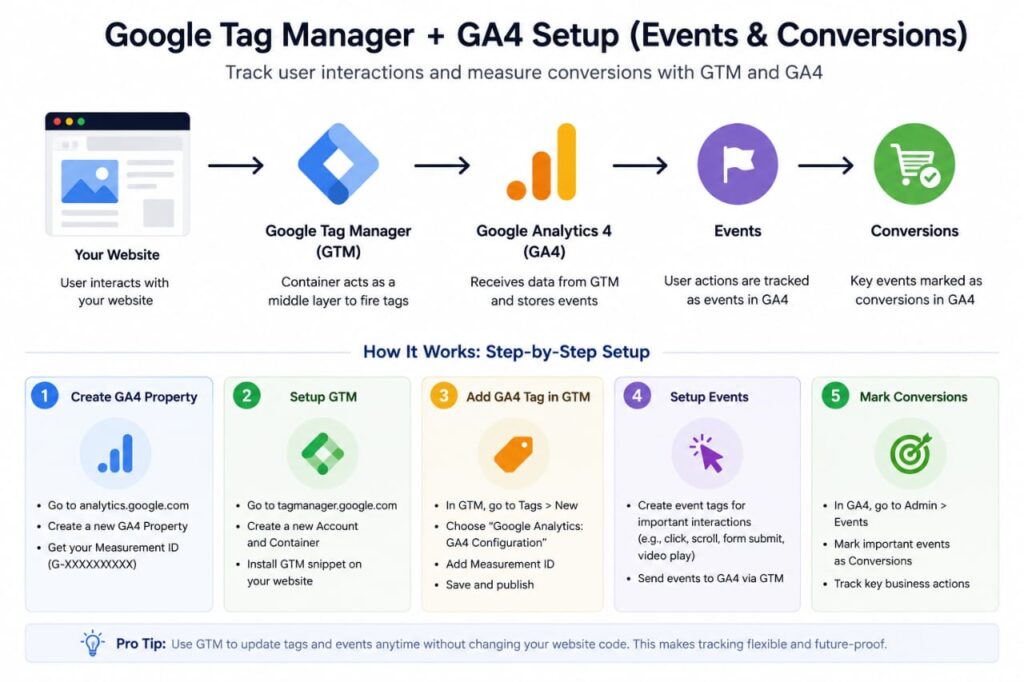
- Sign up for a free Google Tag Manager account, and make a container for your website.
- Place the GTM code snippets into your website and tags. This will be the only time you’ll need to modify the code on your site.
- Open GTM, add a GA4 Configuration Tag, and enter your GA4 Measurement ID. You can find the ID in your data stream settings. Set the trigger to track activity on “All Pages.”
- Publish the container.
- Test your setup using GTM’s Preview mode to make sure the tag works before making it live.
Good Tip: Give your tags, triggers, and variables clear names like “GA4 – Config – All Pages.” This helps keep updates simple later on, even if someone else on your team handles them.
Breaking Down Important GA4 Reports for Beginners in India
Most beginner guides about GA4 just cover setup. The real benefit, though, is learning how to interpret the reports — a key part of mastering GA4 for Beginners in India.
- Realtime Report — Displays the visitors on your website. Use this to check if tracking works or to monitor activity during a live event or campaign.
- Acquisition Report — Breaks down where your visitors come from, like search engines, social platforms, direct links, referrals, paid ads, and even AI assistants.
- Engagement Report — Highlights the pages and events your audience interacts with the most, showing how long they stay. It helps identify your most successful content.
- Monetization Report — Tracks sales, revenue, and how well your e-commerce is doing. A must-have tool for any online business.
- Demographics Report — Gives details about your audience’s age, gender, location, and interests. This helps you create content suited to match your real Indian audience groups.
- Retention Report — Tracks how often visitors come back over time. This reveals if your content or product is keeping people loyal.
Breaking Down Events and Conversions in GA4 for Beginners in India
What are events?
An event in GA4 is any action users take while visiting your site. This could be viewing a page, clicking something, or playing a video. GA4 records all these actions as events, which form the base of how it tracks interactions.
What do conversions mean?
Conversions refer to specific events that are valuable to your business. These could be things like making a purchase, filling out a contact form, subscribing to a newsletter, or clicking a phone number.
Some relatable examples for Indian businesses
- A blogger using “affiliate_link_click” as an important event
- An online store focusing on tracking “purchase” and “add_to_cart” actions
- A local service business keeps track of “WhatsApp_click” or “call_button_click”
Tips for tracking
Avoid tagging every activity as a conversion. Stick to tracking actions that are related to your goals. Marking too many events as key ones can make the useful signals harder to spot.
One way to figure out what counts is to ask yourself if the action would make you happy if it happened 100 more times tomorrow. Something like a “scroll_to_footer” event wouldn’t make much difference by itself. But a “form_submission” or “purchase” event would. Just using this simple rule can help most beginners avoid crowding their key events list with unnecessary actions.
It’s important to break down micro-conversions and macro-conversions as separate things. A micro-conversion could be something simple, like signing up for a newsletter or viewing a product page. These actions show interest but don’t involve actual commitment. Meanwhile, a macro-conversion is the big result you’re aiming for, like someone completing a purchase or booking a consultation. By tracking both, you can better understand your funnel. However, only macro-conversions are the ones you’d want to set as Key Events when using GA4’s conversion tracking.
Mistakes Beginners Often Make While Setting Up GA4 for Beginners in India
- Skipping the installation check — Many assume tracking works fine, but don’t check the Realtime report. Then they find weeks later that tracking never worked.
- Setting the wrong time zone or currency — Choosing the wrong time zone or currency messes up reports. This often causes problems for Indian e-commerce sites where revenue is tracked in incorrect currencies.
- Tagging too many events as key events — Marking too many events as important makes it confusing to figure out which conversions matter.
- Not turning on Enhanced Measurement — Businesses miss out on easy automatic event tracking by forgetting to enable this feature.
- Failing to connect Google Ads and GA4 — This mistake causes you to lose GA4 conversion data that could make ad campaigns more effective.
- Overlooking consent mode settings — Ignoring these settings can lead to compliance problems and incomplete data. This issue affects visitors from the EU.
- Using duplicate tracking codes — Adding GA4 and also through GTM messes up the data by inflating the numbers.
- Failing to use internal traffic filters — Your own visits and test runs can mess with actual visitor data if filters aren’t in place.
- Depending on default reports — Skipping custom insights means losing key details that match your specific business needs.
- Not looking at the data after setup — Treating GA4 like a “set it and forget it” tool stops you from using it to make better decisions.
A common issue stands out here: most of these errors occur because people treat setting up GA4 as a one-time task instead of thinking of it as an ongoing part of managing their site. Businesses that benefit the most from GA4 for Beginners in India are the ones that check back on their setup every few months, remove events they no longer need, and include new ones as their goals change.
Tips to Use GA4 for Beginners in India in 2026
- Use clear and uniform names for events. This helps GA4’s AI-based prediction and tracking tools perform better.
- Update and review consent mode settings often since compliance rules can change over time.
- Add Google Tag Manager to adapt as your tracking requirements expand.
- Keep an eye on the Acquisition report often to see how much traffic is coming from AI assistants and chatbots, which are growing fast in 2026.
- Track the main events connected to your actual business goals.
- Compare Google Ads and GA4 data using attribution settings for each conversion. This helps fix any reporting mismatches.
- Plan a monthly checkup of your GA4 reporting dashboard instead of glancing at it once in a while.
GA4 Checklist for Beginners in India
| Task | Stats |
| Create a Google Analytics account | ☐ |
| Create a GA4 property with correct time zone & currency | ☐ |
| Add a web data stream | ☐ |
| Install tracking code (gtag.js or GTM) | ☐ |
| Verify tracking with Realtime report | ☐ |
| Enable Enhanced Measurement | ☐ |
| Configure relevant custom events | ☐ |
| Mark key business actions as Key Events (conversions) | ☐ |
| Link Google Ads account (if running ads) | ☐ |
| Review consent mode settings | ☐ |
| Bookmark and schedule regular report reviews | ☐ |
Conclusion
Getting started with GA4 for Beginners in India doesn’t have to be complicated. If you grasp events, focus on major conversions, and pay attention to the few key reports that matter, you’ll have a strong and free tool to learn about your audience and grow your website.
Begin with the basics. Install your tracking, double-check it, activate enhanced measurement, and define the real conversions for your business. The advanced features like AI insights, budget tools, and cross-channel reports become effective when you have this strong groundwork in place.
If this guide on Google Analytics 4 helped you out, check out more digital marketing tutorials on TrendChaska.com. Keep learning to expand your expertise and boost your online presence with ease.
Top Points to Remember About GA4 for Beginners in India
- Google introduced GA4 as its event-driven analytics tool. It takes the place of the older session-based Universal Analytics.
- Setting it up means creating a property, setting up a data stream, adding tracking code, and checking everything in the Realtime report to confirm it works.
- To track conversions in GA4, beginners should focus on Enhanced Measurement and Key Events.
- Common mistakes — like skipping verification or over-marking conversions — can quietly undermine your data quality.
- In 2026, GA4 is evolving toward AI-assisted insights, cross-channel budgeting, and tracking AI-driven traffic sources, making it more relevant than ever for Indian businesses and creators.
Frequently Asked Questions on GA4 for Beginners in India
1. Is GA4 free to use?
Yes. Google Analytics 4 costs nothing for most small businesses and regular websites. Large organizations that need higher data caps and extra support can use the paid enterprise version, Google Analytics 360.
2. Do I need coding knowledge to set up GA4?
No. Setting up basic GA4 involves adding a tracking code to your website. Many CMS platforms like WordPress simplify this through plugins or built-in settings, which makes GA4 for Beginners in India fairly accessible even without a developer.
3. Can GA4 detect visits from AI tools like ChatGPT or Gemini?
Yes. GA4 organizes traffic from popular AI assistants into a specific channel. This helps you see how AI-based tools affect the number of visits to your site.
4. Can GA4 track clicks on WhatsApp or call buttons?
Yes, you can do this using custom event tracking. This is helpful to track interactions on WhatsApp and phone calls—something many Indian businesses use instead of online checkout.
5. How are events different from conversions in GA4?
Events track any action that users take on your site. Conversions, or “Key Events” in GA4, are just specific events you flag as valuable, such as someone making a purchase or signing up.

Nidhi Patel is an SEO and digital marketing content strategist focused on AI SEO, content marketing, blogging, and personal branding. Through TrendChaska, she shares practical digital marketing insights, SEO strategies, and AI tools for beginners, students, and small businesses in India.