HubSpot vs Zoho vs Mailchimp compared for Indian businesses — pricing, CRM, automation, and AI features. Find the right fit for 2026.
INTRODUCTION
Choosing the right marketing tool is like finding the perfect business partner. When it works, your team saves time every week, and potential customers turn into paying ones without a hitch. When it doesn’t, you end up wasting money on unused tools, scrambling to move your data after a few months, and explaining to your boss why you’re still shelling out ₹15,000 every month for a CRM no one even touches.
If you’ve been searching HubSpot vs. Zoho vs. Mailchimp, you’re stuck comparing three very different platforms that all promise to do “everything.” But the truth is, they don’t. Each tool is designed with a specific type of business in mind. That’s why so many Indian marketers and founders find this comparison so tricky to figure out.
This HubSpot vs Zoho vs Mailchimp comparison dives into what makes each of these platforms stand out — whether it’s their CRM features, email marketing tools, automation, AI, or pricing.
Throughout this HubSpot vs Zoho vs Mailchimp guide, we’ll compare CRM, email marketing, automation, AI, pricing, and ease of use. The goal is to help you decide based on what your business needs, not just what a sales pitch says.
What Does Marketing Automation Software Do?
Marketing automation software is a tool businesses use to take care of repetitive marketing and sales tasks on its own. You set the rules one time, and it keeps running things with little need for you to adjust it later.
Most platforms rely on a mix of basic components at their foundation.
- CRM (Customer Relationship Management): keeps track of contact info, sales stages, and past interactions all in one spot.
- Email automation: handles tasks like sending welcome emails, reminders for abandoned carts, or regular newsletters automatically.
- Lead nurturing: helps turn a potential customer into a buyer by sending timely and relevant messages or offers.
- Workflow automation: sets up automatic actions, like tagging or notifying the sales team, based on specific customer activities like clicking a link.
- Customer segmentation: organizes contacts into groups based on their behavior, location, or buying history to send them tailored messages.
- AI-powered automation: modern tools now use AI to create subject lines, figure out the best times to send emails, rank potential customers, or recommend future actions.
This idea isn’t groundbreaking. That’s why many businesses comparing HubSpot vs Zoho vs Mailchimp start by understanding how marketing automation software actually works.
By 2026, the real shift lies in how much of it operates on its own. AI now integrates into CRM and email tools handling things. Indian businesses, however, weigh more than just features. They look at support tailored to local time zones, payment options in INR, and whether a platform works with WhatsApp or SMS alongside email. These factors decide if a tool becomes part of daily operations or gets ignored after a free trial.
The HubSpot vs Zoho vs Mailchimp comparison becomes easier once you see how each platform performs side by side.
Quick Comparison Table
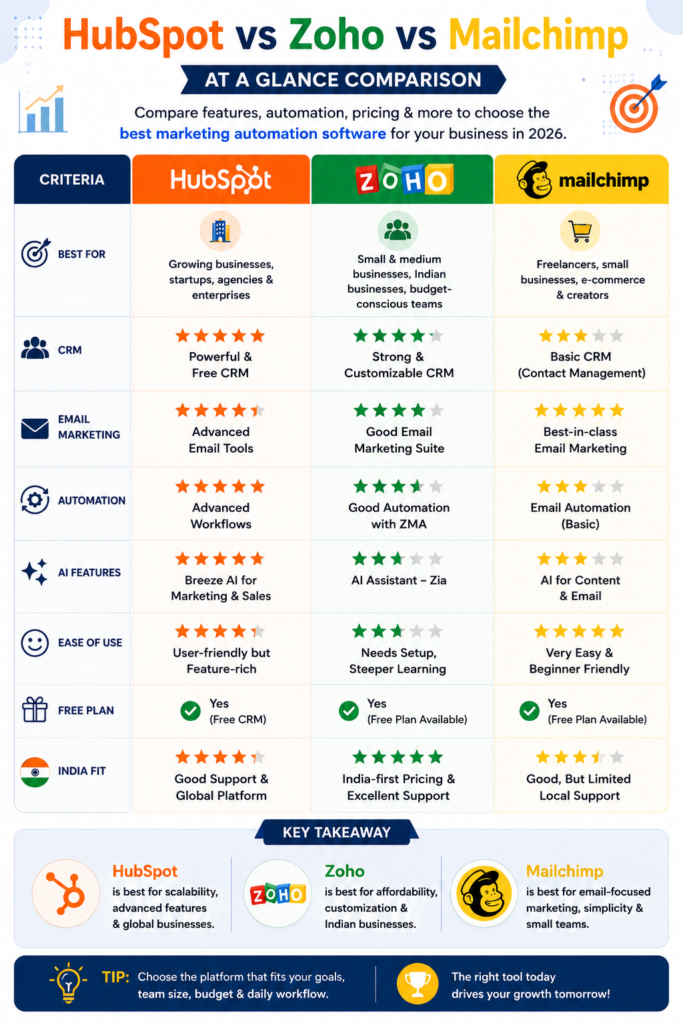
Pricing for HubSpot, Zoho, and Mailchimp changes over time. Visit the official websites to check the latest pricing before making a decision.
Choosing between HubSpot, Zoho, and Mailchimp boils down to three main questions.
- How complicated is your sales process?
- Do you prioritize professional email design or a deeper CRM tool?
- What’s your budget as your contact list grows?
Answering these questions can help you figure out the best option.
HubSpot Overview
In the HubSpot vs Zoho vs Mailchimp comparison, HubSpot stands out for its CRM-first approach. HubSpot made its name as the go-to marketing CRM for inbound strategies.
That focus is still clear today. The HubSpot CRM offers a free version that’s functional and not just a basic demo. Marketing Hub builds on the CRM by adding landing pages, forms, lead scoring, and workflows with multiple steps.
HubSpot’s AI tool Breeze helps create content drafts, prioritize leads, and handle chatbot-like conversations across different stages in the process. HubSpot stands out in reporting. Its dashboards combine marketing, sales, and service data without needing an extra BI tool. You can connect with many platforms, from Shopify to Slack and lots of smaller apps.
Pros
- Strong CRM with a free starting point
- Great tools to track and report performance
- Advanced automation and tools to rank leads
- Large variety of integrations
Cons
- Advanced Marketing Hub tiers can get expensive fast.
- Smaller teams may find it harder to learn.
- Higher-priced plans lock some features.
Zoho Overview
When comparing HubSpot vs Zoho vs Mailchimp, Zoho appeals especially to Indian businesses looking for affordable marketing automation software.
Zoho feels like one of the most India-relevant options in this list, and it’s no accident. From the start, it was developed and backed with Indian businesses in mind. Zoho CRM is the foundation of its platform, while tools like Zoho Marketing Automation and Zoho Campaigns manage emails, lead scoring, and campaign planning. Its workflow builder adapts well to complicated sales setups, and Zoho’s all-in-one support (social, SMS, WhatsApp, and email integration) works great for businesses managing lots of ways to connect with customers.
Indian teams gain a big edge from Zoho’s ecosystem. Teams already working with tools like Zoho Books, Zoho Desk, or Zoho Analytics can add marketing automation without needing complicated integrations that are common with other platforms.
Good things about it
- Affordable pricing and support tailored to Indian businesses
- Works well if you use other Zoho products
- Lets you design workflows to fit your needs
- Handles campaigns across multiple channels
Things that need improvement
- The design isn’t as smooth as HubSpot’s
- Setting up automation takes more effort.
- AI tools like Zia still lag behind top competitors.
Mailchimp at a Glance
Within the HubSpot vs Zoho vs Mailchimp comparison, Mailchimp remains the strongest choice for businesses focused mainly on email marketing. Mailchimp works as an email marketing tool—everything else builds from that core feature. Its customer journeys help you create automated flows based on buying habits or interactions, while AI tools assist with choosing subject lines, timing emails, and arranging content blocks.
The templates feel intuitive and simple to use. This explains why small e-commerce businesses and solo marketers often choose Mailchimp. The platform’s e-commerce integrations, like Shopify and WooCommerce, function well and sync purchase info with audience segments.
However, Mailchimp doesn’t excel in CRM capabilities. It monitors contacts and tracks activity, but it isn’t designed to handle the detailed multi-step B2B sales workflows you’d find in tools like HubSpot or Zoho.
Upsides
Pros
- Top-notch tools to design and deliver emails
- Simple platform to use and launch without delay
- Strong connections with e-commerce platforms
- Handy AI features to help with content creation and scheduling
Cons
- Lacks the features of a true CRM for sales-focused businesses
- Automation feels limited outside of email campaigns.
- Costs rise as your email list grows.
HubSpot vs Zoho vs Mailchimp: Side-by-Side Comparison
After looking at the big picture, it’s useful to compare these tools. The HubSpot vs Zoho vs Mailchimp discussion becomes much easier to follow when you look at the matchups.
Each pair shows differing strengths and trade-offs, whether it’s about CRM capabilities, email design, or the range of marketing features.
HubSpot or Zoho CRM?
Both platforms provide solid CRMs, but they tackle different needs.
HubSpot’s CRM feels easier to get started with straight away. Its sales pipeline is simple to see, and it has a stronger connection between marketing and sales.
Zoho CRM gives more flexibility with custom features like tailored modules and detailed field control, but it takes more effort to set up. When it comes to automation, both let you create workflows with multiple steps.
However, HubSpot’s tool is more visual and easier for beginners to use. Zoho’s AI, called Zia, is getting better but still isn’t as developed as HubSpot’s Breeze. On cost, Zoho tends to come out ahead in India, where businesses are careful about spending and get more value from its mid-tier plans.
Zoho vs. Mailchimp Comparison: CRM vs Email Marketing
The choice depends on how much CRM functionality you require.
In this Zoho Mailchimp discussion, the biggest difference is that Zoho focuses on CRM and marketing automation, while Mailchimp specializes in email marketing and eCommerce automation.
Zoho’s email marketing offered through Zoho Campaigns works well but doesn’t have the polished design tools you get with Mailchimp’s editor. Mailchimp stands out when it comes to templates and automation built for e-commerce. Zoho has an edge with reporting if you need to link email performance to CRM-level customer insights. Mailchimp’s behavior-based tagging feels natural and works well for smaller lists, but Zoho handles complex and multi-source segmentation more as your needs grow.
HubSpot vs. Mailchimp
Among the three matchups in the HubSpot vs. Zoho vs. Mailchimp discussion, this comparison sparks the most debate. The reason is simple: these two tools serve very different purposes.
The real question here is whether you prioritize “CRM-first” or “email-first.”
HubSpot’s Marketing Hub manages the entire customer process — starting with their first website visit and ending with closing a deal. Mailchimp, on the other hand, focuses more on email workflows and engagement triggers. HubSpot stands out in lead nurturing by using CRM insights like deal stage and lifecycle stage, details Mailchimp doesn’t track. When it comes to AI features, HubSpot’s Breeze offers more functionality for sales and service scenarios.
In contrast, Mailchimp focuses its AI efforts on improving content and optimizing email sends.
If you’re just using email, Mailchimp costs less, but HubSpot provides better value when combining sales and marketing efforts.
Pricing Comparison
HubSpot pricing in India:
HubSpot includes a free CRM option and has Marketing Hub plans—Starter, Professional, and Enterprise—that increase in cost with more contacts and features. Indian pricing is listed in USD or INR depending on your billing region.
You can verify the latest pricing on HubSpot.com.
Zoho pricing:
Zoho has the most affordable starting plans in India compared to the others. It offers free, standard, professional, and enterprise options for both Zoho CRM and Zoho Marketing Automation.
Their bundled plan, Zoho One, helps save more money if you use multiple apps.
Mailchimp pricing:
Mailchimp organizes its Free, Essentials, Standard, and Premium plans around your contact list size. This setup means your costs might increase fast as your contacts grow even if you don’t use much automation.
Since all three vendors change pricing and plan details, use any figures you find online, including here, as a general guide. Make sure to check the latest plans on HubSpot.com, Zoho.com/in, and Mailchimp.com before making a decision.
To get the most value, Zoho provides the best features for every rupee spent by Indian SMEs. HubSpot gives better long-term flexibility if you can afford it.
Mailchimp is the easiest and cheapest choice for basic email marketing needs.
Feature Comparison: HubSpot vs Zoho vs Mailchimp
| Feature | HubSpot | Zoho | Mailchimp |
|---|---|---|---|
| Email Automation | Advanced | Advanced | Excellent in its category |
| Workflow Builder | Visual and solid | Adaptable but complex | Basic to simple |
| Lead Scoring | Effective | Effective | Limited capabilities |
| AI Features | Breeze AI for content, sales, and service | Zia AI in development | AI focusing on content and send times |
| Forms | Built-in and versatile | Built-in | Simple forms |
| Landing Pages | Strong page builder | Available but less advanced | Basic options |
| CRM Depth | Comprehensive | Comprehensive | Limited functionality |
| Sales Automation | Developed | Basic functions | — |
| Reporting | Advanced and supports multiple hubs | Good with customization options | focused on emails |
| Customer Journeys | Full-funnel capability | Covers multiple channels | Geared toward email and e-commerce |
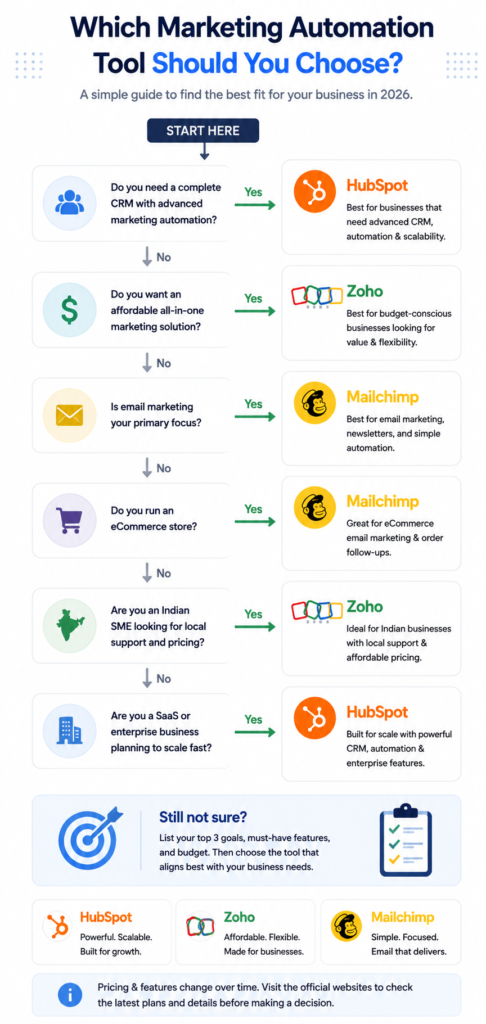
Choosing the Best Tool for Your Business
When comparing HubSpot vs. Zoho vs. Mailchimp, the choice boils down to one main question:
What does your business need to do every day?
A freelancer who sends out a monthly newsletter has different needs than a B2B SaaS company managing a six-week sales cycle even though both fall under the umbrella of “marketing.”
Here’s how it breaks down by type of business.
- Startup: Opt for Zoho or HubSpot’s free CRM. Both give you a risk-free start while you figure out your sales process.
- Freelancer: Go with Mailchimp. It’s quick, straightforward, and handles email marketing, which is often all a freelancer requires.
- Small business: Choose Zoho. It’s budget-friendly, prioritizing India-first pricing, and offers features that scale as your business expands.
- Marketing agency: HubSpot offers better client reporting and handles multi-channel campaigns more.
- E-commerce: Mailchimp stands out with e-commerce automation and tailored audience tools.
- B2B company: HubSpot or Zoho both offer the pipeline features needed to manage B2B sales cycles.
- Enterprise: HubSpot provides advanced reporting tools, stronger permissions, and scalability to handle larger teams.
- SaaS company: HubSpot aligns well with SaaS funnels through its lifecycle stages and lead scoring features.
Ultimately, the HubSpot vs Zoho vs Mailchimp decision depends on your team’s workflow rather than simply choosing the most popular platform.
Pros & Cons Table
| Platform | Pros and Cons |
|---|---|
| HubSpot | HubSpot offers a powerful free CRM, detailed reporting, advanced automation, and many integrations. Costs rise at scale, and learning it can take more effort. |
| Zoho | Zoho is affordable with India-first pricing, has a large ecosystem, and is very customizable. The user interface feels less smooth, and setting it up can take longer. |
| Mailchimp | Mailchimp is simple to use, has top-notch email design tools, and is great for e-commerce integration. CRM features are weaker, and automation is limited to email. |
Real-Life Examples
- If you’re a startup on a tight budget: Try Zoho’s free or basic CRM tier or use HubSpot’s free CRM. Invest in advanced automation tools after you generate enough leads to make it worth the cost.
- To get a CRM with strong reporting for big teams: HubSpot’s advanced plans provide the detailed reports and access controls that larger groups often require.
- To focus a lot on email marketing: Mailchimp stands out because of its top-notch templates and reliable delivery features, which work great for businesses that rely on email strategies.
- To stick with the Zoho ecosystem you already use: Adding Zoho Marketing Automation keeps everything in one system and helps you skip the costs of creating custom integrations.
- To handle inbound marketing in a single platform: HubSpot combines CRM tools, content management, and automation. This setup simplifies work for marketing teams that are scaling.
These examples show that the best HubSpot vs Zoho vs Mailchimp choice varies from one business to another.
Common Pitfalls to Watch Out For
- Focusing on price: The cheapest plan might seem tempting, but it often doesn’t provide the level of automation you will need six months later.
- Forgetting CRM requirements: Choosing an email-focused tool like Mailchimp can backfire if your sales team needs pipeline management features.
- Paying for big software too soon: Purchasing HubSpot’s higher-end plans before your team is large enough or generating enough leads can be a waste of resources.
- Not planning for growth: Picking a solution that works for your current contact list might cost you more than expected as your business expands.
- Missing integration options: Skipping checks on whether the tool integrates with your website, e-commerce, or accounting systems can create future issues.
- Overlooking customer service: This is crucial in India, where vendor response time and access to local support can vary a lot.
Avoiding these mistakes makes the HubSpot vs Zoho vs Mailchimp decision much easier.
Final Thoughts
There’s no clear champion in the HubSpot vs. Zoho vs. Mailchimp discussion. The best choice depends on your business goals, current size, and budget.
HubSpot works well for teams that are growing and need tools for CRM, marketing, and reporting in one place.
Zoho fits with businesses in India that are already using its ecosystem.
Mailchimp offers one of the easiest and quickest options to manage email-focused marketing without dealing with complicated CRM tools.
Let your sales process decide the platform, not the other way around. If you’re still unsure which is right, check out more software comparisons on TrendChaska to build the right stack for your business in 2026.
Hopefully this HubSpot vs Zoho vs Mailchimp guide has helped you identify the right platform for your business.
Building a complete software comparison hub also helps strengthen topical authority.
FAQs
1. Which is better: HubSpot or Zoho?
One isn’t overall “better” than the other. HubSpot works well if teams need a polished CRM along with marketing tools in the same platform. Zoho fits Indian companies looking for affordable and flexible software if they already use other Zoho apps.
2. Is Mailchimp good for Indian businesses?
Mailchimp works well for small businesses and e-commerce brands in India if their main goal is email marketing. It’s not ideal for those needing advanced CRM or managing sales pipelines.
3. Which marketing automation software is cheapest?
Zoho gives Indian businesses the cheapest entry-level plans. For very small email lists, Mailchimp’s free plan can be a solid option too.
4. Does HubSpot offer a CRM?
Yes, HubSpot provides a free CRM at its basic level. It includes tools like contact management, deal tracking, and pipeline overviews all without needing to pay for a subscription.
5. Is Zoho better than Mailchimp?
If you need CRM and sales automation, Zoho works better. But Mailchimp stands out for creating beautiful emails and delivering them
6. What’s the best platform for startups?
Zoho or HubSpot’s free CRM option works well. They both allow startups to get going without spending a lot of money upfront
7. Which software works better for automation?
HubSpot and Zoho provide stronger workflow automation compared to Mailchimp. Mailchimp sticks to automating email journeys.

Nidhi Patel is an SEO and digital marketing content strategist focused on AI SEO, content marketing, blogging, and personal branding. Through TrendChaska, she shares practical digital marketing insights, SEO strategies, and AI tools for beginners, students, and small businesses in India.