Discover 25 proven ChatGPT prompts for digital marketing. Create better content, SEO, social media, email, ads, and marketing strategies faster.
Introduction
If you’ve asked ChatGPT to write a marketing post and gotten something generic and boring back, you’re not alone. Most people hit this wall early — the issue isn’t ChatGPT, it’s the questions being asked.
Digital marketers, from solo bloggers to established D2C companies, already lean on ChatGPT daily for blog posts, social captions, ad copy, and keyword research. This guide contains 25 proven prompts to help you get the most out of ChatGPT for digital marketing, plus tips on asking better marketing-related questions.
What is ChatGPT for Digital Marketing?
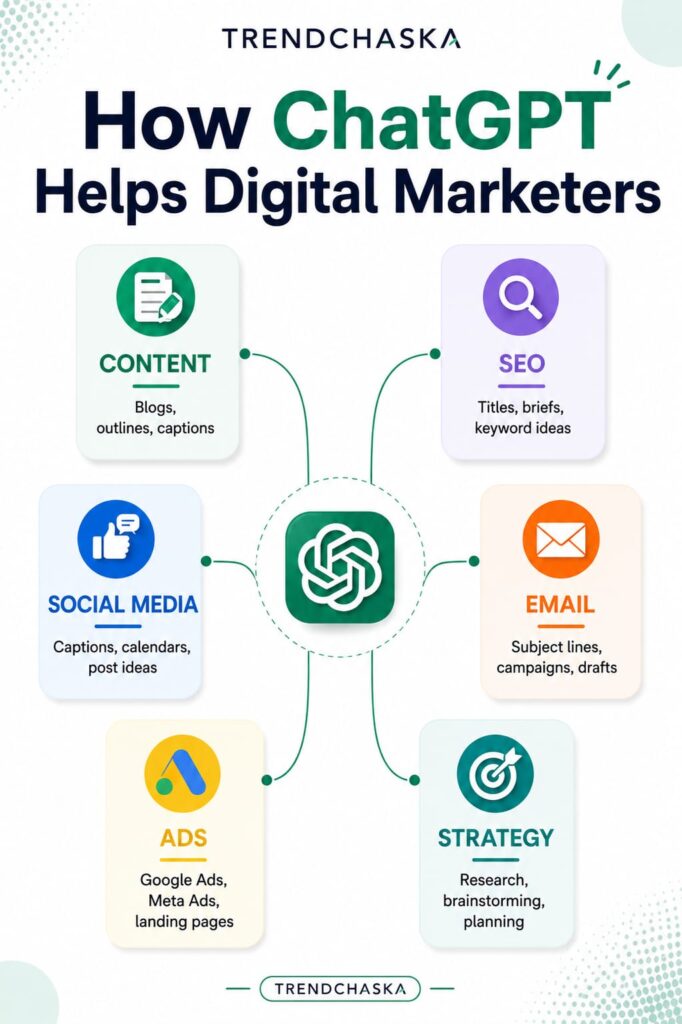
Using ChatGPT for digital marketing generally means content writing or marketing research. Specifically, it can help with:
- General content writing: blogs, outlines, captions, product descriptions
- SEO assistance: titles, content briefs, keyword suggestions (always fact-checked in a keyword tool)
- Social media: captions, calendars, post suggestions
- Email marketing: subject lines, drafts, welcome sequences
- Ads: Google Ads headlines, Meta suggestions, landing page copy
- Market research: competitor/customer research summaries
- Strategy assistance: brainstorming, topics, angles, repurposing ideas
For a marketer juggling multiple accounts, or a small-business owner on a budget, this can save real hours. The key is knowing which chatgpt marketing prompts to use for which purpose — and when to fact-check the results.
Why is ChatGPT Useful for Digital Marketing?
ChatGPT helps digital marketers, it doesn’t replace them. It works as a friction reducer: draft faster, brainstorm ideas, build outlines and calendars, and handle repetitive tasks. What it can’t do is replace strategic thinking, brand-building, or a real understanding of your customer’s voice. Treat it as an enabler that gets you past the blank page — every suggestion still needs a human fact-check before it goes live.
How to Write Better ChatGPT Prompts for Marketing Purposes
There’s no single “correct” way to phrase a prompt, but the best ones tend to share these elements:
- Role – what role should ChatGPT play (e.g., SEO content writer)?
- Objective – what do you want it to do?
- Context – relevant background information
- Audience – who is this for?
- Format – what should the response look like?
- Tone/style – what voice should it use?
- Requirements – any other guidelines?
- Revision – ask for a rewrite if the first draft misses the mark
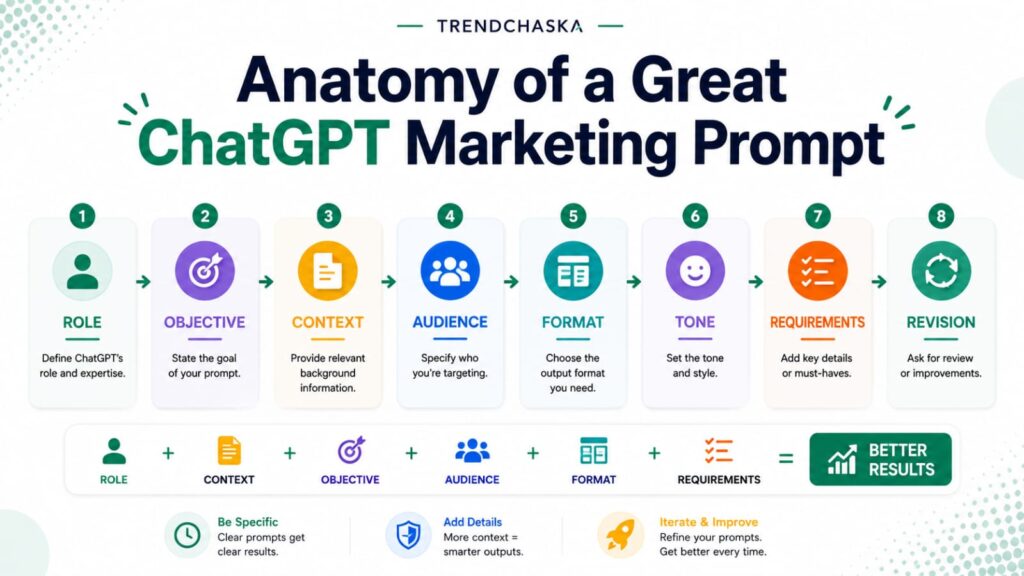
A good formula is: role + context + objective + audience + format + requirements.
For example: “Act as a social media strategist. I own a jewelry business in Jaipur targeting women aged 22–35. Write 5 Instagram captions about the new festive collection in a friendly tone, under 150 characters.” That prompt hits every element above — which is why it gets useful results instead of generic ones.
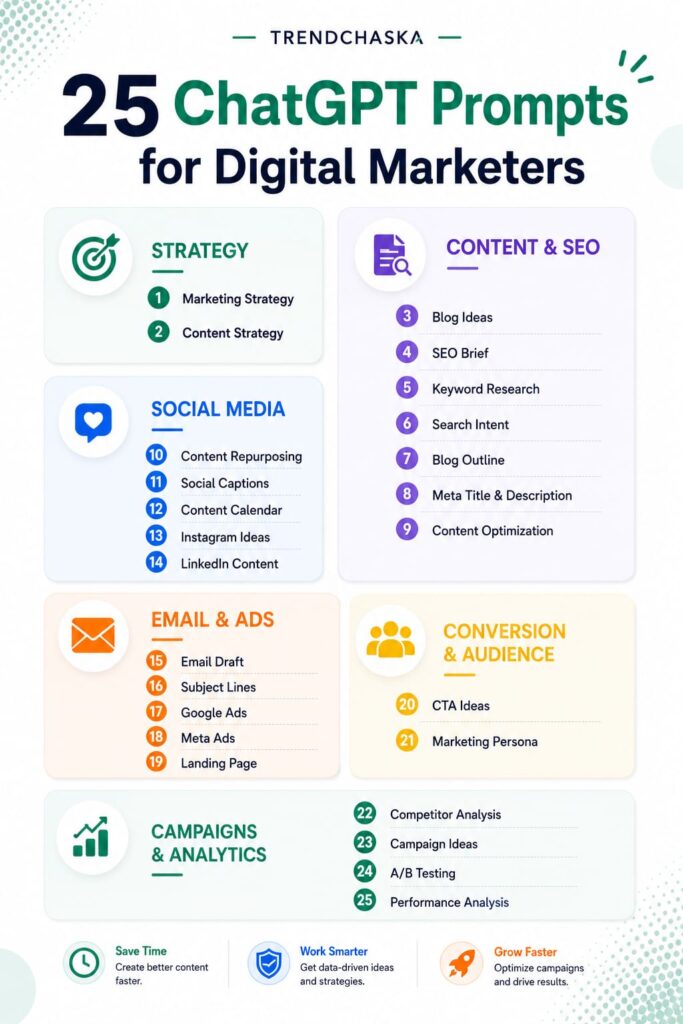
25 ChatGPT Prompts for Digital Marketers
Every prompt below is written so you can copy-paste it directly into the tool. Where you see brackets, replace the bracketed text with your own information.
1. Marketing Strategy Overview
Prompt: “Act as a digital marketing consultant. I run a [type of business] targeting [audience] in [location] with a monthly budget of [amount]. Suggest a 90-day marketing strategy that covers content, social media, and paid channels, outlining what should be prioritized.”
How to use it: Replace the bracketed text with relevant information, and ask follow-up questions about strategies for any channels you want discussed in detail. Example: a home-based bakery targeting locals in Pune with a ₹10,000 monthly budget can use this to discuss a preliminary strategy before consulting a professional.
2. Content Strategy Roadmap
Prompt: “Act as a content strategist for [business/industry]. Our target audience is [audience]. Suggest a 3-month content strategy including themes for blog posts, social media, and email, with a focus on [goal, e.g., lead generation or brand awareness].”
How to use it: Be specific when it comes to the strategy goal. The suggestions needed will vary depending on whether the goal is brand awareness or lead generation, among other factors.
3. Blog Topic Ideas
Prompt: “Suggest 15 blog post ideas for a [industry] business targeting [audience] in India, focusing on topics with informational search intent that beginners would search for.”
How to use it: Use the suggestions provided to put together a list of topics with good keyword volume.
4. SEO Content Brief
Prompt: “Act as an SEO content strategist. Create a content brief for a blog post targeting the keyword ‘[keyword].’ Include suggested word count, search intent, recommendations for H2/H3 subheadings, and 3-5 related keywords to include.”
How to use it: Keep in mind that the suggested keywords may have low volume, so always do a fact-check.
5. Keyword Research Brainstorming
Prompt: “Suggest 20 related keyword ideas around the seed keyword ‘[keyword]’ for an Indian audience, grouped by search intent: informational, commercial, and transactional.”
How to use it: Treat this as a brainstorming session. Use the suggestions provided as a starting point to look for keywords with good volume and low competition.
6. Search Intent Analysis
Prompt: “Analyze the type of search intent behind the keyword ‘[keyword].’ Explain what kind of content (guide, comparison page, etc.) would be helpful for someone searching for this term.”
How to use it: This can be used to determine what kind of content should be published based on a given keyword.
7. Blog Outline Generator
Prompt: “Create a detailed blog outline for a post titled ‘[title]’ targeting [audience]. Include an introduction hook, subheadings (H2/H3), and a suggested conclusion, with a target word count of [word count].”
How to use it: Edit the suggested headings based on your own research.
8. SEO Meta Title and Description
Prompt: “Write 3 SEO meta titles (under 60 characters) and 3 meta descriptions (under 160 characters) for a blog post about [topic], targeting the keyword ‘[keyword].'”
How to use it: Go through the suggestions provided and choose the best one. Alternatively, ask the model to write more options if you are not satisfied with the 3 suggestions.
9. Content Optimization Check
Prompt: “Here is my blog draft: [paste content]. Review it for SEO optimization around the keyword ‘[keyword]’. Suggest where to include the keyword and where the text could be improved for better flow.”
How to use it: This can be used as a second opinion while optimizing a blog post or other content, but remember to fact-check if the suggestions actually make sense.
10. Content Repurposing
Prompt: “Here is a blog post: [paste content or summary]. Repurpose it into 1) a 5-tweet X thread, 2) 3 LinkedIn post ideas, 3) an Instagram caption, and 4) a YouTube Shorts script.”
How to use it: This is extremely useful if you do not have much time but have to publish content on multiple platforms.
11. Social Media Captions
Prompt: “Write 5 Instagram captions for a post about [topic/product] targeting [audience] with a [casual/professional/fun] tone of voice, each with a CTA.”
How to use it: After reviewing the suggestions, ask the model to modify any caption if you are not satisfied with the length.
12. Social Media Content Calendar
Prompt: “Create a 2-week content calendar for [business type] on [platform]. Include post themes and a short caption idea for each day.”
How to use it: This can be used as a guideline, but make sure to tailor the content to current trends.
13. Instagram Content Ideas
Prompt: “Suggest 10 Instagram content ideas for a [industry] brand targeting [audience] in India, including a mix of reel, carousel, and static post ideas.”
How to use it: Filter out any ideas that are not realistic, depending on your available equipment and manpower.
14. LinkedIn Content
Prompt: “Act as a LinkedIn content writer. Write a post about [role/industry] [topic/insight] for a [role/industry] audience. Keep it under 200 words, using a conversational but professional tone of voice.”
How to use it: Always personalize the content, since these posts are supposed to represent your voice.
15. Email Marketing Draft
Prompt: “Write a marketing email for [product/offer] targeting [audience] for the purpose of [goal, e.g., driving sign-ups]. Include a subject line, preview text, and a CTA in the email. Keep the tone of the email [tone].”
How to use it: You can use prompt #16 below to come up with multiple subject line options, if desired.
16. Email Subject Lines
Prompt: “Write 8 email subject lines for an email about [topic/offer] targeting [audience]. Include a mix of curiosity-driven, benefit-driven, and urgency-driven subject lines.”
How to use it: Avoid using similar subject lines, and consider doing an A/B test, if possible.
17. Google Ads Copy
Prompt: “Write Google Ads copy for [product/service]. Include 5 headlines (under 30 characters) and 3 descriptions (under 90 characters) targeting the keyword ‘[keyword]’ for the audience ‘[audience].'”
How to use it: Always make sure to double-check the character count in Google Ads itself, since it can be slightly different from the tool.
18. Meta/Facebook/Instagram Ad Copy
Prompt: “Write 3 Facebook/Instagram ad copy variations for [product/offer] targeting [audience]. Include a hook, short body of text, and a CTA. Keep each ad under 125 words.”
How to use it: Make sure to adhere to the tone suggested in the prompt or, if none is suggested, go with the tone of the brand itself.
19. Landing Page Copy
Prompt: “Write landing page copy for [product/service]. Include a headline, subheadline, 3 benefit-focused bullet points, and a closing CTA section targeting [audience] with a [tone] tone of voice.”
How to use it: Use testimonials or quotes from support tickets, if available, to make the landing page more relatable. Always make the tone of the landing page match the tone of the rest of the website.
20. Call-to-Action Ideas
Prompt: “Suggest 10 call-to-action phrases for [goal, e.g., newsletter sign-up, product purchase, free trial], keeping them short, benefit-focused, and appropriate for [platform].”
How to use it: Make sure to use the CTAs that are relevant for the buyer’s journey.
21. Audience and Persona Creation
Prompt: “Create a marketing persona for the ideal customer of [business type] in India, focusing on [audience]. Include age, pain points, goals, preferred platforms, and buying triggers.”
How to use it: Make sure to fact-check the persona if possible — always try to use real data, if available.
22. Competitor and Content Analysis
Prompt: “Here is a summary of my competitor’s content/positioning: [paste details]. Analyze their likely content strategy and suggest 3 content gaps I could target instead.”
How to use it: Remember that ChatGPT cannot browse the web, so this has to be a summary of what you already know.
23. Marketing Campaign Ideas
Prompt: “Suggest 5 marketing campaign ideas for [product/occasion, e.g., Diwali sale] targeting [audience]. Include a campaign theme, key message, and suggested channels for each.”
How to use it: Make sure to narrow down the ideas based on your own budget and time constraints.
24. A/B Testing Ideas
Prompt: “I’m running [ad/email/landing page] for [product/offer]. Suggest 5 A/B test ideas, including variations in headline, CTA, and format, and what each test would reveal.”
How to use it: Always remember to only test one variable at a time so you can have clearer insights.
25. Marketing Performance and Reporting Analysis
Prompt: “Here is my campaign performance data: [paste metrics]. Summarize the key takeaways in simple language, highlighting what’s working and what’s not, and suggest 3 next steps.”
How to use it: Always make sure to double-check the analysis, since ChatGPT can sometimes misunderstand the context of numbers.
How to Get Better Results From ChatGPT Marketing Prompts
- Add context and name your audience. “Write an Instagram caption” is vague; “for busy working mothers in Bengaluru” isn’t.
- Give it a reference example of content you like, and set limits — word count, tone, platform — since ChatGPT tends to run long otherwise.
- Ask for multiple options, not just the first draft, and request revisions when needed.
- Add brand voice guidelines, and always fact-check before publishing.
- Avoid keyword stuffing and don’t reuse the same prompt across every platform.
ChatGPT vs. Other AI Tools for Marketers
ChatGPT is just one of many large language models marketers use daily. Many prefer Claude for long-form writing — TrendChaska’s separate guide on Claude for digital marketing compares the two. For tools beyond chatbots, this guide to AI tools for bloggers is worth a read.
Conclusion
Once integrated well, ChatGPT for digital marketing lets you automate routine tasks and spend more time on strategy. The 25 prompts above cover the most common tasks, from blog posts and SEO research to ad copy and performance analysis. Treat each as a starting point, not a finished product, and tailor it to your audience.
Explore the rest of TrendChaska to see how ChatGPT pairs with other tools to boost your productivity.
Frequently Asked Questions
1. Can ChatGPT be used for digital marketing?
Yes — for content writing, social captions, ad copy, email writing, and brainstorming. It’s an addition to a marketer’s skill set, not a substitute, and the value comes from integrating it into your workflow well.
2. What are the best prompts for ChatGPT in digital marketing?
The best ones state the role, target, aim, format, tone, and requirements for the deliverable — the structure the 25 prompts above follow.
3. Can ChatGPT help with SEO content?
Yes, for outlines, briefs, and optimization suggestions. Keyword research and volume estimation still need a proper SEO audit.
4. Can ChatGPT help with social media marketing?
Yes, for ideas, captions, and calendars — though visual content and detailed planning still rely on human effort.
5. Is ChatGPT free for digital marketing?
There’s a free plan with limited features and message caps, and a paid plan with full access. Check the OpenAI Help Center for current pricing.
6. Can ChatGPT replace a digital marketer?
No. It supports writing, brainstorming, and planning, but lacks human intuition and strategic judgment — outcomes still depend on people.

Nidhi Patel is an SEO and digital marketing content strategist focused on AI SEO, content marketing, blogging, and personal branding. Through TrendChaska, she shares practical digital marketing insights, SEO strategies, and AI tools for beginners, students, and small businesses in India.