
Learn Technical SEO for small business websites in India, including site speed, mobile SEO, Core Web Vitals, and sitemaps.
1. Reasons Many Small Business Websites in India Struggle with SEO
Imagine this: You own a saree boutique in Jaipur. Your website looks amazing. Your catalogue is top-notch. Your prices beat the competition. But when someone searches “saree shop Jaipur” on Google, your site doesn’t show up at all. Meanwhile, your competitor’s outdated website, from two years ago, is still at the top.
Sound familiar? Many small businesses across India face this challenge. Most of the time, it’s not about your content—it’s about technical SEO.
Technical SEO forms the backbone of your website. Without it, even the greatest content and an active social media presence won’t help you get on Google’s first page. The best part? You don’t have to be a tech expert to fix it.
GUIDE PROMISE
This guide explains technical SEO for small businesses in India through simple and clear steps. You can use it to boost your rankings today.
2. What is Technical SEO?
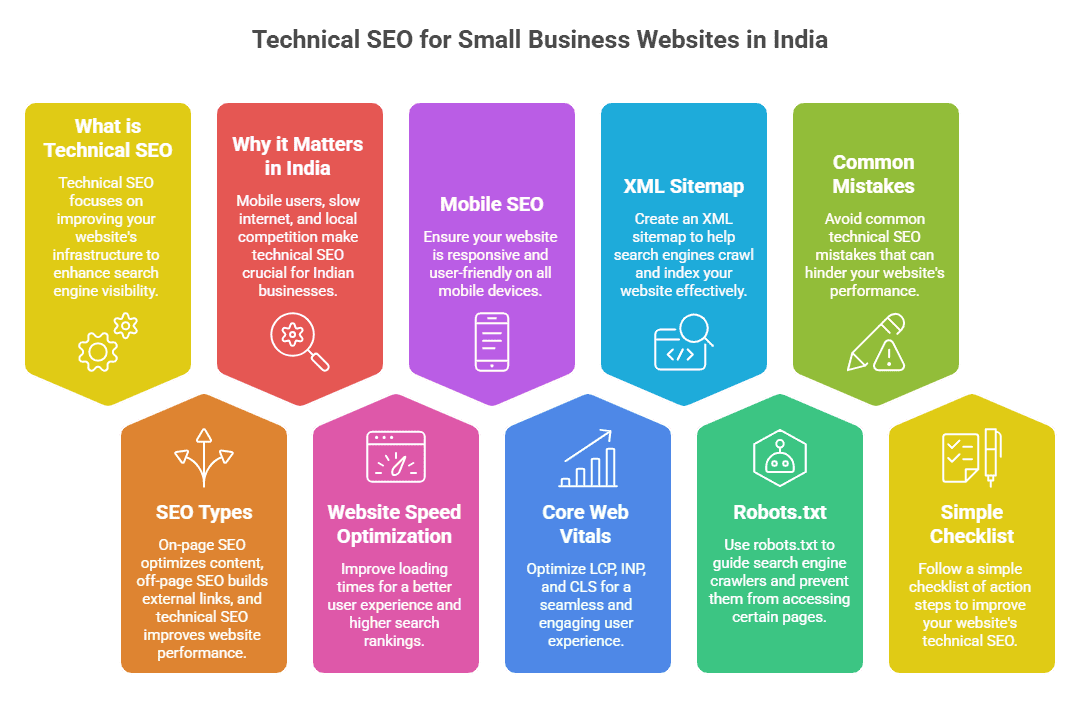
SEO, which stands for Search Engine Optimisation, is divided into three main categories:
- On-page SEO involves the text, keywords, and titles you see on your website’s pages.
- Off-page SEO focuses on links that connect back to your site and how trusted your site is online.
- Technical SEO deals with the setup behind the scenes, helping Google locate, crawl, and index your site.
You can think about it like this: on-page SEO is all about the content written in a book. Meanwhile, technical SEO makes sure the book gets printed , is placed on the correct shelf, and is simple to read.
QUICK EXPLANATION:
Technical SEO involves things like how fast your website loads, how well it works on phones, how secure it is, how the site is organised, and how easy it is for Google’s bots to read and understand it.
3. Why Small Indian Businesses Need Technical SEO
India has a unique online audience. Here’s why technical SEO is important to Indian businesses:
| 90%+ Indians browse on mobile devices | 2–3s Patience before leaving a slow site | 76% Local searches → store visit in 24hrs | #1 India is Google’s fastest-growing market |
Why This Matters
Mobile-first audience: Across India, from big cities like Mumbai to smaller towns, people use their phones to visit websites. If your site isn’t mobile-friendly, you’ll lose them right away.
Slow internet struggles: Even with 4G available, users in smaller towns often experience sluggish internet. A slow-loading site, one that isn’t optimised, will drive them away fast.
Rising local competition: Indian businesses are joining the internet in bigger numbers every month. Local searches are becoming tougher, and technical SEO decides who appears at the top and who gets ignored.
Optimising Website Speed To Boost Indian Businesses
Speed plays a vital role in the technical aspects of Indian websites. Google has stated that page speed helps determine rankings. In a country where most users rely on mobile, a slow-loading site can harm business.
Why Speed is Important
Research shows that a one-second delay in loading a page can drop conversions by almost 7%. Whether it’s a local kirana store, a travel agent, or a coaching centre hoping to attract online queries, every second matters.
Simple Tips To Improve Website Speed
- Make your images smaller. Use tools like TinyPNG or ShortPixel to shrink them. A 3MB photo can drop to 200KB and still look good. Doing this can make your website load way faster.
- Turn on browser caching. This saves some website files on the visitor’s device, so your site loads quicker the next time they visit.
- Pick the right hosting. Many Indian businesses try to save on hosting and end up with slower websites. Go with providers that have servers in India. Hostinger India, BigRock, or AWS Mumbai are solid options for good local speed.
- Try a CDN (Content Delivery Network). A CDN spreads copies of your website to servers around the world. Small businesses can benefit from Cloudflare’s free CDN option.
- Reduce CSS, JavaScript, and HTML. Tools like WP Rocket made for WordPress or features in page builders can manage this for you.
TOOLS YOU CAN TRY
Use free tools like Google PageSpeed Insights and GTmetrix to check and measure website speed. These tools give you a score out of 100 and suggest specific ways to make it better. Test your site with them before you start tweaking anything.
5. Mobile SEO India: Why Your Mobile Experience Matters the Most
Google started using mobile-first indexing in 2019. Now, the mobile version of your website determines your ranking, not the desktop version.
If your site looks good on a computer but is slow, broken, or tough to use on a phone, Google will rank it lower. That’s just how it works.
Understanding Responsive Design
A responsive website changes its layout to match the screen size, whether it’s a phone, tablet, or computer. Popular platforms like WordPress, Wix, and Shopify provide responsive themes by default. Always check if your theme adjusts before you publish.
Common Mobile SEO Errors on Indian Websites
- Text is hard to read: Keep body text on mobile at a minimum size of 16px. People shouldn’t have to zoom in just to read.
- Buttons are too close: Make sure tap targets are at least 48x48px. Small and crowded buttons can cause people to tap the wrong thing, which can be annoying.
- Pop-ups hide content: Google doesn’t like big pop-ups that block content when a page first loads on mobile. Try to avoid them.
- Flash or outdated elements: Flash doesn’t work on mobile devices. Use HTML5 for videos or animations to ensure everything runs .
QUICK CHECK:
Grab your phone and visit your website. Pretend you’re a customer—can you read everything ? Is it simple to tap the menu or complete a contact form without needing to zoom in? If not, it’s time to fix it.
6. Core Web Vitals India: What Google Says About Your Site’s Speed
Google uses three specific metrics called Core Web Vitals to measure speed and user experience. These have been part of Google’s official ranking factors since 2021. To optimise site speed in India, it is important to understand these metrics well.
| LCP: Largest Contentful Paint How quickly the biggest visible element (image or heading) loads on screen. Measures perceived load speed. Target: under 2.5s | INP: Interaction to Next Paint How quickly your page responds when a user clicks, taps, or types. Measures interactivity and responsiveness. Target: under 200ms | CLS: Cumulative Layout Shift How much the page jumps around while loading. Annoying layout shifts (buttons moving) score badly on this. Target: under 0.1 |
Easy Fixes
- Better LCP: Compress your main image and use faster web hosting.
- Boost INP: Minimise bulky JavaScript that slows down user interactions.
- Fix CLS: Assign width and height attributes to images to let the browser allocate space even before they load.
Check your Core Web Vitals scores without cost using Google Search Console in the “Experience” section or through Google PageSpeed Insights.
7. How XML Sitemaps Guide Google to Your Pages
Think of your website as a massive office building. An XML sitemap is like its blueprint. It shows Google where to find every room, or in this case, every page, and how to navigate to it.
What is an XML Sitemap?
An XML sitemap works as a special file that shows all the key pages on a website. Google’s crawlers, known as Google bots, use it to find and index your site’s content more .
Why Is It Important?
If your site doesn’t have a sitemap, Google could overlook some of your pages. This is more likely for pages that are new or not linked from your homepage. As a result, these pages might not appear in search engine results.
Steps to Create and Submit a Sitemap
- Using WordPress: You can add the free Yoast SEO or Rank Math plugin. These tools generate a sitemap for you located at yourwebsite.com/sitemap.xml.
- Using Shopify or Wix: Your sitemap gets created . For Shopify, it will be found at yourstore.com/sitemap.xml.
- Upload to Google: Sign in to Google Search Console. Open the Sitemaps section from the left-hand menu. Enter your sitemap link and hit the Submit button.
PRO TIP:
After uploading, monitor Google Search Console to track how many pages get indexed. Missing pages might mean there’s a crawling problem you need to look into.
8. Robots.txt Guide India: Guide Google on What Not to Crawl
While the sitemap guides Google on what content to check out, the robots.txt file shows Google what to avoid scanning. It’s just a basic text file located at yourwebsite.com/robots.txt that provides directions to search engine bots.
Outline of a Robots.txt File
# This is a robots.txt file User-agent: * # Applies to all bots Disallow: /admin/ # Block admin pages Disallow: /checkout/ # Block checkout pages Allow: / # Allow everything else Sitemap: https://yourwebsite.com/sitemap.xml |
Sitemap: https://yourwebsite.com/sitemap.xml
Robots.txt Errors You Should Avoid
IMPORTANT
Never block your entire site by using “Disallow: /”. That stops Google from crawling anything, which can hurt your SEO. Also, do not block CSS or JavaScript files. Google needs those to see and understand how your site looks and works.
To check the contents of your robots.txt file, open your browser and type in your domain followed by /robots.txt. Many WordPress SEO tools give you an option to modify this file , so you won’t need to deal with coding.
Other Important Parts of Technical SEO
HTTPS and Security
Does your website show a padlock icon in your browser? That means it uses HTTPS, which provides a safe connection. Google has made it clear that HTTPS has an impact on rankings, and browsers now show “Not Secure” warnings on sites still using HTTP. Many hosting services include a free SSL certificate. Check if yours is turned on.
Identify and Fix Broken Links
Broken links take users to pages that no longer exist. They make browsing frustrating and waste Google’s crawl budget. To find and fix these, try tools like Ahrefs’ free Broken Link Checker or Google Search Console.
Canonical Tags
When the same content is available on several URLs (like on e-commerce sites with filtered product pages), a canonical tag helps Google identify the ‘primary’ version to index. This avoids issues with duplicate content. Your SEO plugin takes care of this .
Structured Data (Schema Markup)
Structured data uses code added to your webpage to explain to Google what the content represents. It can define whether it’s a product, a recipe, an event, or a business. To show up in rich results or Google’s Knowledge Panel, local Indian businesses can include structured data with their business name, address, phone number, and opening hours.
10. Internal Linking Strategy
Internal linking is the practice of connecting pages on your website to one another. One of the easiest SEO tricks that works well is internal linking. Yet most small businesses overlook it .
Why Internal Linking Is Important
- It helps Google find every page on your site.
- It spreads ranking power across your website.
- It keeps people on your site longer and lowers the bounce rate.
- It helps users find other useful content on your site.
To understand SEO before setting up technical stuff, you’ll want to check out our main resource: SEO Guide for Beginners India — Start Your SEO Journey Here.
When you post a new blog or page, revisit 2 or 3 older pages and link them to the new one. Developing this easy habit helps create a strong network of internal links as time goes on.
11. Common Technical SEO Mistakes Small Businesses Make
Skipping Google Search Console is like owning a store without windows. You won’t know what Google sees or when something is broken on your site.
| ✗ Cheap, slow hosting Shared hosting at ₹99/month means hundreds of websites on one server. Your site loads slowly and Google notices. | ✗ Ignoring mobile users Building a desktop-only website in 2025 is like printing a menu nobody can read. India is mobile-first. |
| ✗ No XML sitemap Google may take months to find all your pages without a sitemap. Submitting one speeds this up dramatically. | ✗ Duplicate content Copying product descriptions or having the same content on multiple URLs confuses Google and hurts rankings. |
| ✗ Uncompressed images Images straight from a DSLR can be 5–10MB each. This kills page speed. Always compress before uploading. | ✗ No Google Search Console Not having GSC is like running a shop with no windows. You can’t see what Google sees or detect errors. |
Wrapping it up
Technical SEO might feel tricky in the beginning, but it’s just small, actionable changes you can tackle one at a time. These updates make your site easier to use, faster, and more reliable for both Google and visitors who land on your pages.
Your Checklist — Get Started Now
- Use Google PageSpeed Insights to test your website speed.
- Ensure your site is mobile-friendly and uses HTTPS.
- Check for errors in your Google Search Console.
- Make and upload your XML sitemap to Google Search Console.
- Check your robots.txt file to ensure it doesn’t block anything important.
- Repair broken links and reduce your image file sizes.
- Start linking your pages for better navigation.
You don’t need to tackle it all at once. Choose two tasks from the list to handle this week, then move on to two more afterwards. Progress in SEO takes time and steady effort.
Stay Ahead with TrendChaska
Check out TrendChaska for simple SEO advice, digital marketing how-to guides, and updates on online business trends in India.
→ Dive into more SEO tips at TrendChaska.
→ Check out the latest digital marketing trends in India with us!
Frequently Asked Questions
Q: What does technical SEO mean, and why is it important to small businesses?
A: Technical SEO is all about making sure your website runs well behind the scenes so search engines can find, index, and understand it . For small businesses in India, technical SEO has an important role in making sure your website doesn’t go unnoticed by Google, even if your content is excellent. You need to have a fast, secure website that works well on mobiles and follows a good structure for SEO to work .
Q: What’s the cost of technical SEO for small businesses in India?
A: You can handle technical SEO yourself without spending much money. Free tools like Google Search Console and Google PageSpeed Insights help you get started. If you work with a freelancer or agency in India, technical SEO audits range from ₹5,000 to ₹25,000 based on how big and complex your website is.
Q: What free tools can beginners try out to handle technical SEO in India?
A: Some great free options are Google Search Console to track indexing and fix errors, Google PageSpeed Insights to check site speed and Core Web Vitals, and GTmetrix for detailed speed analysis. You can also use Ahrefs Free Broken Link Checker and the free version of Screaming Frog SEO Spider (which crawls up to 500 URLs). If you use WordPress tools like Rank Math or Yoast SEO, you can manage most technical tasks yourself.
Q: How fast can you see results from technical SEO?
A: Some changes can make a difference pretty quickly. Things like uploading a sitemap or fixing mobile issues might start showing results in just a few days or weeks once Google checks your site again. But bigger improvements in rankings or traffic take around 3 to 6 months of steady effort. Technical SEO isn’t a one-and-done deal. You need to keep an eye on it and keep up with it over time.
Q: Is coding knowledge necessary to do technical SEO?
A: Nope! You don’t need coding skills for most technical SEO work on small business websites. You can manage a lot of tasks using plugins and tools without touching any code. Tools like Rank Math, Yoast SEO, and WP Rocket make it simple to work on tasks like sitemaps, canonical tags, and boosting site speed with just a few clicks. Editing basic robots.txt files is easy, too, when you have the right guidance.
Q: What’s the key technical SEO improvement for Indian websites?
A: For most small business websites in India, the most impactful thing you can do is enhance mobile performance and page loading speed. Since internet users in India rely on mobile devices and often deal with slower connections in Tier-2 and Tier-3 cities, a speedy and mobile-optimised site can boost user experience and improve rankings on Google more than anything else.
© 2025 TrendChaska ·trendchaska.com · All rights reserved

Nidhi Patel is an SEO and digital marketing content strategist focused on AI SEO, content marketing, blogging, and personal branding. Through TrendChaska, she shares practical digital marketing insights, SEO strategies, and AI tools for beginners, students, and small businesses in India.