If you have ever scrolled through Instagram and stopped mid-scroll because a sari brand, a D2C skincare label, or a local gym showed you an ad that felt oddly relevant, that was Meta Ads at work.
And if you are reading this, you are probably wondering how a college student, a freelancer, or a small business owner in India can set up the same kind of campaign without burning a lakh of rupees figuring it out by trial and error.
This guide walks you through Meta ads for beginners in India from the very first click to reading your first performance report. Whether you are a marketing intern who wants to actually understand what “boosting a post” really means, or a small business owner who has heard “run Facebook and Instagram ads for beginners” advice from everyone but never seen a proper step-by-step, this article is built for you.
📌 Note: If you already run a few campaigns and just want a refresher on Advantage+ or Conversions API, there are pro-tip boxes scattered through this piece for you too — Meta’s ad platform changes fast enough that even experienced marketers need a refresh every few months.
Why Businesses in India Are Investing in Meta Ads in 2026
India now has one of the largest bases of Instagram and Facebook users in the world, and mobile-first shopping behaviour has only grown stronger.
Tier-2 and Tier-3 cities are increasingly where the growth is happening, not just Mumbai, Delhi, or Bangalore. A kurti brand in Surat or a coaching institute in Indore can reach a hyper-local audience for a fraction of what traditional advertising would cost.
A few reasons Meta Ads keep winning budget in Indian marketing plans:
- Low entry cost — you can start testing with as little as ₹200–300 a day
- Visual-first formats fit Indian shopping habits, especially fashion, food, and beauty
- Precise targeting by city, language, interest, and even life events
- Instant feedback loop — you know within days, not months, if a creative is working
- Festive season spikes — Diwali, Eid, wedding season, and IPL season all drive predictable demand
💡 Pro Tip: Before you spend a single rupee, look at your competitor’s Instagram ad activity through the free Meta Ad Library (search their page name at facebook.com/ads/library). This alone will teach you more about what works in your niche than most paid courses.
What Are Meta Ads?
Meta Ads are paid advertisements that run across Facebook, Instagram, Messenger, and the Meta Audience Network, created and managed through Meta Ads Manager.
Unlike a simple “boost post” button, Ads Manager gives you control over objectives, audience targeting, budget, placements, and detailed reporting.
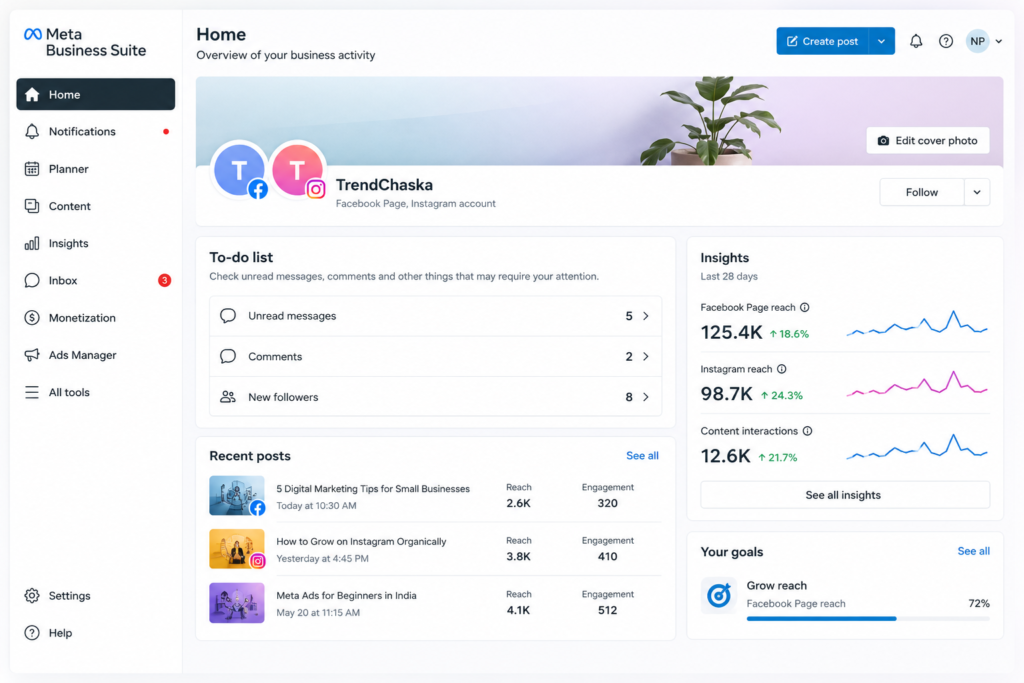
Facebook Ads vs Instagram Ads vs Meta Ads Manager vs Meta Business Suite
People often use these four terms interchangeably, but they mean different things:
| Term | What It Actually Is |
|---|---|
| Facebook Ads | Ads that appear specifically on Facebook (feed, marketplace, video) |
| Instagram Ads | Ads that appear on Instagram (feed, reels, stories, explore) |
| Meta Ads Manager | The dashboard where you build, launch, and track ads for both platforms |
| Meta Business Suite | The broader hub for managing your Page, Instagram profile, inbox, and posts — Ads Manager sits inside this ecosystem |
In simple terms: Meta Business Suite is your control room, and Ads Manager is the specific machine inside it that runs paid campaigns.
How Meta Advertising Works
Meta Ads run on an auction system. Every time someone is eligible to see an ad, thousands of advertisers are technically “competing” for that impression.
Meta decides the winner based on three factors:
- Bid — how much you are willing to pay
- Estimated action rate — how likely that person is to actually engage or convert
- Ad quality — based on relevance, feedback, and creative quality
This is why a smaller budget with a highly relevant, well-targeted, well-designed ad can often outperform a bigger budget with generic creative.
Benefits of Meta Ads
- Reaches audiences based on real interests and behaviours, not just keywords
- Works across the entire funnel — awareness to sales
- Offers granular budget control, down to ₹100 increments
- Provides detailed analytics through Meta Pixel and Conversions API
- Supports retargeting people who already visited your website or engaged with your content
Meta Ads for Beginners India: Why It’s Worth Learning
Even if you eventually want to specialise in Google Ads, SEO, or performance marketing broadly, Meta Ads for beginners in India is one of the most beginner-friendly places to start because the learning curve rewards experimentation quickly.
Campaigns can be tested with small budgets, results come fast, and the skills audience research, creative testing, funnel thinking transfer directly to every other paid platform, including Google Ads, LinkedIn Ads, and even Amazon Ads.
Types of Meta Ads
| Ad Format | Best Used For |
|---|---|
| Image Ads | Simple, fast-to-launch offers and announcements |
| Video Ads | Storytelling, demos, brand awareness |
| Carousel Ads | Showing multiple products or steps in one ad |
| Collection Ads | Mobile shopping experiences, catalogue-driven stores |
| Reels Ads | Short, native-feeling video content, high reach |
| Stories Ads | Full-screen, immersive, great for younger audiences |
| Lead Ads | Collecting enquiries without leaving the app (coaching institutes, real estate) |
| Messenger Ads | Starting conversations directly in Messenger inbox |
| Advantage+ Campaigns | Meta’s AI-automated campaign type that optimises targeting and creative automatically |
🚀 Quick Tip: If you are a beginner with a limited budget, start with a single Reels or Carousel ad rather than trying five formats at once. Depth of testing beats spreading yourself thin.
Meta Ads Funnel Explained
Every campaign should map to a stage of the buyer’s journey:
- Awareness — introduce your brand to a cold audience
- Traffic — drive clicks to your website or landing page
- Engagement — build likes, comments, shares, and page follows
- Leads — collect contact details through forms
- Sales — drive actual purchases or conversions
⚠️ Important: A common beginner mistake is jumping straight to a “Sales” objective on day one, before the audience even knows the brand exists. Warm them up first.
How to Create a Meta Business Account (Step-by-Step)
This is where most guides to Meta ads for beginners in India actually lose people, not because the steps are hard, but because the settings menus aren’t in the order you’d expect. Follow these seven steps in sequence, and you won’t get lost.
Step 1: Create a Facebook Page
Go to facebook.com/pages/create, choose a Page name and category relevant to your business, and add a profile picture and cover image.
Step 2: Connect Your Instagram Account
Inside Meta Business Suite, go to Settings > Accounts > Instagram accounts, and link your existing Instagram business or creator profile.
Step 3: Open Meta Business Suite
Visit business.facebook.com and set up your Business Portfolio, adding your Page and Instagram account under one roof.
Step 4: Access Ads Manager
From Business Suite, click the grid icon and select Ads Manager, or go directly to adsmanager.facebook.com.
Step 5: Verify Your Business
Under Business Settings > Security Centre, complete business verification with your GST number or business registration documents if you plan to run higher ad spends.
Step 6: Add a Payment Method
Go to Business Settings > Payments, and add a debit/credit card or UPI-linked payment method (availability depends on your account region and currency settings).
💡 Pro Tip: Set a low spending limit under Payment Settings when you’re just starting, so a targeting mistake doesn’t drain your bank account overnight.
How to Create Your First Campaign
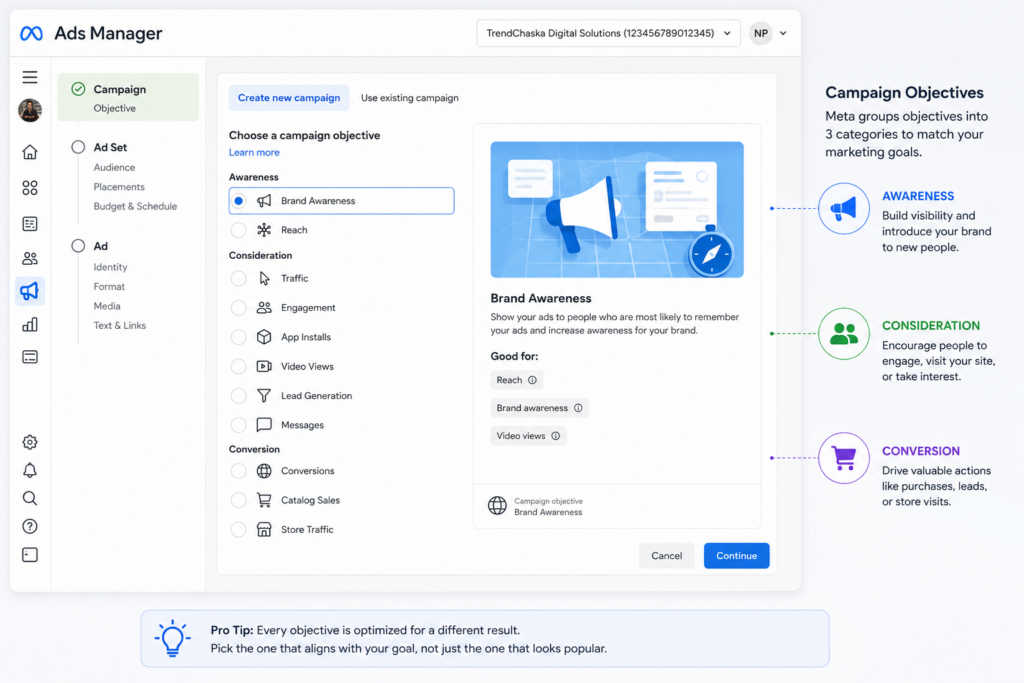
Step 1: Choose a Campaign Objective
Meta now groups objectives into six categories: Awareness, Traffic, Engagement, Leads, App Promotion, and Sales. Pick based on where your audience sits in the funnel above.
Step 2: Campaign Settings
Name your campaign clearly (e.g., “Diwali_Sale_Reels_Nov2026”) so you can track performance later without confusion.
Step 3: Set Your Budget
| Budget Type | How It Works |
|---|---|
| Daily Budget | Meta spends approximately this amount every day |
| Lifetime Budget | Meta spends the total amount across the whole campaign duration, pacing it automatically |
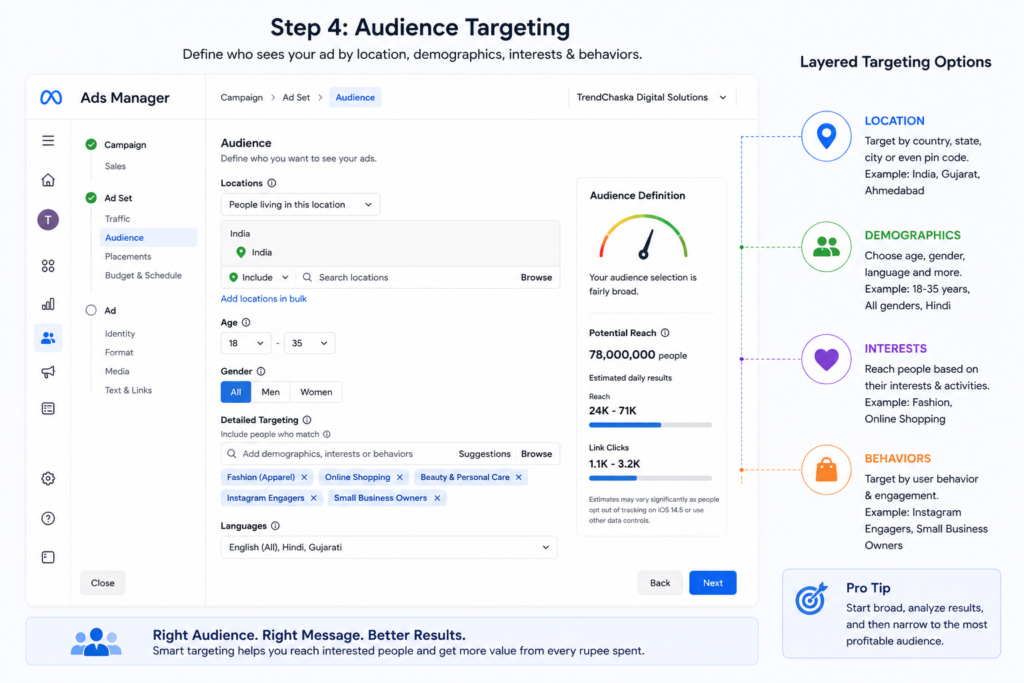
Step 4: Audience Targeting
| Targeting Option | Example |
|---|---|
| Age | 18–34 for a college fashion brand |
| Gender | All, Men, or Women |
| Location | Ahmedabad + 15km radius |
| Languages | Hindi, Gujarati, English |
| Interests | Online shopping, skincare, cricket |
| Behaviours | Frequent travellers, small business owners |
| Custom Audience | Website visitors, past customers uploaded via CSV |
| Lookalike Audience | New people similar to your best existing customers |
Step 5: Placements
- Automatic Placements — Meta decides where your ad shows (recommended for beginners)
- Manual Placements — you choose specific spots like Instagram Stories only or Facebook Feed only
Step 6: Create Your Ad
- Primary Text — the main message above the media
- Headline — short, punchy line under the image or video
- Description — optional supporting line
- CTA button — Shop Now, Learn More, Send Message, etc.
- Media — your image, video, or carousel assets
Step 7: Publish Your Campaign
Review everything once more, then click Publish. Approval usually takes a few minutes to a few hours.
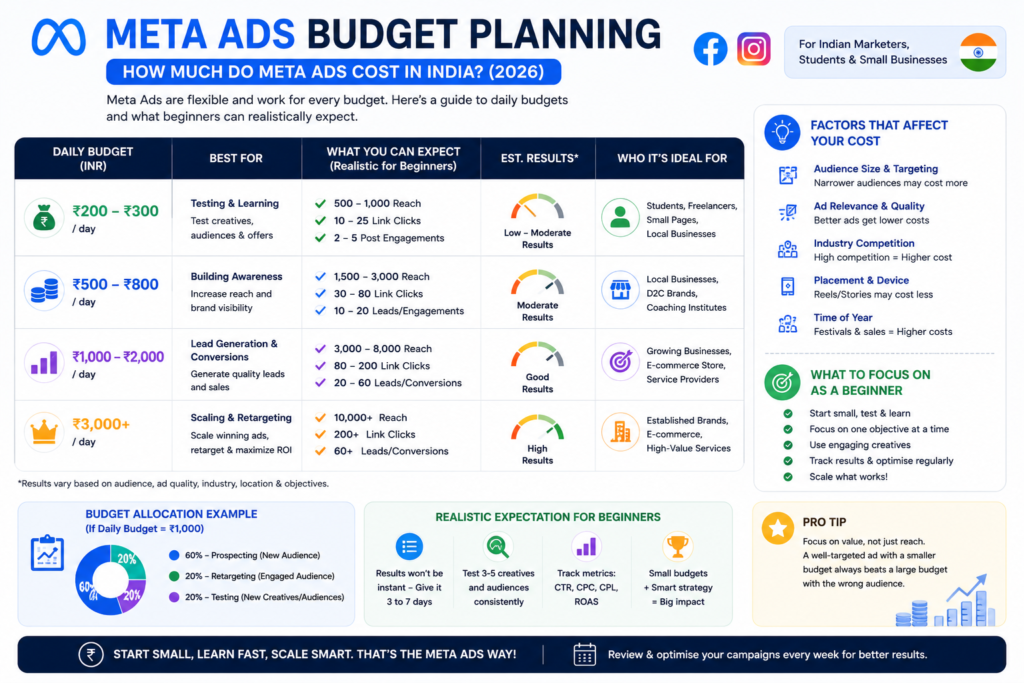
How Much Do Meta Ads Cost in India?
Meta Ads in India can start from as little as ₹200 per day, with average CPC ranging between ₹3–₹15 and average CPM between ₹80–₹250, though actual costs vary heavily by industry and audience competitiveness.
| Daily Budget | What to Realistically Expect |
|---|---|
| ₹200/day | Small local reach, good for testing creative and audience ideas |
| ₹500/day | Steady traffic or lead generation for a local business |
| ₹1000/day | Meaningful reach for a city-wide or statewide campaign |
Average CTR for well-optimised campaigns in India typically falls between 1%–3%. Results always depend on niche, creative quality, and audience size, so treat these as starting benchmarks, not guarantees.
Common Mistakes Beginners Make
| Mistake | Why It Hurts Performance |
|---|---|
| Wrong objective | Optimising for the wrong funnel stage wastes budget |
| Poor creatives | Low-quality visuals get skipped in the feed |
| No testing | Running only one ad variation limits learning |
| Broad targeting | Wastes spend on uninterested audiences |
| Ignoring Meta Pixel | No way to track what happens after the click |
| No conversion tracking | Impossible to know true ROI |
| No retargeting | Missing warm leads who almost converted |
| No A/B testing | Never discovering what actually works better |
Best Practices for Better Results
- Creative tips: Use native, mobile-shot looking video over overly polished stock footage; Reels-style content usually outperforms static images now
- Copywriting tips: Lead with the benefit, not the feature; use a simple, conversational Hindi-English mix where your audience actually speaks that way
- Audience tips: Start narrow enough to be relevant, but not so narrow that delivery slows down
- Budget optimisation: Let campaigns run at least 3–4 days before judging performance; Meta’s algorithm needs a learning phase
- Campaign scaling: Increase budget by 20% increments rather than doubling overnight, to avoid resetting the learning phase
✅ Best Practice (for experienced marketers): If you’re already comfortable with manual campaigns, test Advantage+ Shopping campaigns against your manual builds side by side for a full learning phase before shifting budget entirely Meta’s automation has improved, but manual audience testing still surfaces insights Advantage+ won’t show you directly.
How to Measure Performance
| Metric | What It Tells You |
|---|---|
| Reach | Unique people who saw your ad |
| Impressions | Total number of times your ad was shown |
| CTR | Click-through rate — how compelling your ad is |
| CPC | Cost per click |
| CPA | Cost per acquisition (lead or sale) |
| ROAS | Return on ad spend |
| Conversions | Actual leads or purchases |
| Frequency | Average number of times one person saw your ad |
Meta Pixel is a small code snippet installed on your website that tracks visitor behaviour and feeds data back to Ads Manager.
Conversions API works alongside Pixel as a server-side tracking method, making your data more reliable, especially after browser privacy changes affected cookie-based tracking.
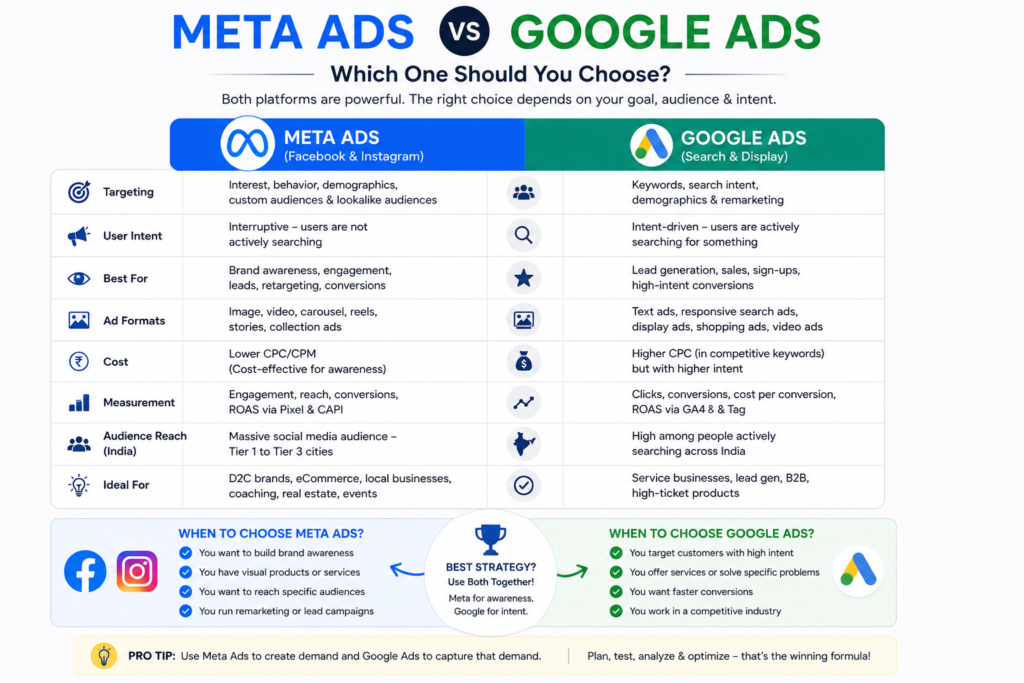
Meta Ads vs Google Ads
| Factor | Meta Ads | Google Ads |
|---|---|---|
| Cost | Generally lower CPC | Often higher CPC, especially for competitive keywords |
| Intent | Interruption-based (interest targeting) | Intent-based (search-driven) |
| Audience | Discovered through browsing behaviour | Actively searching for a solution |
| Best Use Case | Brand discovery, visual products | High-intent purchases, local services |
| Traffic Quality | Broader, needs nurturing | Narrower, often more sales-ready |
| Conversion Speed | Slower funnel, needs warm-up | Often faster, since intent already exists |
| Advantages | Great visuals, precise interest targeting, lower cost | Captures ready-to-buy searchers |
| Disadvantages | Requires strong creative to stop the scroll | Can get expensive in competitive niches |
Which one should beginners choose?
If your product is visual (fashion, food, beauty, home decor), start with Meta Ads. If your product solves an urgent need people actively search for (plumber, lawyer, exam coaching), Google Ads may convert faster. Many mature Indian brands eventually run both together.
If you want a deeper breakdown, TrendChaska’s guide on Google Ads India 2026 covers the search-side setup in detail.
Latest Meta Ads Features in 2026
- AI Creative tools — generating text and image variations automatically
- Advantage+ campaigns — fuller automation of targeting and budget allocation
- AI-driven optimisation — real-time bid and placement adjustments
- Deeper automation across campaign creation workflows
- Catalog Ads — dynamic product ads pulled from your inventory feed
- Reels Ads expansion — increased inventory and improved performance data
- Lead Instant Forms — faster in-app lead capture with pre-filled fields
📌 Note: For the most current documentation on new features and policy updates, the Meta Business Help Center remains the most reliable source, since ad platform features change frequently.
Meta Ads Launch Checklist
Before you hit publish on your first campaign, run through this checklist — it covers the exact gaps that trip up most Meta Ads for Beginners India campaigns in week one.
- [ ] Business Page and Instagram account connected
- [ ] Business verified in Meta Business Suite
- [ ] Payment method added with a spending limit set
- [ ] Meta Pixel installed on website
- [ ] Campaign objective matches funnel stage
- [ ] Audience defined (custom or lookalike where possible)
- [ ] At least 2–3 creative variations ready
- [ ] Budget and schedule confirmed
- [ ] UTM tracking added to landing page links
Creative Checklist
- [ ] Vertical (9:16) format ready for Reels/Stories
- [ ] First 3 seconds grab attention without sound
- [ ] Clear CTA visible on screen
- [ ] Brand logo or colours present but not overwhelming
- [ ] Text overlay kept minimal and readable on mobile
Target Audience Checklist
- [ ] Age range matches actual buyer profile
- [ ] Location radius realistic for delivery/service area
- [ ] Language settings match audience preference
- [ ] Interest layers not too broad or too narrow
- [ ] Lookalike source audience has enough data (500+ people minimum recommended)
Campaign Optimisation Checklist
- [ ] Allowed learning phase to complete before judging results
- [ ] Reviewed CTR and CPC after 3–4 days
- [ ] Paused underperforming ad variations
- [ ] Scaled budget gradually, not abruptly
- [ ] Set up retargeting for website visitors and engagers
💡 Pro Tip: If your creative needs quick, professional-looking graphics without a design team, TrendChaska’s guide on Canva for social media marketing is a useful next read.
Meta Ads for Beginners India: Final Thoughts
Meta Ads can feel overwhelming the first time you open Ads Manager, with its dozens of tabs, settings, and options. But like most things in digital marketing, it becomes intuitive once you have launched a handful of campaigns and watched the data come in.
Start small, test often, track everything through Meta Pixel, and let the numbers, not guesswork, guide your next move. That’s really the whole game with Meta Ads for beginners in India: small, well-tracked bets beat one big untested campaign.
Key Takeaways
- Meta Ads run on Facebook, Instagram, Messenger, and Audience Network through one unified Ads Manager.
- Budgets as low as ₹200/day can be a valid starting point for testing
- Matching campaign objective to funnel stage is critical for results
- Meta Pixel and Conversions API are non-negotiable for accurate tracking
- Small, consistent testing beats one big untested campaign
Found this guide useful? Explore more performance marketing and digital marketing guides on TrendChaska, and feel free to share this article with a fellow marketer, founder, or student who’s just getting started with paid ads. If you have questions about your specific campaign, drop them in the comments — we read and respond to every one.
Frequently Asked Questions
1. What are Meta Ads?
Meta Ads are paid advertisements run across Facebook, Instagram, Messenger, and the Audience Network, managed through Meta Ads Manager.
2. How much do Meta Ads cost in India?
Meta Ads in India can start from as little as ₹200 per day, with typical CPC between ₹3–₹15 depending on industry and targeting.
3. How to start Meta Ads for beginners?
The short version of Meta Ads for beginners in India is this: create a Meta Business Suite account, connect your Facebook Page and Instagram profile, install the Meta Pixel, and launch a small test campaign with one clear objective.
4. Are Facebook Ads worth it in India?
Yes, for visually driven products and services, Facebook and Instagram Ads generally deliver strong reach and reasonable cost-per-result compared to many traditional advertising channels.
5. What is the difference between Facebook Ads and Instagram Ads?
Facebook Ads run on the Facebook platform while Instagram Ads run on Instagram, but both are created and managed through the same Meta Ads Manager.

Nidhi Patel is an SEO and digital marketing content strategist focused on AI SEO, content marketing, blogging, and personal branding. Through TrendChaska, she shares practical digital marketing insights, SEO strategies, and AI tools for beginners, students, and small businesses in India.