
If you’ve been around WordPress SEO groups, you’ve seen this debate crop up over and over again. It seems like Rank Math vs Yoast 2026 is the topic people can’t stop looking into. There’s a good reason for that. Both plugins introduced notable updates this year. With AI-based search visibility now playing a key role in rankings, and the line between “free” and “premium” features shifting again, the conversation is far from over.
This isn’t just another recycled 2023 opinion. It comes from real experience publishing content using Rank Math on TrendChaska running schema, adjusting content scores, fixing redirects, and handling the same backend choices you’re dealing with at the moment.
Who should read this: New bloggers choosing their first SEO plugin, students learning SEO or digital marketing who want to know how these tools work, freelancers or agency owners managing client websites, and site owners wondering if switching plugins is worth the effort.
What you’ll learn: a detailed breakdown of features, a candid comparison of schemas, straight insights on plugin performance, pricing info as it stands, and a straightforward suggestion based on your website type—whether it’s a blog, an agency portfolio, or a WooCommerce store.
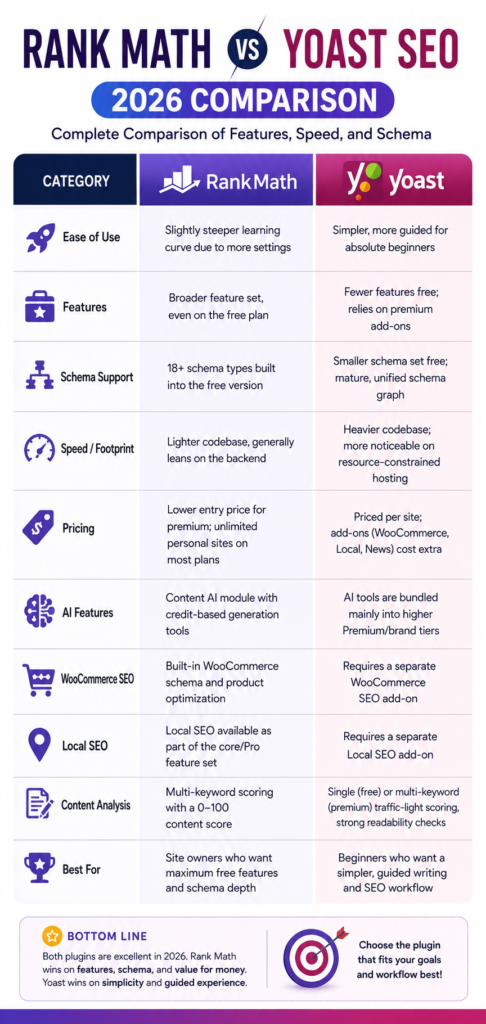
Quick Verdict (Summary Table)
This Rank Math vs Yoast 2026 quick-look table breaks down where each plugin pulls ahead.
What is Rank Math?
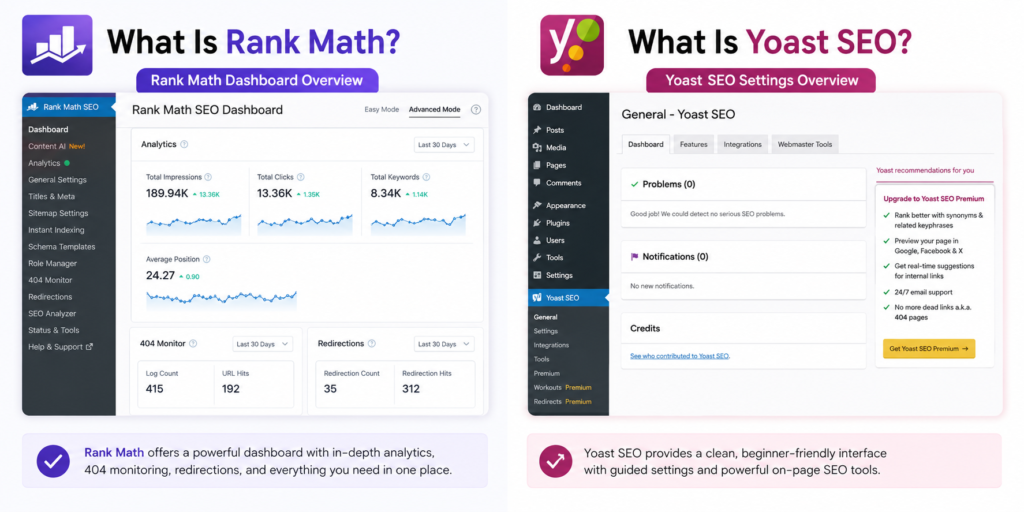
Before going further into the Rank Math vs Yoast 2026 debate, here’s what Rank Math actually offers. Rank Math is an SEO plugin designed for WordPress. Its core idea is that basic SEO tools shouldn’t require a paid subscription. It came out a few years after Yoast but gained popularity fast.
The reason? It offers free features that other plugins make you pay for.
These include tools like a redirect manager, 404 error tracking, Google Search Console integration within WordPress, and various built-in schema options.
Main features:
- The setup wizard detects site types like blogs, stores, businesses, or portfolios and adjusts settings ahead of time.
- Even on the free plan, users can track multiple focus keywords per post.
- A built-in schema generator provides support for formats like Article, FAQ, HowTo, Product, LocalBusiness, and Review.
- It includes a redirection manager and a 404 error monitor at no extra cost.
- The Content AI module offers tools to create outlines, come up with meta descriptions, and suggest on-page improvements using a credit-based system.
- You can link Google Analytics 4 and Google Search Console, avoiding the need for another plugin.
Best for:
Bloggers and site owners who need a powerful plugin without paying for extra features. It’s also great for people managing multiple sites who want to avoid per-site licensing. Anyone looking to manage schema without hiring a developer will find it useful, too.
What Is Yoast SEO?
On the other side of the Rank Math vs Yoast 2026 comparison is Yoast SEO. Yoast SEO is a plugin that started the concept of WordPress SEO plugins.
It has been around the longest, has the most users, and is still the plugin that many WordPress guides and lessons mention as the default option.
Key features include:
- Easy-to-read traffic-light style checks for SEO and readability
- A setup wizard to guide you on site type and how it appears in search results
- A solid schema graph that links your site’s entities, like organization, authors, and articles, instead of just labeling posts
- Built-in features like internal link suggestions and a tool to manage redirects (with Premium)
- Access to Yoast SEO Academy’s training content when using Premium
- Optional add-ons for special needs, like WooCommerce SEO, Local SEO, and News SEO
Best suited for:
Newbies who prefer guidance over dealing with endless options, bloggers focused on content who appreciate tools like readability scoring, and teams already using Yoast’s setup and want to avoid the hassle of teaching their staff anything new.
Rank Math vs Yoast 2026: A Side-by-Side Feature Comparison
Setup Wizard
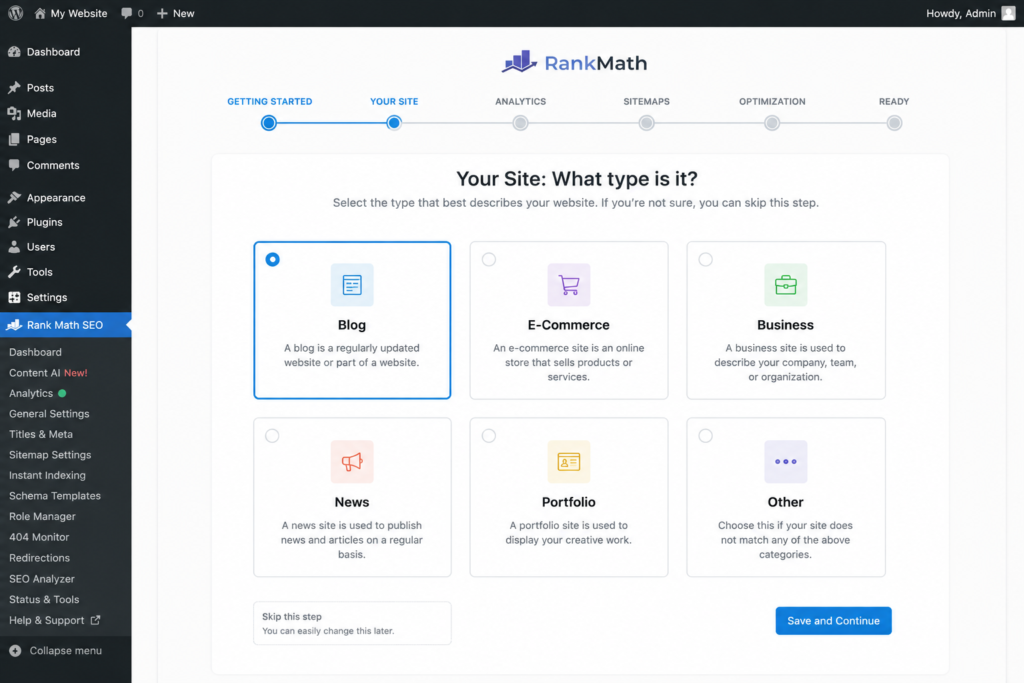
Both plugins guide users to set up site type, organization information, and basic indexing options. Rank Math’s setup wizard takes it further. It identifies the site type on its own and chooses schema and module settings to match, reducing the need to tweak things right after installing. Yoast’s setup process feels more basic and quicker to complete. But later, you’ll need to explore individual settings afterward to adjust things that Rank Math might have already configured during its initial setup.
User Interface
Yoast puts all its SEO and readability tools in one spot right under the content editor. It’s easy to notice and quick to review. On the other hand, Rank Math puts its score up in the top-right corner of the editor. It also lists tips for keywords in a side panel. You can see more details right away, but it might feel overwhelming for a beginner.
On-Page SEO Optimization
Here’s where the two approaches start to split.
Yoast helps you improve your writing by focusing on readability checks like shorter sentences, avoiding passive voice, and using transition words, in addition to checking keywords.
Rank Math, however, puts more emphasis on technical checks tied to keywords. It looks at things like word count limits, whether images have alt text, the number of internal and external links, and where keywords show up in headings. It also gives each of these a numerical score.
On TrendChaska, Rank Math’s scoring system has been helpful when it comes to catching little details. It might flag a missing keyword in a subheading or point out that a post is too long and could use more subheadings.
While it’s no replacement for good editorial judgment, it works pretty well as a final checklist before hitting publish. Pair it with our On-Page SEO Checklist India guide for a more complete pre-publish routine.
Keyword Tracking
Rank Math’s free version lets you use multiple focus keywords for each post right away. On the other hand, Yoast’s free plan allows one keyword. To track extra keywords with Yoast, you’ll need their Premium version. If you’re making content that depends on keyword clusters or secondary terms, which good SEO content in 2026 does this difference isn’t just minor. It practically matters a lot.
Content Analysis
Both tools evaluate your content by measuring it against your desired keyword or keywords.
Rank Math works on a scoring system from 0 to 100, where it looks at keyword use, how long your content is, and structural details like links and headings.
Yoast divides its analysis between SEO and readability. Its readability feature is likely a bit stronger since it can spot awkward sentences more, which isn’t something Rank Math focuses much on.
AI Features
Rank Math’s Content AI uses a credit system to help create outlines and meta descriptions and to provide on-page recommendations within the editor.
Yoast includes its AI features mainly in the Premium and brand-monitoring plans, which offer limited options for free users.
Neither plugin’s AI tools acts as a replacement for serious content planning. They work more as helpful extras than developed strategy solutions.
WooCommerce SEO
Rank Math offers WooCommerce-specific schema, such as Product, Offer, and AggregateRating, within either its core features or Pro plans, depending on the subscription.
Yoast, on the other hand, requires users to purchase an extra WooCommerce SEO add-on in addition to their Premium plan. This adds extra costs for online shop owners.
Local SEO
Rank Math combines local business schema and location-driven optimization as part of its main features. In contrast, Yoast offers Local SEO as a separate add-on. If you manage a single local business website, the price difference isn’t huge. But for agencies handling multiple local clients, those costs start adding up.
Role Manager
Rank Math provides a role manager to limit which user roles can access certain SEO settings. This helps when interns or new writers publish content, and you don’t want them modifying things like redirects or schema. Yoast, on the other hand, has fewer role management options tied to its Premium plan.
Redirection Manager
Rank Math offers this for free, while Yoast requires a Premium plan. If you often update URLs, combine posts, or deal with broken slugs—which is a common job for growing websites—this free feature can reduce the need to rely on third-party redirect plugins.
404 Tracking
The situation is similar here. Rank Math provides free logging of 404 errors. This tool is great to identify broken links within your site or external links that no longer work, so you can address them before they harm the user experience. Yoast, on the other hand, limits this function to its Premium version.
Built-In Analytics
Rank Math includes Google Analytics 4 reporting right in the WordPress dashboard. You can view basic performance stats there without switching to another tool. Yoast doesn’t provide the same feature. You will still need to access GA4 to view performance data.
Google Search Console Integration
Rank Math lets you see GSC data like clicks, impressions, and indexing status in WordPress. This integration has been handy on TrendChaska. Spotting indexing issues right from the dashboard saves time during content reviews. Yoast lacks a similar built-in GSC integration.
If you still need to link Google Analytics 4 with your WordPress site, you should set it up first. Relying too much on the reporting tools in your plugins might not be the best idea. You can follow our GA4 Setup Guide to learn the steps one at a time.
Comparing Schema in Rank Math vs Yoast (2026)
Schema markup sets these two plugins apart in a big way. In 2026, its importance has grown compared to previous years. Structured data no longer powers traditional rich snippets but also plays a role in AI Overviews and other AI-based search tools.
| Schema Factor | Rank Math | Yoast SEO |
| Built-in schema types | 18+ types available free (Article, FAQ, HowTo, Product, Review, LocalBusiness, etc.) | Smaller free-tier schema set, expandable via its schema graph |
| Schema templates | Pre-built templates you can apply per post type | Schema is generated through a unified graph rather than discrete templates |
| Rich snippet capability | Strong support for FAQ, review stars, recipe, and product-rich results | Solid support, particularly for organization and author entity data |
| Custom schema options | Visual schema builder lets you create and save a custom schema (Pro) | More developer-oriented; customization often requires code-level changes |
| Ease of implementation | Point-and-click schema selection per post, minimal technical knowledge needed | Easier to maintain a clean, consistent site-wide structure, but less flexible per-post |
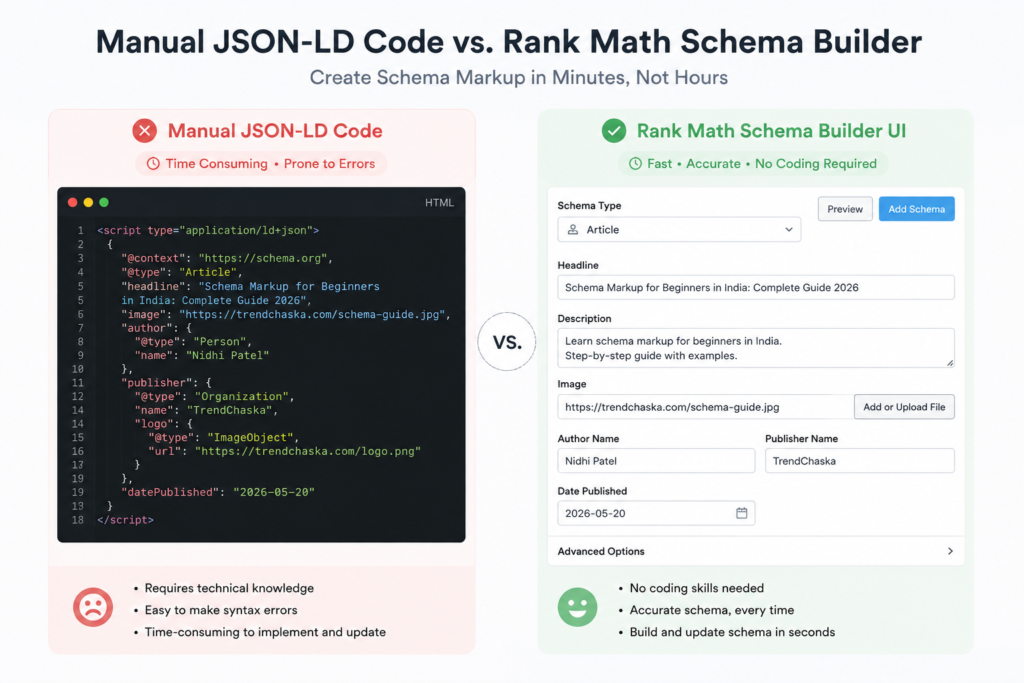
This stands out as a part where the change shows in everyday use. On TrendChaska, Rank Math’s built-in schema generator made creating FAQ blocks way easier. Before, you had to edit JSON-LD, but now you just pick a schema type, type in the info, and it generates the correct markup. You save a lot of time when almost every long post needs an FAQ schema added.
Yoast focuses more on keeping things consistent than letting you tweak every little detail. Its schema graph ties together your organization, author, and content in a way that’s less likely to break by mistake. This setup works better for big or complicated sites where the schema types need to stay connected. But if you’re running a site with a small team or just one author, Rank Math often feels more practical because it lets you adjust things post by post.
You can check any schema setup using Google Search Central’s structured data testing guidance or look up definitions right on Schema.org.
Speed Test: Rank Math vs Yoast
People often throw around claims about how fast plugins work, with many “X times faster” stats showing up in comparison articles. However, you can’t confirm most of these numbers without proper controlled testing on the same hosting setup. Instead of repeating unverified benchmarks, here’s what’s clear and noted:
Plugin size: Rank Math’s codebase is smaller compared to Yoast’s, and the plugin file itself takes up less space. While a smaller codebase doesn’t guarantee quicker page loads, it means less PHP processing work on the backend.
Resource usage: Both plugins work with modules that you can enable or disable as needed. For example, you can turn off WooCommerce modules if your site doesn’t include a store. Turning off the features you don’t use helps reduce the load on the backend. That plays a bigger role in performance than just which plugin you choose to use.
Dashboard performance: The sidebar in Rank Math’s post editor feels quicker when it scores content when you’re working with several keywords. Yoast, on the other hand, keeps things simpler. Its interface doesn’t run as many real-time calculations, which makes it easier to manage on systems with less power.
Backend experience: On a site with a decent number of posts, like a couple of hundred, neither of these plugins slows down the WordPress admin when set up. Speed issues appear on sites using both an SEO plugin and multiple other plugins to handle redirects, schema, or social previews. Rank Math’s all-in-one design aims to cut down on the plugin overload that often causes these problems.
Real-world observation: Most site owners will not see the biggest speed difference in the time it takes plugins to run. They will notice it in how many plugins they can stop using. By switching to Rank Math’s built-in tools for things like redirects, 404 monitoring, and schema, you can cut down the number of plugins on your site. Having fewer plugins is often a better way to boost site performance than trying to shave off a millisecond here or there.
To test performance claims on your own site instead of relying on any comparison article (including this one), you can use tools like Query Monitor or the performance monitoring tools provided by your hosting service.
Pricing Comparison
Pricing is where the Rank Math vs Yoast 2026 decision often gets made for budget-conscious users. The prices of both plugins have changed in recent years. Add-ons can increase the overall price. Visit the official websites of Rank Math and Yoast to review up-to-date pricing before deciding. Here’s how the pricing looks in 2026:
| Plan Type | Rank Math | Yoast SEO |
| Free version | Full-featured: multiple focus keywords, redirects, 404 monitoring, 18+ schema types, GA4/GSC integration | Basic SEO and readability analysis, XML sitemaps, single focus keyword, and limited schema |
| Entry premium plan | Roughly $59/year, typically covering unlimited personal sites | Roughly $89–$119/year, charged per individual site |
| Add-ons needed for full functionality | Generally, most features are included in core plans | WooCommerce SEO, Local SEO, and News SEO are sold as separate paid add-ons |
| Agency/business plans | Higher-tier plans available for multiple sites and team management | Per-site licensing scales quickly across multiple client sites |
| Value for money | Strong, especially for multi-site owners and agencies | Reasonable for single-site beginners; cost climbs fast with add-ons or multiple sites |
The biggest financial contrast becomes clear when you start managing two or more sites or require tools for e-commerce or local SEO. Rank Math’s core paid plan stands out with unlimited-site licensing, making it a much cheaper option for agencies and freelancers handling multiple clients. On the other hand, Yoast’s per-site pricing adds up fast when you start using additional features.
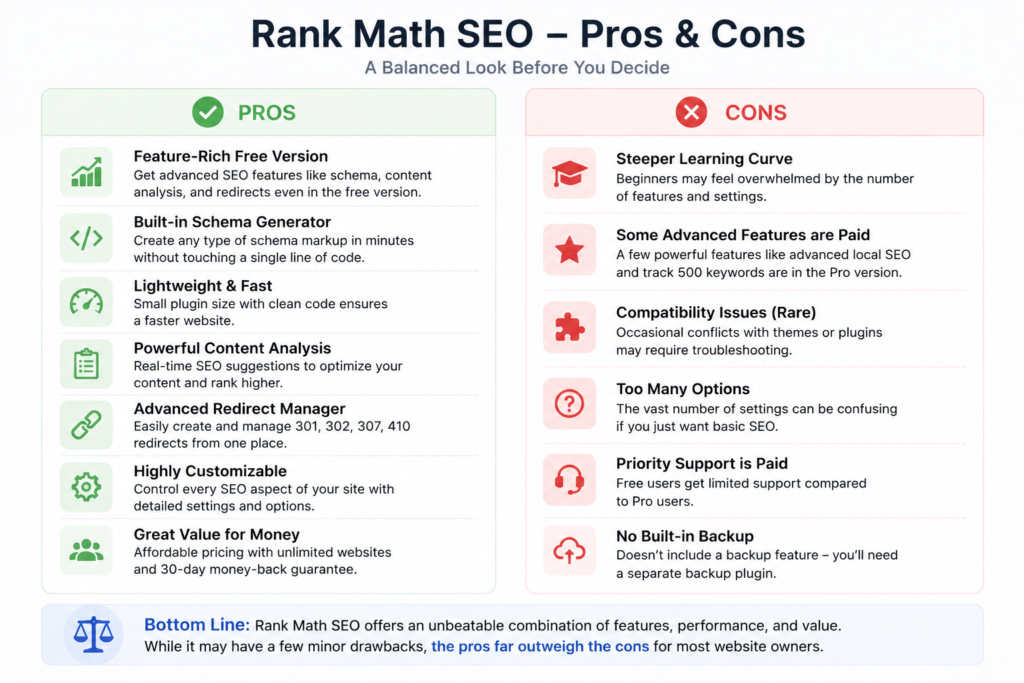
Pros and Cons
Weighing pros and cons is the fastest way to settle the Rank Math vs Yoast 2026 question for your site.
Rank Math Pros
- Free plan includes features that rivals often charge for
- Built-in schema support works without needing extra code
- Free tools for managing redirects and tracking 404 errors
- Smaller and faster plugin
- Affordable choice for managing multiple sites or agencies
Rank Math Cons
- Too many settings might confuse first-time users
- The content AI tools have a credit limit and need an upgrade for heavier use.
- Its readability checks feel a bit less advanced compared to Yoast
Yoast Pros
- Easy setup that works well for beginners
- Readability analysis is rated and reliable
- Plenty of tutorials, guides, and community help available
- Offers a clear and consistent schema graph for managing complex sites
Yoast Cons
- The free version allows targeting one focus keyword
- Premium features are charged per site, which makes it less cost-effective for agencies
- Extra add-ons like WooCommerce, Local, and News come with additional costs
- Uses heavier code compared to Rank Math
What’s the Best SEO Plugin in 2026?
There’s no one-size-fits-all answer when picking between Rank Math vs Yoast; the right call depends on the kind of site you’re running.
Beginners: Yoast SEO works better as a starting point if you’re new. It’s easy to use and doesn’t overwhelm you right away. Its readability checks can also feel like having a built-in writing coach while you pick up the basics of SEO.
Bloggers: Rank Math offers almost everything most bloggers need at no cost. It’s free plan handles multiple keywords, redirects, and schema support without making you pay to upgrade. For content-heavy blogs like TrendChaska, it’s tough to argue against sticking with the free features.
Agencies: When managing multiple sites for clients, Rank Math makes more sense. Its paid plans come with unlimited site licenses, which work better for a large portfolio. Yoast’s per-site fees can pile up pretty quickly in those cases.
E-commerce websites: Rank Math has a built-in WooCommerce schema, which removes the need to pay for an extra add-on like Yoast. This can be a big deal for stores already trying to minimize the number of plugins they use.
Content marketers: With multi-keyword tracking and content scoring, Rank Math aligns well with workflows that focus on keyword clusters and pillar or cluster content strategies.
SEO professionals: Both plugins are effective in skilled hands. The decision often depends on whether you prefer Rank Math’s detailed per-post schema settings or Yoast’s more structured and consistent entity graph.
Final Verdict
No single plugin works best for everyone. The right choice depends on what you need to optimize.
Go with Rank Math if you want a free plan packed with features, a built-in schema that doesn’t need coding, and an option that works well across multiple websites without breaking the bank. This choice suits bloggers, agencies, and e-commerce sites looking to add more tools without spending extra on upgrades.
Pick Yoast SEO if you’re new to SEO, need something simple to follow, or if your team already uses it and relies on its easy approach to readability. Switching to something else might mess with your current setup.
TrendChaska, a content site that grows and publishes articles, relies on schema to create detailed FAQ-rich content. Rank Math offers free schema features and built-in technical tools, making it a more practical choice for their daily needs. The actual ranking gains will still come from the content, structure, and internal linking you build around it.
At the end of the day, the Rank Math vs Yoast 2026 decision comes down to what your specific site actually needs, not which plugin scores higher on a feature checklist.
At the end of the day, the Rank Math vs Yoast 2026 choice comes down to what your site actually needs.
Ready to decide?
Whichever side of the Rank Math vs Yoast 2026 debate you land on, the plugin itself is just the starting point.
The real boost in rankings comes from how you use your SEO plugin — setting up clean schema, improving internal links, and writing content that matches what people search for online.
If you’re just getting started, try the free version of Rank Math or Yoast on a test post. That way, you can figure out which one works better for your workflow before spending money on a premium option.
Haven’t set up your website’s data yet? That’s step one. Use our GA4 Setup Guide to track if your new SEO plugin is making a difference.
Frequently Asked Questions
When it comes to Rank Math vs Yoast 2026, is Rank Math actually better?
When it comes to Rank Math vs Yoast, the answer depends on your priorities. Rank Math offers more features without extra cost and provides better built-in schema support. On the other hand, Yoast works well for complete beginners and offers more polished tools to check readability. Neither one is outright “better.” They just follow different approaches.
Which plugin runs faster?
Rank Math uses less code and has a smaller file size, which means a lighter impact on your site’s backend. However, how fast your site loads on the front end depends on your hosting, theme, and other plugins, not just the SEO plugin.
Which plugin handles schema better?
Rank Math includes more pre-built schema types for free and lets you build schemas on individual posts with greater flexibility. Yoast uses a schema graph that stays consistent throughout the site, but has fewer available schema types unless you do custom development.
Which plugin works better for beginners?
Most people say Yoast SEO feels easier to use for first-timers because of its straightforward interface and built-in readability tips. Rank Math has more options to tweak, but its setup wizard simplifies the process by setting most things up for you.
Should you upgrade to Rank Math Pro?
If you already use most of the free tools and need things like advanced schema options, extra keyword tracking, or credits for Content AI, then upgrading makes sense. It’s affordably priced since it offers unlimited site licenses on most of its plans.
Is Yoast still a good option in 2026?
It is. Yoast’s readability tools are more polished, its schema graph works well for sites with complex relationships, and its long-standing documentation and community help are still excellent.
What’s the best SEO plugin for WooCommerce?
Rank Math takes the lead. It includes WooCommerce schema and product optimization without extra costs, while Yoast makes you buy its WooCommerce SEO add-on.
Is it safe to move from Yoast to Rank Math?
Yes, it is. Rank Math provides a setup wizard to help bring in your existing SEO data, like titles, meta descriptions, and redirects, from Yoast. Before making the switch, back up your website. If you can, try the migration on a testing site first. In most cases, the migration keeps your SEO data intact and avoids harming your rankings.

Nidhi Patel is an SEO and digital marketing content strategist focused on AI SEO, content marketing, blogging, and personal branding. Through TrendChaska, she shares practical digital marketing insights, SEO strategies, and AI tools for beginners, students, and small businesses in India.